
How to add the FedEx Freight LTL Live Rates shipping method?
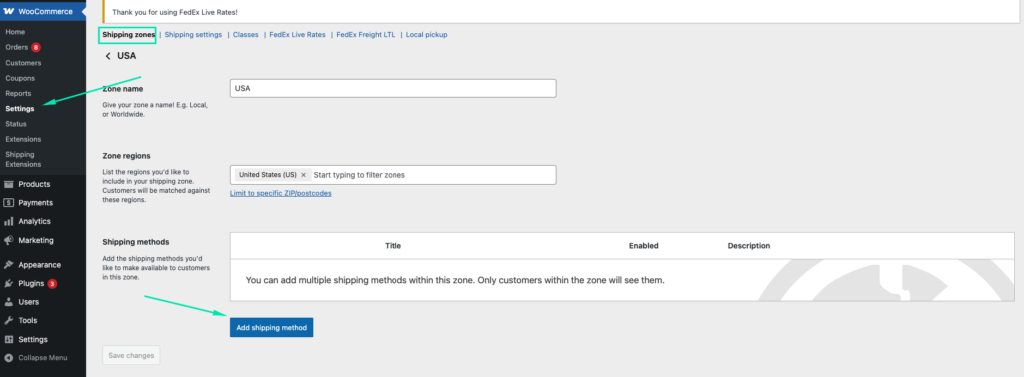
Adding the FedEx Freight LTL Live Rates shipping method uses the same mechanism as the WooCommerce default shipping methods, and the FedEx Freight LTL Live Rates can be easily added the same way. In order to create a new FedEx Freight LTL Live Rates shipping method, simply go to WooCommerce → Settings → Shipping. After that click the shipping zone name you want to add the FedEx Freight LTL Live Rates method within. Once you are in, hit the Add shipping method button at the bottom of the Shipping methods table:
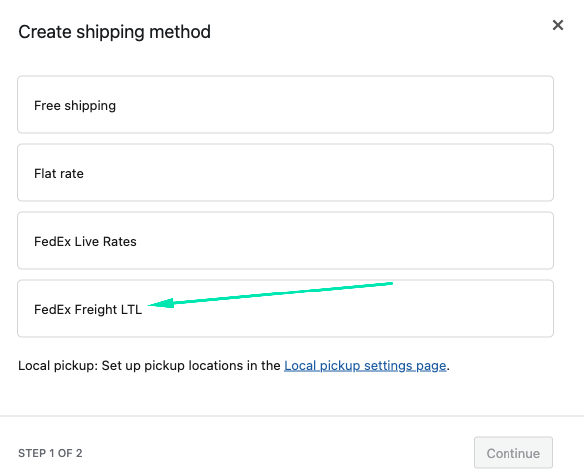
In the popup window which should appear, select the FedEx Live Rates from the dropdown list and confirm your choice with Add shipping method button once again:
Right after it is added, click Edit button:
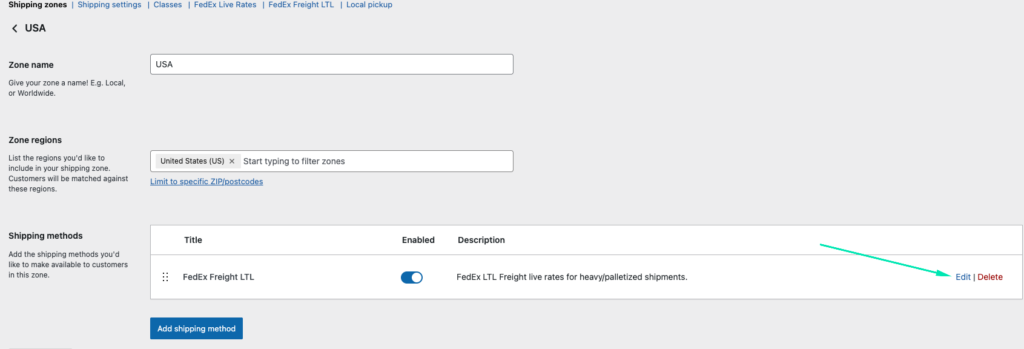
to reach the FedEx Live Rates method’s configuration screen. Learn more about the FedEx Freight LTL Live Rates shipping method configuration →