
To switch an existing Canada Post Live Rates connection, obtain credentials from the new Developer Portal and select REST API in the plugin settings. Updating the plugin does not automatically migrate Legacy credentials.
The API connection is shared by all Canada Post Live Rates shipping methods in the store. Review each shipping zone after switching.
Before switching
Follow How to get the REST API Key and API Secret? (materiał 01 na tej karcie) to prepare a Production application with Rating access. Keep your existing Legacy credentials available while checking the new connection.
Review your customer number and commercial contract number, if applicable. Record the current Quote Type, package settings, selected services, insurance, tax adjustments, and any PRO handling fees for the methods you use.
Switch the connection
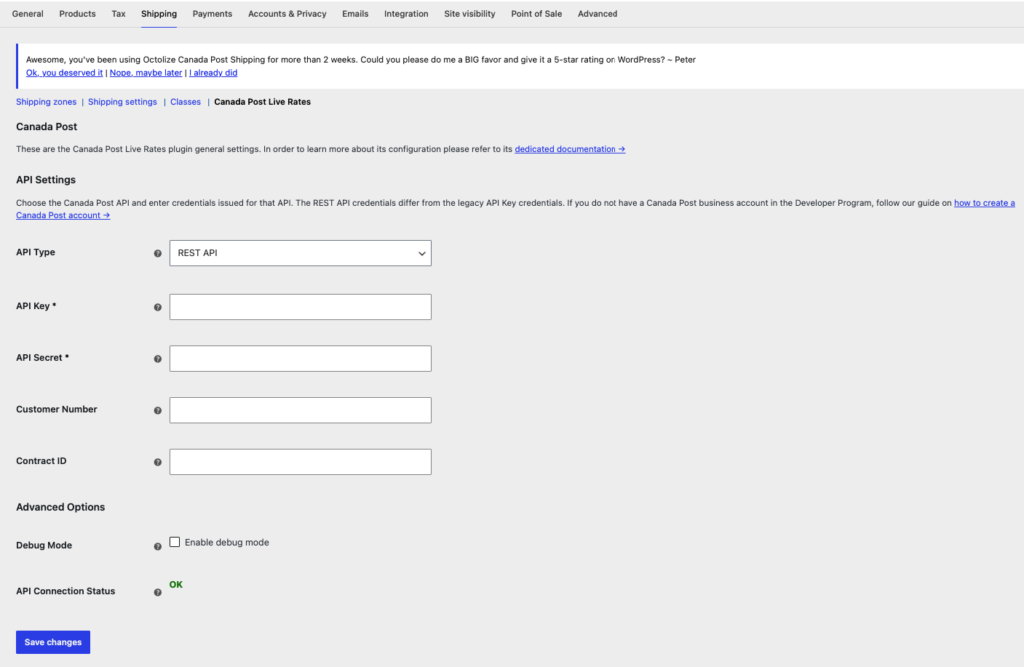
- Go to WooCommerce → Settings → Shipping → Canada Post Live Rates.
- Select API Type → REST API.
- Enter the new application’s API Key and API Secret.
- Enter Customer Number for Commercial rates. For a commercial contract, also enter Contract ID. Leave Contract ID empty for Solutions for Small Business or a business account without a commercial contract, as described in the Rating specification.
- Select Save changes and check API Connection Status.
- Open each Canada Post method in Shipping zones. Review Rates Adjustments → Quote Type, selecting Commercial or Counter as appropriate.
Counter requests ignore the globally saved customer number and contract ID. Clearing Customer Number alone does not turn a Commercial method into a Counter method.
Verify the rates
Use a physical product with a positive weight and a delivery address covered by a configured shipping zone. Check the routes you offer, including Canadian, US, and international destinations where applicable.
Confirm that the expected services appear, the package settings are correct, and account rates use the intended customer number and contract. When comparing prices, use the same service, parcel details, origin, destination, quote type, insurance, and tax treatment. Review handling fees and additional cost rules as well.
A green connection status uses a sample Counter quote; it does not verify your Commercial rates. If needed, enable Debug Mode and follow REST API troubleshooting.
Returning to Legacy API
If your Legacy access remains active, select API Type → Legacy API, check API Key Username, API Key Password, and Customer Number, then save and verify a cart again. Enter the Legacy credentials if the fields are empty.