
- Home
- WooCommerce
- What plugin are you looking for?
- Shopify
- Find my product
- About us
- Blog
- Docs
- Contact us
- What can we help you with?

Looking for Flexible Shipping PRO nulled? You want to download Flexible Shipping PRO from the best possible source? We’ve got it! 100% safe and secure.
Well, if you are here, then most likely you have some knowledge about Flexible Shipping, and its capabilities. To summarize our plugin in a few sentences, Flexible Shipping allows you to:
And much more, as we created Flexible Shipping as a complete shipping calculation for WooCommerce.
The main reason why you are looking for a nulled Flexible Shipping PRO is the features included in the PRO version. It’s a powerful plugin that allows you to achieve almost every shipping scenario that you can imagine. Most popular PRO features are:

The best Table Rate Shipping for WooCommerce. Period. Create shipping rules based on weight, order totals, or item count.
View DetailsorAdd to cartIt’s a plugin (quite similar to Flexible Shipping PRO), which you can download from many websites. Depending on the source from which you are downloading a nulled plugin, it may contain:
Flexible Shipping PRO downloaded from an unofficial source may look and behave like the original plugin. It may even display a message saying that its API key is active. However, that message does not necessarily mean the activation has been confirmed by the Octolize server.
Modified packages, often described as “nulled” or “cracked,” may contain additional code that forces the plugin to appear activated. Understanding what this code does, when it runs, and how it can affect your store helps you make an informed decision.
One approach is to change the information the plugin reads from WordPress.
In a modified Flexible Shipping PRO package we examined, additional code:
As a result, the dashboard may show an active key even when the Octolize server rejects it. This also explains why entering your own key may not solve the problem: the additional code can restore the preset details.
A local “active” status is therefore not proof of a valid activation on the server.
Yes. It can add unnecessary work when your store processes requests.
In the package we examined, the code forcing activation was placed directly in the plugin’s main file. It does not run only when someone enters an API key. It runs on every request where WordPress loads the plugin.
This can include storefront and dashboard requests, as well as relevant AJAX requests, REST API requests, and cron tasks. Requests served entirely from a page cache, without running WordPress, do not execute this code.
The examined crack calls update_option() three times on every such execution. This WordPress function updates settings stored in the database.
Calling this function does not always produce an SQL UPDATE query. WordPress compares the previous and new values. If they are identical, it can skip the database write. Reading the existing setting may also be handled by a cache.
However, additional code still runs: retrieving and comparing values and processing filters. When the values differ—for example, after an attempt to change the API key—the process can also involve database writes and cache updates.
As the number of requests grows, this overhead repeats. Its actual impact depends on the crack’s implementation, caching configuration, hosting environment, and store traffic. Without measurements, it would be misleading to claim a specific slowdown. What we can confirm is that the modification we examined performs unnecessary operations whenever the plugin loads.
A preset key does not provide entitlement to official Octolize updates or support. Displaying an activation message locally does not change what the licensing server recognizes.
Modified code can restore forced settings. An administrator enters a valid key, but a subsequent request causes the plugin to use different credentials again.
The dashboard, stored settings, and server response may indicate different activation states. This makes activation and update problems harder to diagnose.
A package from an unofficial source may contain additional modifications that are not visible in the dashboard. These changes could affect the store’s stability or security.
This does not mean every modified package contains malicious code. A rejected API key is not evidence of an infection either. However, without inspecting the files, you cannot confirm what has been changed.
The notice means that the Octolize server rejected the API key saved in your installation.
We do not assume that the administrator knowingly installed a modified plugin. A store may have been built by an external developer or handed over with its plugins already installed.
Check whether you are using your own API key from your Octolize account and where the plugin package came from. If it was supplied as “already activated,” its files are worth checking.
The notice itself does not disable your configured shipping methods or shipping rate calculations.
If additional code keeps overwriting activation details, changing the key alone may not be enough. You also need to remove those modifications by replacing the package with the official version.
The official package provides files from the plugin’s developer, while an active subscription gives you access to Octolize updates and support.
If you are still evaluating the plugin, explore Flexible Shipping PRO. If you already have a subscription, download the plugin and retrieve your API key from your Octolize account.
It costs only $99/year – that’s a little over $8 per month. It is a fair price for a long list of this plugin’s features.
If you’re not sure this plugin has all the features you need, check out the demo. You get 7 days to test all Flexible Shipping PRO functions in a safe environment, absolutely for free.
You can also try out the free version of the plugin. It has over 100 000 active downloads worldwide, and a 4.9 rating out of 705 reviews. It contains fewer rules than the PRO version, but it’s more than enough to test out its functionalities, interface, and compatibility with other plugins before you commit to the purchase.
The best Table Rate Shipping for WooCommerce. Period. Create shipping rules based on weight, order totals, or item count.
Go to WordPress.orgorDownload for freeEven after all the testing, you somehow decide that Flexible Shipping PRO isn’t for you, we offer a 30-day money-back guarantee.
We know you’d like to download a free version of plugins for your WordPress site.
But let’s break down the benefits you get from buying the official Flexible Shipping PRO plugin.
The indisputable argument. Nulled versions of plugins – not just ours, but all of them – come with an array of security risks. They can be packed with viruses that will infect your store and cause significant damage. They often don’t support the latest WordPress and WooCommerce versions, which means they can unexpectedly stop working at any time and break down all your configurations.
Lastly, they also pose a risk to your clients. Unlike Flexible Shipping PRO, the nulled versions aren’t compliant with GDPR rules. As a store owner, you are responsible for the safekeeping of your customers’ data. If their addresses, payment details, or even emails or phone numbers get leaked due to a data breach, it will be you who bears the legal and financial consequences.
We have a dedicated Support Team at Octolize. This means that there are 4 people who spend 8 hours a day, 5 days a week, answering your questions, solving your doubts, and troubleshooting errors. Our data shows that every customer who has purchased one of our plugins reaches out to us at some point.
This means that every user eventually needs help with configuration, has a question about an upgrade, or wants to double-check if a specific plugin will solve their problems. You won’t get that with a nulled version of a plugin, which usually provide very basic support, or no support at all. They don’t have the inside knowledge of our products we do, which means they can’t provide you with the help our superb Support Team can.
WordPress plugins need to be constantly updated to work. Both WordPress and WooCommerce regularly release new versions, which means all related tools must be updated accordingly to continue working properly.
This is yet another feature you won’t get with a nulled version of the plugin. There isn’t an entire team behind them, working to make sure they are up-to-date and compliant with all the latest versions.
At Octolize, we have been building shipping solutions for WooCommerce for more than 10 years. We know the ecosystem inside out, and constantly collect feedback from our customers.
Next to the Support Team, there is a QA Team on board, responsible for testing every plugin, every functionality, and every little update before it goes live, to make sure it’s properly working, easy to use, and, most importantly, safe for your store.
If you don’t believe us, just look at what people have to say about Flexible Shipping and Octolize:
In the WordPress plugin repository:
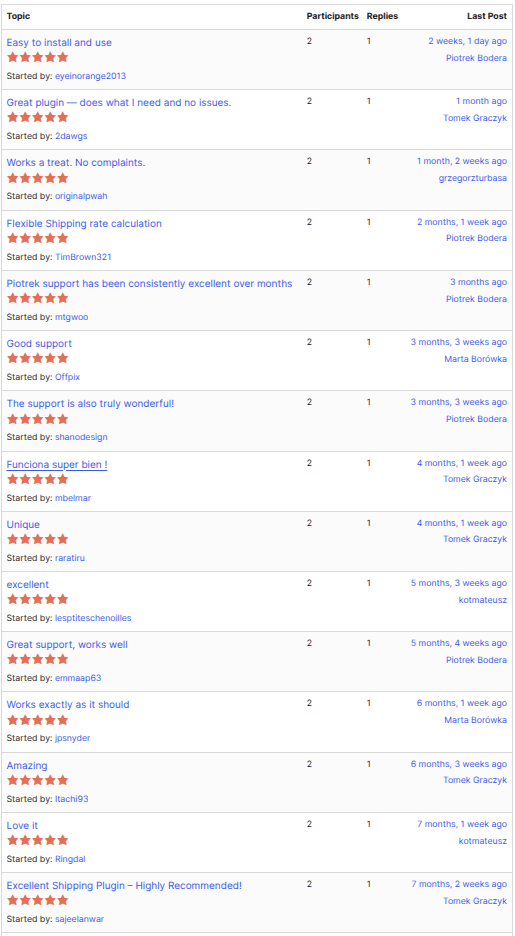
On Trustpilot:
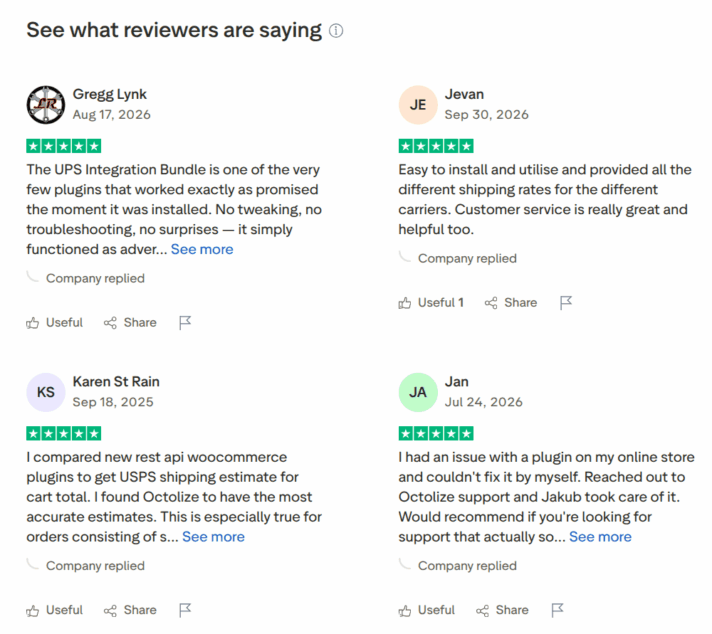
We hope you’ve changed your mind and decided to buy the plugin instead of downloading a nulled version.
Are you interested in exploring Flexible Shipping PRO in more detail? On our YouTube channel, we have videos dedicated to this plugin, such as:

We don’t provide support for Flexible Shipping PRO nulled. It would be unfair to our paid customers, and these days, support is a value in itself. If you buy Flexible Shipping on our site, you are free to ask us any questions about your plugin or WooCommerce in general, at any point. We are always eager to help and solve all of your issues as soon as possible. Support is one of our best strengths. We always try to respond efficiently, be as helpful as possible, and most of all, we take a human approach, helping with WooCommerce issues as well.
No automatic updates for nulled plugins. For the Flexible Shipping plugin, we are constantly adding new features to it, solving issues, etc. What does it mean for a Flexible Shipping PRO nulled user? Permanent manual update flow. Which will take time. A lot of time. We bet that there are better ways of spending your free time than manually updating a nulled plugin.

Content Writer at Octolize
Bartosz Gajewski is a content and marketing specialist with a solid background in SEO, WordPress content strategy, and technical documentation for digital products. With years of hands-on experience in both in-house and freelance roles, he supports tech companies – especially in the SaaS and e-commerce space – by creating content that informs, engages, and drives results.
His approach blends storytelling with data-driven SEO, and he’s been involved in projects ranging from rebranding and product marketing to growth experiments and copywriting for complex software tools. On the blog, he shares actionable insights from his work across marketing teams, product documentation, and online store optimization.





Learn how Octolize helped Kurzgesagt, the online shop behind one of YouTube’s most popular science channels, set up conditional courier rules using the Shopify Shipping Rates Rules & Zones app.

Learn how Octolize solutions helped WooCommerce store based in the United Kingdom set up shipping scenarios.
Learn how Octolize helped Shopify store based in the USA set up distance based rates with a usage of Octolize Distance Based Rates.
 Pickup Points
Hi! Are you planning a similar action as in the case of NULLED code? I would like to take this opportunity 🙂
Hi! Please contact us directly using support form. Use Pre Sale option, and we will find some nice discount for you 😉