
- Home
- WooCommerce
- What plugin are you looking for?
- Shopify
- Find my product
- About us
- Blog
- Docs
- Contact us
- What can we help you with?

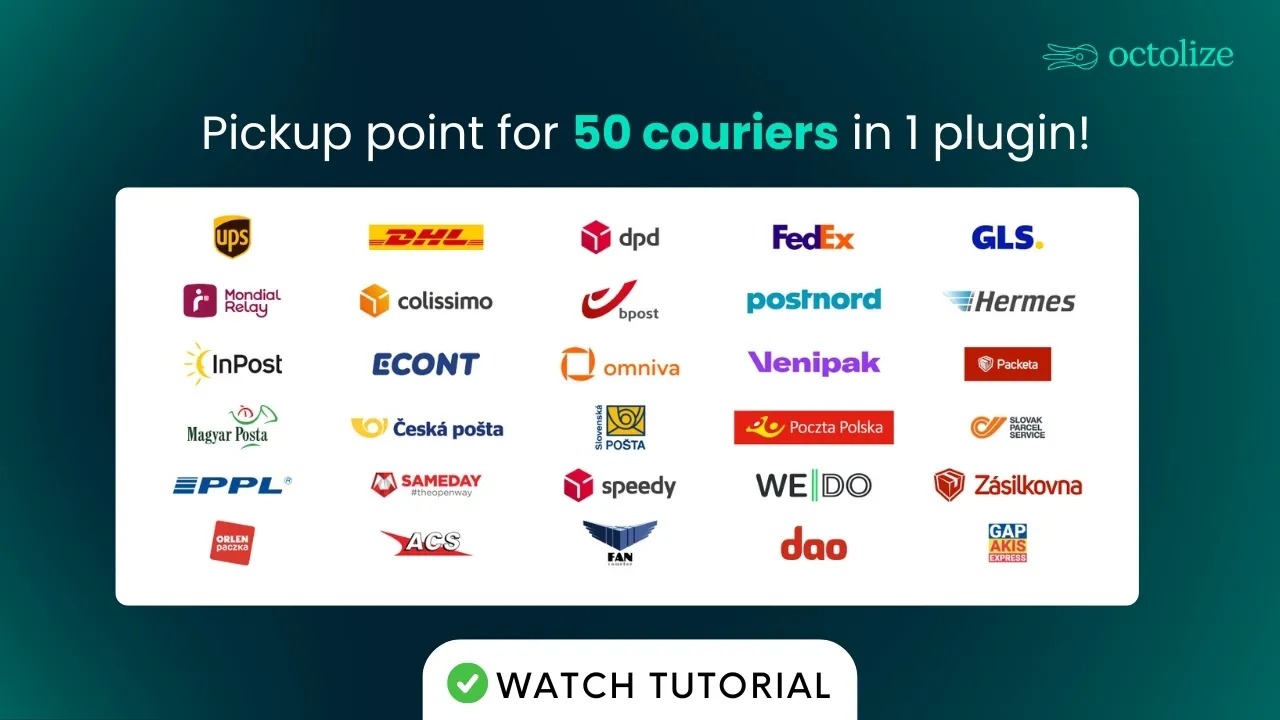
Adding pickup points to your WooCommerce checkout takes 1 plugin and about 3 minutes. Depending on where you sell, that could mean parcel lockers, parcel shops or carrier counters. You don’t need to sign anything with any carrier, and it costs you $49 a year. Below, you will find the full setup, what your customer sees at checkout, and the carrier list for every European country. If the list is the only reason you’re here, it’s further down.
Half the confusion here is the terminology. 3 terms, all describing roughly the same thing.
In WooCommerce, the distinction doesn’t matter much. They all show up as one delivery option, and your customer picks a spot on a map. Which ones you can offer depends on where you sell, and that’s what the table further down covers.
You’ve got two options. The first one is fine in a fairly narrow set of cases.
| Building it yourself | Our plugin | |
|---|---|---|
| Carrier account | One per carrier | None |
| Contract | Usually | None |
| Time to a working option | Days, sometimes weeks | Minutes |
| Who fixes it when a carrier changes something | You | The vendor |
| Adding a second country | Start again | Tick another carrier |
Build it yourself if this describes you: one carrier, one country, that carrier publishes its location data openly, and you’ve got no plans to sell abroad. A custom integration is a sensible solution in this case. You control it, and there’s no annual fee.
Add a second carrier or a second country and the sums change. The checkout interface is a weekend’s work. Keeping location data correct for every carrier your customers use is the part that never finishes, because they all do it differently and they change things without telling anyone.
On a store that already has a shipping method, this takes about 3 minutes. Nothing you’ve already built gets replaced.
Prefer watching instead of reading? We go through the whole thing here:
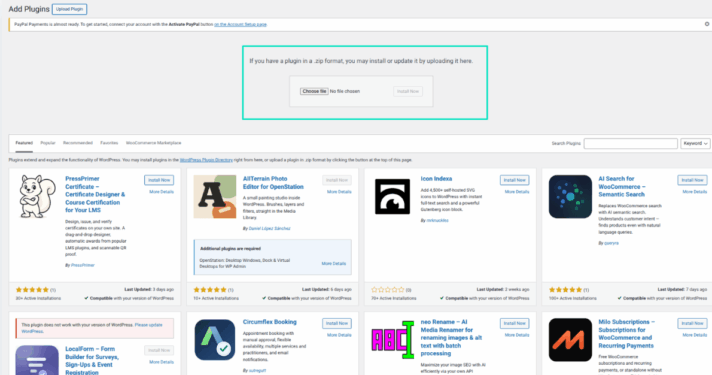
Plugins → Add New, upload the file, activate. No account to create and nobody to get approval from. The whole carrier network is live the moment the plugin is.
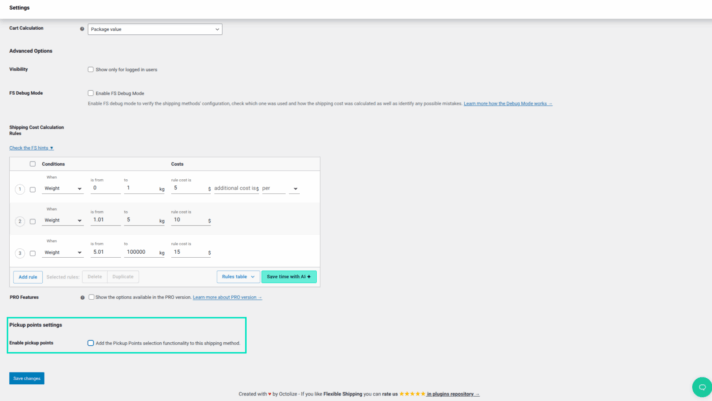
Head to WooCommerce → Settings → Shipping, open one of your shipping zones, and click on an existing method. Flat rate, free shipping, something from another plugin- they all work. Scroll to the bottom of the settings, and the pickup points option should be sitting there.
The option doesn’t work independently; it attaches to a shipping method. Therefore, there has to be a method for it to work.
If Flat Rate feels too blunt, Flexible Shipping is our free table rate plugin on the WordPress repository. It lets you set shipping costs by weight, cart value or quantity instead of one price for everything, and pickup points hook into it the same way they hook into Flat Rate.
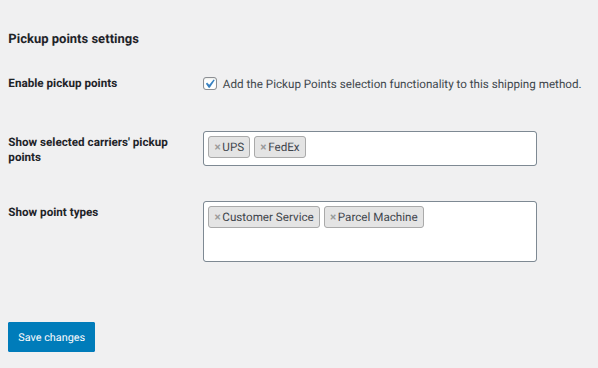
Tick the option, and you’ll get the full carrier list to choose from. It isn’t filtered for you, so pick the ones that actually operate where your customers are. Each carrier covers a specific set of countries – you can check which zones are covered by each courier in our docs. Poczta Polska is Poland only, Zásilkovna is Czechia only, DPD covers most of Europe.
You can also choose which Types of points you’d like your customers to see. Decide if you want to display parcel machines, staffed customer service points, or both. Save when you’re done.
Add any object to cart and go to checkout. The pickup point option should now be displayed alongside your usual delivery methods. Have a proper look at it, because this is what every customer will see.
Don’t like how it looks? You can change it. Go to WooCommerce → Settings → Shipping → Pickup Points PRO, where you decide:
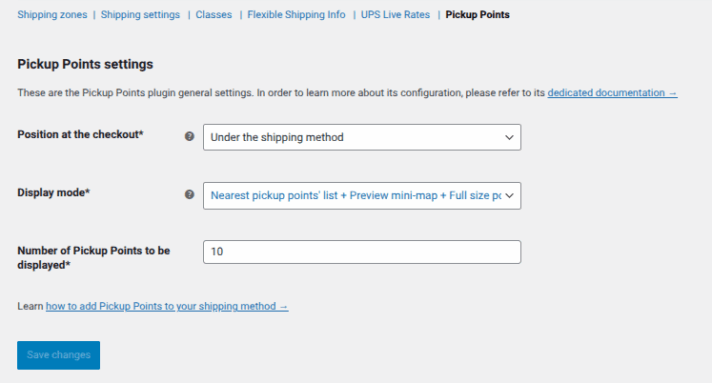
That’s the whole configuration. There’s no step 5.
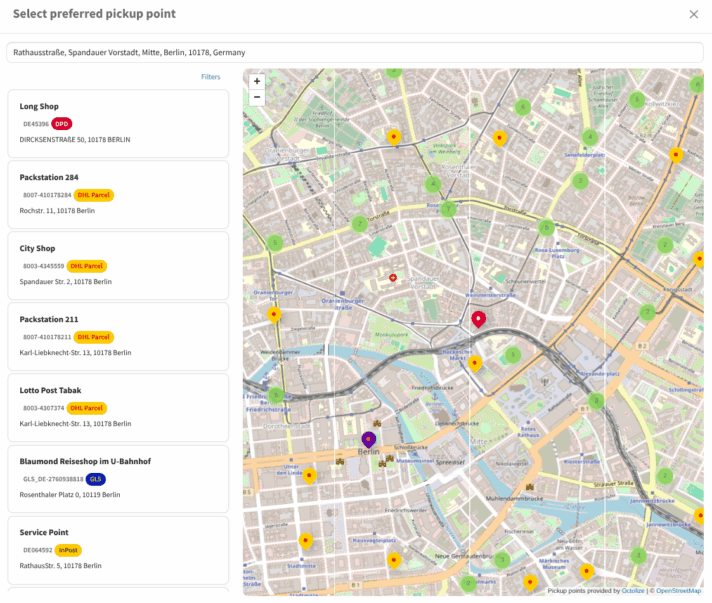
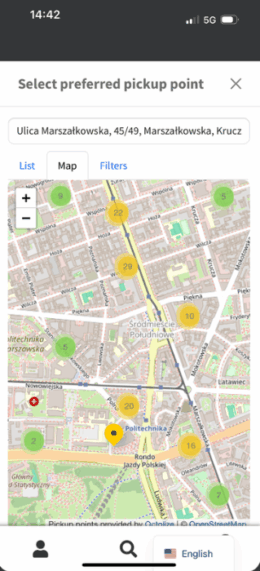
They choose pickup point delivery, a map opens, and they either share their location or type in a city or postcode. Locations display as pins on a map and group into clusters where there are a lot of them. They pick one and confirm: done.
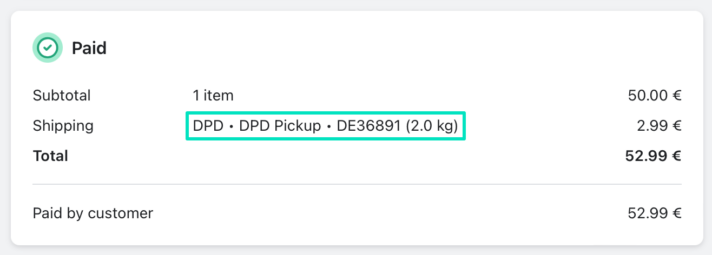
The chosen point doesn’t vanish after checkout, either. It’s in the order confirmation, in the order details in your admin panel, and on whatever you print when you pack. Nobody ends up emailing a customer to ask which locker they meant.
Coverage can vary across Europe. A store in Spain gets 13 carriers to choose from. A store in Ireland gets 4. Neither number is a problem, but it’s worth knowing which one is yours before you plan anything around it.
It’s a long table, so use your browser’s find function to jump to your country. The gap in coverage narrows down to how each market developed. In the countries that pioneered in the parcel locker expansion, like Poland, Czechia, and Spain, several operators ended up competing. Smaller markets tend to be covered by 2 or 3 international carriers, plus the national post.
| Country | Carriers | Available at checkout |
|---|---|---|
| Spain | 13 | InPost, DPD, DHL Parcel, UPS, FedEx, GLS, bpost, PostNord, DHL Express, DHL eCommerce, Correos, MRW, Nacex |
| Poland | 12 | Poczta Polska, InPost, DPD, DHL Parcel, UPS, ORLEN Paczka, FedEx, GLS, Packeta, PostNord, DHL Express, DHL eCommerce |
| Hungary | 12 | InPost, DPD, DHL Parcel, UPS, FedEx, GLS, Sameday, Magyar Posta, Packeta, DHL Express, DHL eCommerce, FoxPost |
| Germany | 11 | InPost, DPD, DHL Parcel, UPS, FedEx, GLS, Hermes, bpost, PostNord, DHL Express, DHL eCommerce |
| Italy | 11 | InPost, DPD, DHL Parcel, UPS, FedEx, GLS, bpost, PostNord, DHL Express, DHL eCommerce, Poste Italiane |
| Czechia | 11 | DPD, DHL Parcel, UPS, GLS, Česká pošta, PPL, WEDO, Zásilkovna, PostNord, DHL Express, DHL eCommerce |
| France | 11 | DPD, DHL Parcel, UPS, DPD Relais France, GLS, Mondial Relay, bpost, Colissimo, PostNord, DHL Express, DHL eCommerce |
| United Kingdom | 10 | InPost, DPD, DHL Parcel, UPS, FedEx, GLS, bpost, DHL Express, DHL eCommerce, Royal Mail |
| Portugal | 10 | InPost, DPD, DHL Parcel, UPS, GLS, PostNord, DHL Express, DHL eCommerce, MRW, Nacex |
| Belgium | 10 | DPD, DHL Parcel, UPS, FedEx, GLS, Mondial Relay, bpost, PostNord, DHL Express, DHL eCommerce |
| Denmark | 10 | DPD, DHL Parcel, UPS, GLS, dao, bpost, PostNord, DHL Express, DHL eCommerce, Bring |
| Finland | 10 | DPD, DHL Parcel, UPS, GLS, bpost, PostNord, DHL Express, DHL eCommerce, Matkahuolto, Bring |
| Netherlands | 10 | DPD, DHL Parcel, UPS, FedEx, GLS, Mondial Relay, bpost, PostNord, DHL Express, DHL eCommerce |
| Romania | 10 | DPD, DHL Parcel, GLS, FAN Courier, Sameday, Packeta, DHL Express, DHL eCommerce, Cargus, Crosswin |
| Austria | 9 | InPost, DPD, DHL Parcel, UPS, FedEx, GLS, PostNord, DHL Express, DHL eCommerce |
| Bulgaria | 9 | DPD, DHL Parcel, GLS, Econt, Sameday, Speedy, DHL Express, DHL eCommerce, Box Now |
| Lithuania | 9 | DPD, DHL Parcel, Venipak, Omniva, bpost, PostNord, DHL Express, DHL eCommerce, Lietuvos paštas |
| Slovakia | 9 | DPD, DHL Parcel, GLS, Slovak Parcel Service, Slovenská pošta, Packeta, PostNord, DHL Express, DHL eCommerce |
| Greece | 8 | DPD, DHL Parcel, GLS, ACS, DHL Express, DHL eCommerce, Box Now, Elta Courier |
| Luxembourg | 8 | DPD, DHL Parcel, UPS, GLS, Mondial Relay, PostNord, DHL Express, DHL eCommerce |
| Latvia | 8 | DPD, DHL Parcel, Venipak, Omniva, bpost, PostNord, DHL Express, DHL eCommerce |
| Sweden | 8 | DPD, DHL Parcel, UPS, bpost, PostNord, DHL Express, DHL eCommerce, Bring |
| Croatia | 7 | DPD, DHL Parcel, GLS, DHL Express, DHL eCommerce, Hrvatska Pošta, Box Now |
| Slovenia | 7 | DPD, DHL Parcel, GLS, PostNord, DHL Express, Express One, Pošta Slovenije |
| Estonia | 6 | DPD, DHL Parcel, Venipak, Omniva, PostNord, DHL Express |
| Cyprus | 6 | DHL Parcel, ACS, GAP Akis Express, DHL Express, DHL eCommerce, Box Now |
| Norway | 6 | DHL Parcel, UPS, bpost, PostNord, DHL Express, Bring |
| Ireland | 4 | DPD, UPS, PostNord, DHL Express |
| Serbia | 3 | DHL Express, Bex Express, D Express |
| Ukraine | 3 | DHL Express, Meest, Nova Post |
| Switzerland | 2 | UPS, DHL Express |
There’s coverage outside Europe as well, including the US, Canada, Mexico, and a number of markets across Asia and South America. Full list: 55 carriers, 73 countries.
You know your own market. You know what people reach for when they buy something online in your home country. There’s no particular reason you would know the local standards in other countries.
A shopper in France goes for Mondial Relay. In Czechia, the primary choice is Zásilkovna. In Greece, Box Now. In Estonia and Latvia, Omniva. In Hungary, FoxPost. If you offer only the carriers you personally recognise, your foreign customers will be given a delivery option that means nothing to them.
A few names from the table worth knowing even if you have no personal experience with them:
One thing worth being clear about: the plugin shows the pickup points that exist at your customer’s address and passes their choice through to the order. Actually getting the parcel to that point is still your own shipping arrangement, the same as it is today.
So before you switch on a foreign market, check that whoever you ship with can deliver to that carrier’s points. Plenty of these operators only work inside their own country. It would be a shame to take an order and then find you can’t fulfil it the way the customer picked.
Two things get constantly updated here, and they’re not the same thing.
The carrier list grows. New carriers get added regularly, and they’re covered by an existing licence, so your coverage improves without the need for you to do anything. This article gets reviewed when that happens.
The locations themselves refresh every 6 hours, straight from the carriers. Pickup points close down, move, and go temporarily out of service more often than you’d expect. When the list is outdated, a customer picks a locker that isn’t there any more, the delivery fails, and you’re the one dealing with it.
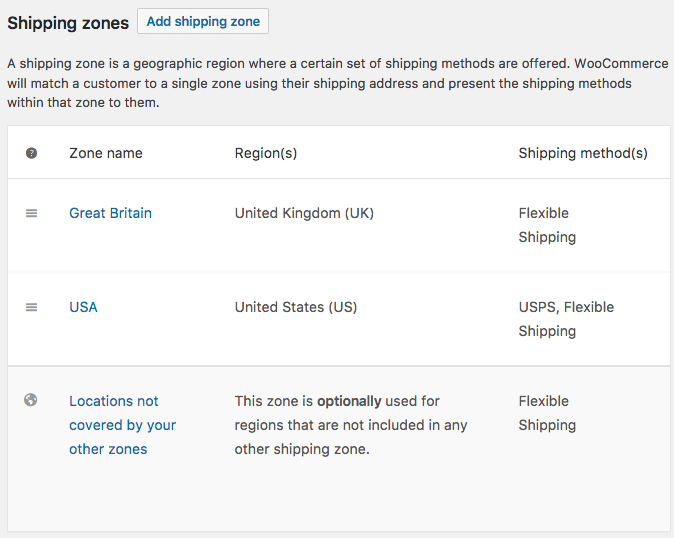
Two things to check. 9 times out of 10, it’s the shipping zone: remember that delivery to pickup points is tied to a specific shipping method inside a shipping zone. So, if the test address falls into a different zone, you’re looking at that zone’s methods instead. To fix it, go back to Step 2 of the setup process and tick the pickup points option for the method you want in the shipping zone that interests you.
The other one is the carriers you picked. If you only ticked one or two, and none of them operates at your customer’s address, there’s nothing to show. Go back to the method and add more.
Usually, it’s the case of a JavaScript conflict, either with another plugin or a heavily customised theme. Deactivate plugins one at a time on a staging copy until it comes back. If your checkout is built with a page builder, try the default WooCommerce checkout first to narrow it down.
The selection is filtered by the countries in your shipping zone, so a carrier that doesn’t operate there won’t appear. Compare against the table above.
Test this one deliberately, because that’s where most of your orders come from. A cramped or cut-off map is nearly always theme CSS squeezing the checkout width. Try it against your theme’s default checkout template before blaming the plugin.
Pickup Points PRO is $49 a year for one store. That covers updates, new carriers as they get added, support from a person rather than a form, and the location data refreshing through the day. No per-order fees, nothing extra per carrier.
There’s no free version and no separate demo. A demo wouldn’t tell you much anyway, since the whole point of pickup points shows up on a real checkout with real customer addresses. So instead, you get 30 days to change your mind. Run it on your actual store, see what happens, and if it’s not right, email us, and you get your money back.
A plugin, a shipping method you already have, a few ticked boxes. 50+ carriers, nothing signed with any of them, no developer, and you’re running in about 3 minutes. What you can offer depends on where you sell, so check the table before you plan around it.





Learn how Octolize helped Kurzgesagt, the online shop behind one of YouTube’s most popular science channels, set up conditional courier rules using the Shopify Shipping Rates Rules & Zones app.

Learn how Octolize solutions helped WooCommerce store based in the United Kingdom set up shipping scenarios.
Learn how Octolize helped Shopify store based in the USA set up distance based rates with a usage of Octolize Distance Based Rates.
 Pickup Points