
- Home
- WooCommerce
- What plugin are you looking for?
- Shopify
- What Do I Need?
- About us
- Blog
- Docs
- Contact us
- What can we help you with?

Standard shipping options in WooCommerce are often too limited for growing businesses that need to calculate rates by weight, price, or item count. Learning how to add a custom shipping method for WooCommerce is key to reducing cart abandonment and protecting your profit margins. This guide explores three proven ways to help you optimize your shipping strategy today.
Running a successful WooCommerce store often starts with a simple “Flat Rate” shipping option. But as your business grows, you quickly realize that shipping is not a one-size-fits-all solution. Perhaps you’ve hit a wall trying to set up shipping costs based on the weight of a parcel, or you want to offer your customers a specific courier service that isn’t available out of the box. Maybe you’ve noticed that customers are abandoning their carts because the shipping options are confusing or too expensive for small orders.
The truth is, standard WooCommerce settings only take you so far. To truly optimize your checkout experience and protect your margins, you need to know how to add a custom shipping method that aligns with your specific logistics.
There are three main ways to add a custom shipping method in WooCommerce, depending on your technical skills and business needs:
Before diving into complex code or external tools, it’s essential to understand what WooCommerce offers right out of the box. The easiest way to add a basic custom shipping method in WooCommerce is by using shipping zones. A Shipping Zone is a geographical area where a specific set of shipping methods is available. WooCommerce will match a customer to a single zone based on their shipping address, and only the methods within that zone will be displayed to them.
Go to your WordPress dashboard and head to WooCommerce > Settings > Shipping.
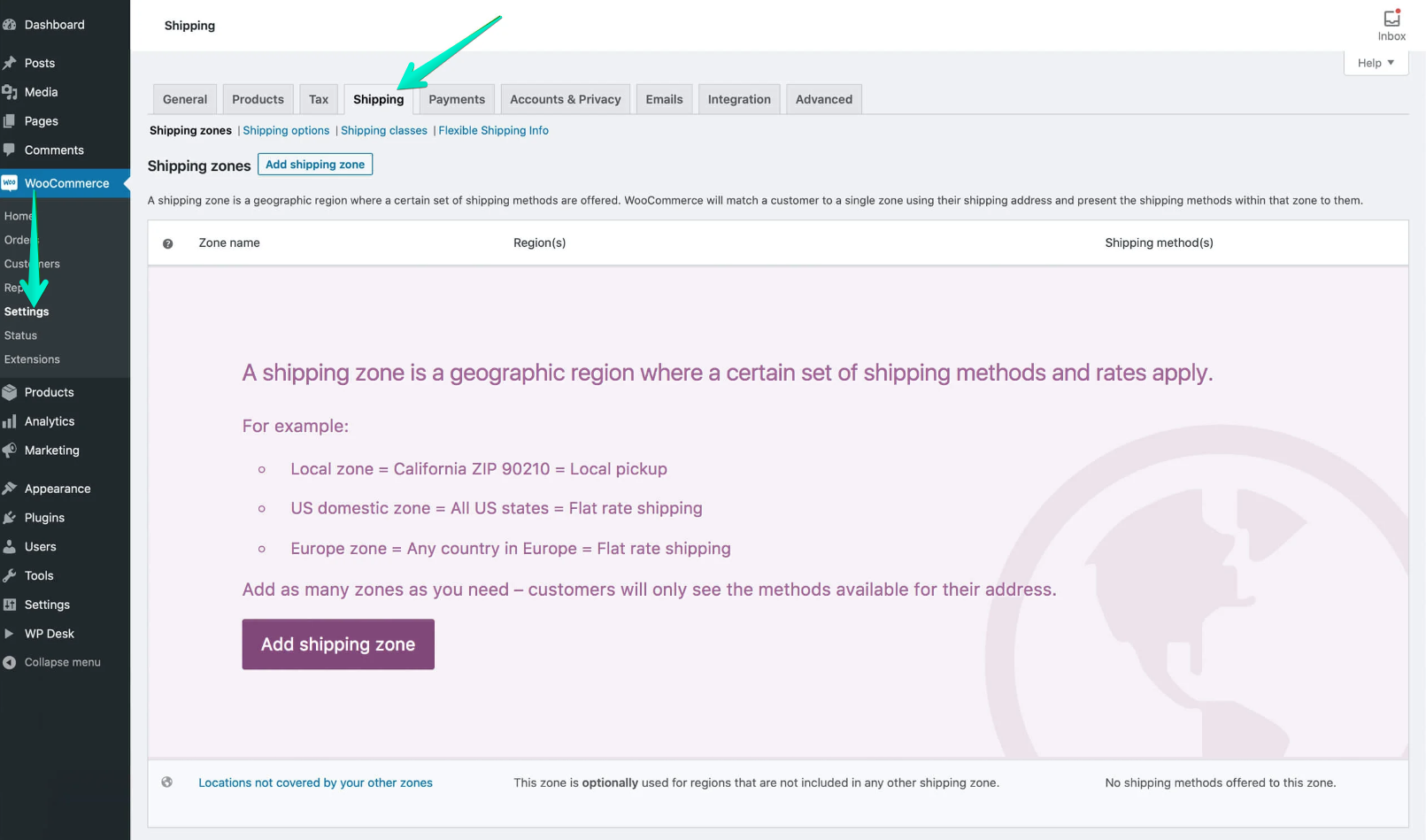
Define a Zone: Click on Add shipping zone button. Give your zone a name (e.g., “UK Mainland”) and select the regions included in this zone. You can even limit it to specific postcodes.
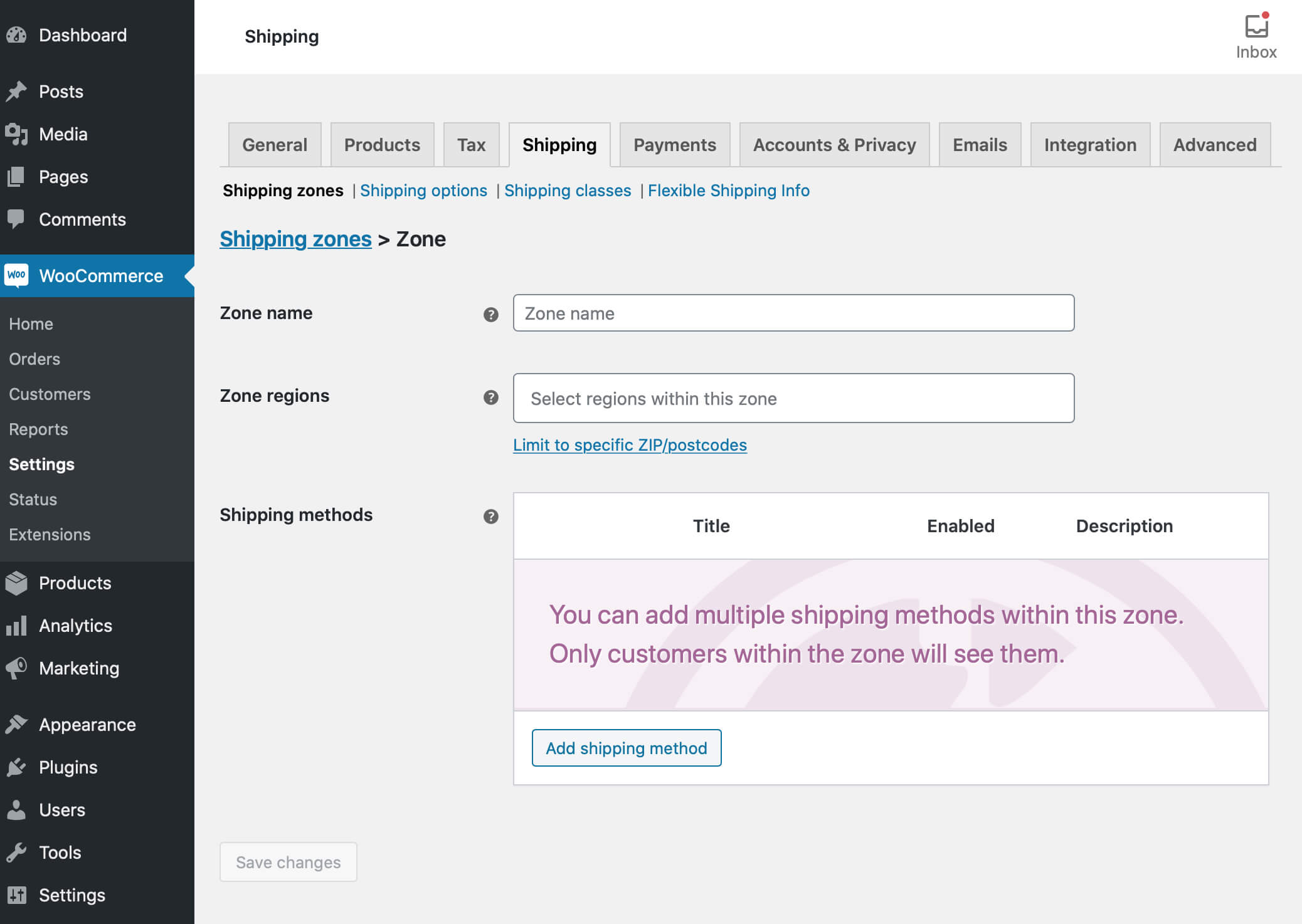
Add a Shipping Method: Inside your zone, click the Add shipping method button. A modal will appear allowing you to choose from three core options:
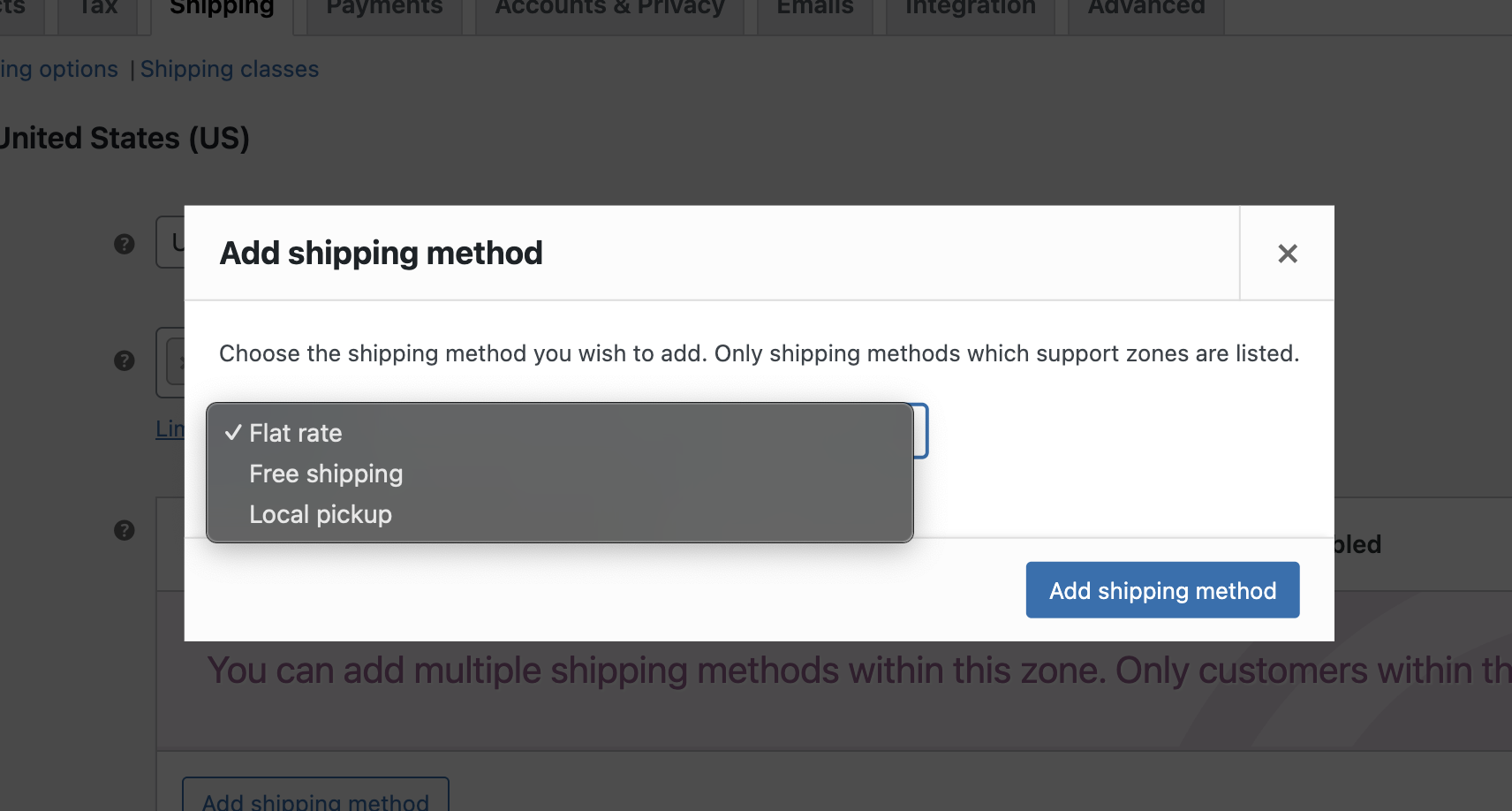
Choose Flat Rate and configure the method. Once added, click Edit under the method name to set the cost or specific requirements (like “Minimum order amount” for free shipping).
While this method is “free” and built-in, it is quite rigid. You will quickly encounter obstacles if you need:
Pro Tip: If your shipping strategy is purely based on “One price for everyone in the country,” this method is perfect. However, if you want to avoid overcharging customers or losing money on heavy shipments, you’ll likely need the more advanced methods described below.
If you have specific requirements that no standard setting can meet, you can create your own shipping method from scratch. This approach gives you total control over how the shipping cost is calculated and displayed. Please have in mind that it’s best suited for developers or stores with in-house technical resources.
To do this, you need to hook into WooCommerce and create a new class that extends the built-in WC_Shipping_Method class.
Every shipping method in WooCommerce is an instance of a class. By extending the base class, you inherit all the necessary logic to handle shipping zones, tax calculations, and integration with the checkout page. You only need to “fill in the blanks” with your custom logic.
Simple Code Skeleton (PHP)
Below is a basic boilerplate to register a custom shipping method. This custom WordPress code should ideally go into a custom plugin or a child theme’s functions.php.
/**

* Check if WooCommerce is active

*/

if ( in_array( 'woocommerce/woocommerce.php', apply_filters( 'active_plugins', get_option( 'active_plugins' ) ) ) ) {
function custom_shipping_method_init() {

if ( ! class_exists( 'WC_Custom_Shipping_Method' ) ) {

class WC_Custom_Shipping_Method extends WC_Shipping_Method {

public function __construct() {

$this->id = 'custom_shipping';

$this->method_title = __( 'Custom Shipping', 'text-domain' );

$this->method_description = __( 'Custom Method Description', 'text-domain' );
$this->init();

}
function init() {

// Load the settings

$this->init_form_fields();

$this->init_settings();

$this->enabled = $this->get_option( 'enabled' );

$this->title = $this->get_option( 'title' );
add_action( 'woocommerce_update_options_shipping_' . $this->id, array( $this, 'process_admin_options' ) );

}
public function calculate_shipping( $package = array() ) {

$rate = array(

'id' => $this->id,

'label' => $this->title,

'cost' => '10.00', // You can add your logic here

'calc_tax' => 'per_order'

);

$this->add_rate( $rate );

}

}

}

}

add_action( 'woocommerce_shipping_init', 'custom_shipping_method_init' );
function add_custom_shipping_method( $methods ) {

$methods['custom_shipping'] = 'WC_Custom_Shipping_Method';

return $methods;

}

add_filter( 'woocommerce_shipping_methods', 'add_custom_shipping_method' );

}
While coding your own method is powerful, it comes with significant responsibilities:
Important: If you are not comfortable with PHP or FTP access, we strongly recommend using a dedicated plugin. It ensures your site stays stable and receives regular updates.
For most store owners, using a plugin is the fastest and safest way to add a custom shipping method for WooCommerce. If you need a solution that is flexible, secure, and ready to use in minutes, a dedicated plugin is the way to go. In such cases, tried and tested solutions work best. And when it comes to shipping in WooCommerce, there is probably nothing better than the Flexible Shipping plugin. It’s the most popular Table Rate shipping plugin for WooCommerce, used by over 100,000 stores worldwide. This plugin is based on the table rate solution, which is the simplest solution for implementing more complex shipping scenarios in WooCommerce.
Table Rate shipping allows you to create complex rules based on conditions. Instead of a single flat fee, the shipping cost “adapts” to the contents of the customer’s cart.
Install the Plugin: Search for Flexible Shipping in the WordPress plugin repository, install, and activate it. You can also use the link below.

The best Table Rate Shipping for WooCommerce. Period. Create shipping rules based on weight, order totals, or item count.
Go to WordPress.orgorDownload for freeHaving the plugin installed and activated, add a New Shipping Method: Go to WooCommerce > Settings > Shipping. Then, select a Shipping Zone, and click Add shipping method. Choose “Flexible Shipping” from the list.
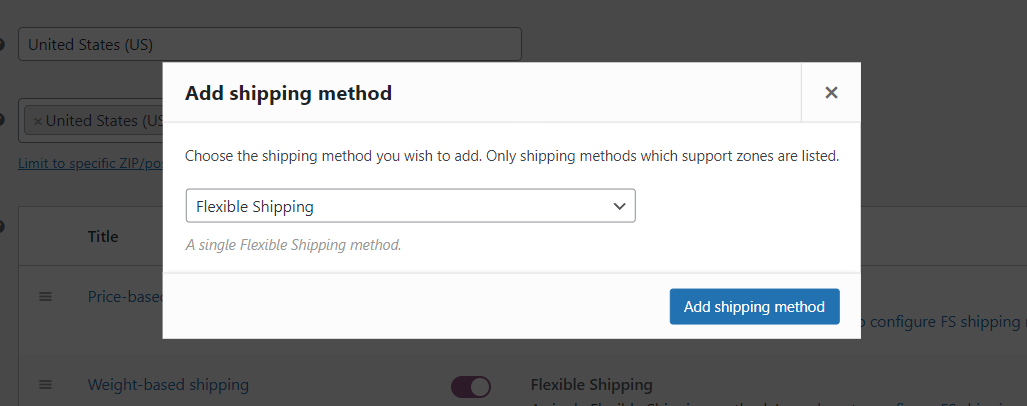
Configure Your Rules: Click on the method name to open the configuration panel. This is where the magic happens.
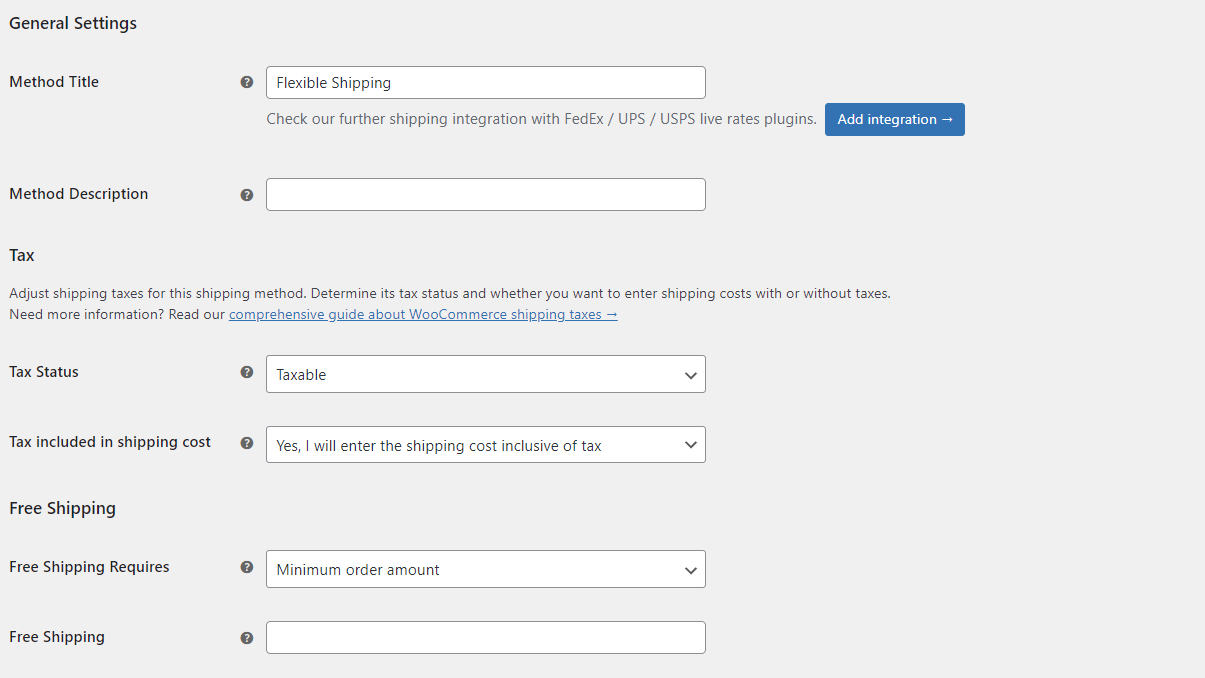
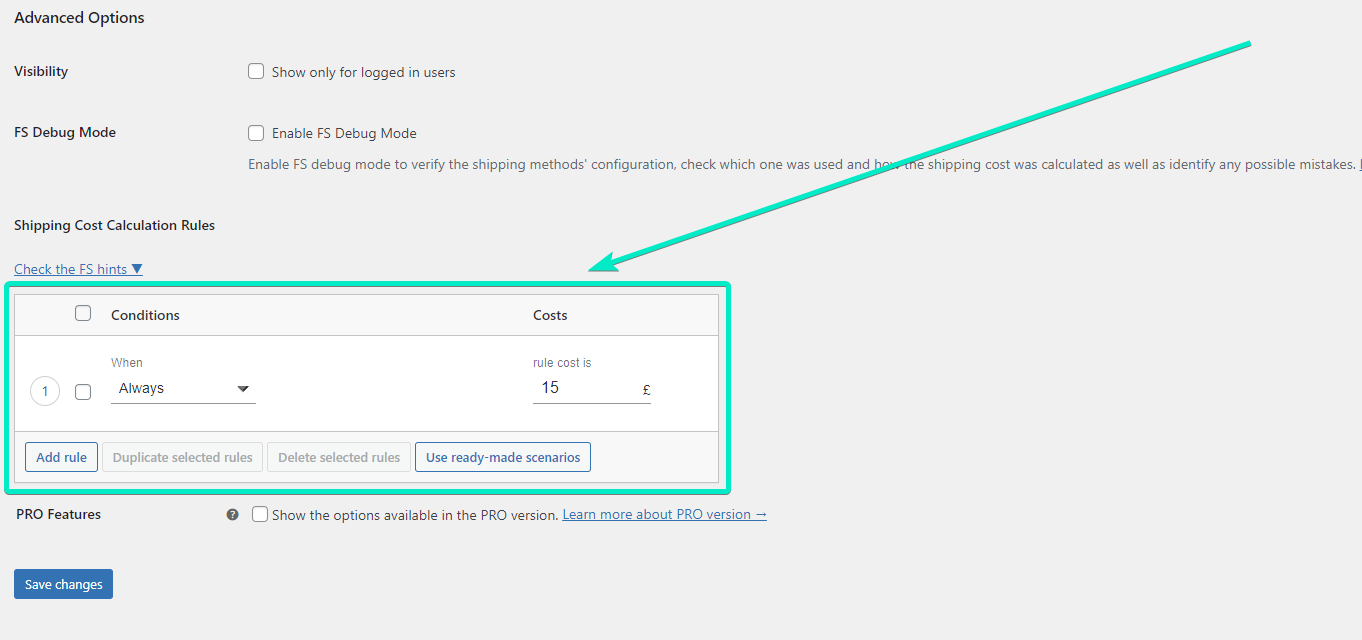
In the configuration page, you can enter both the Method Title, Method Description and use all of the Flexible Shipping plugin’s features. The most important element, however, is the Shipping Cost Calculation Rules table. You’ll find it at the bottom of the configuration page:
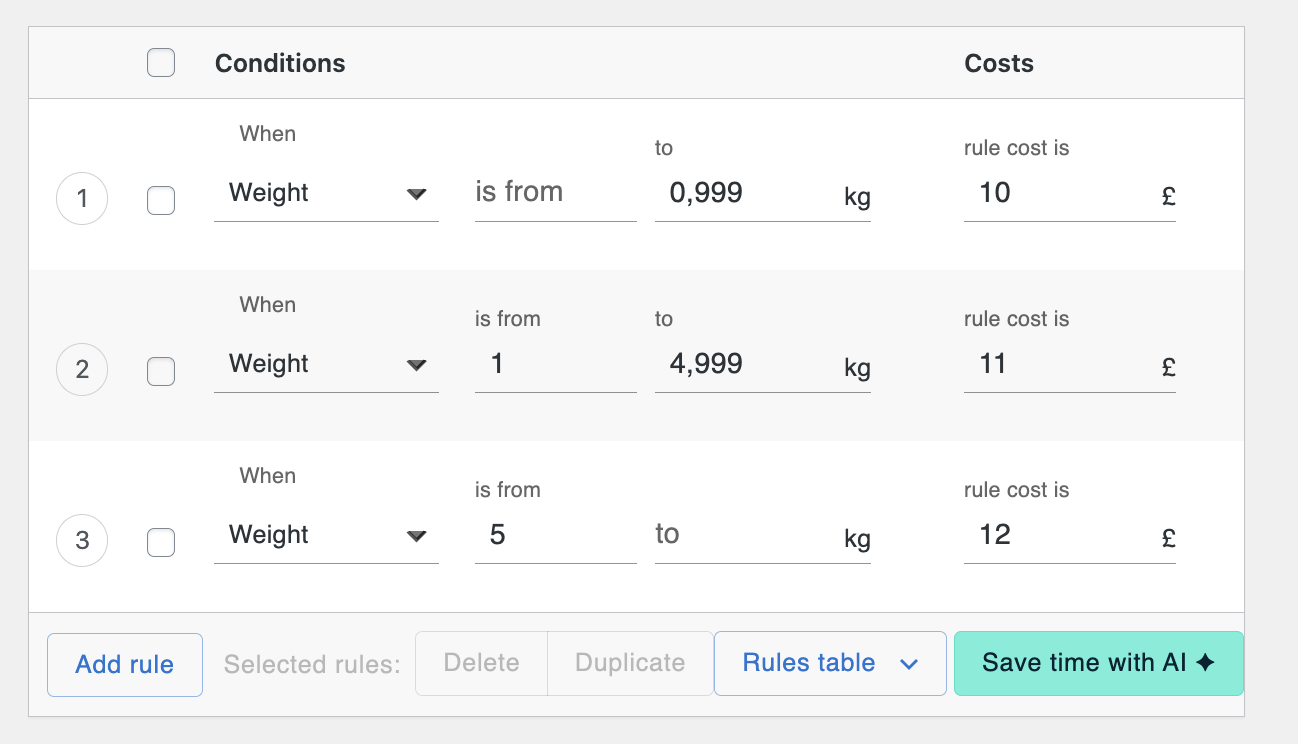
If you sell heavy items, you don’t want to pay for the shipping difference out of your own pocket. You can set a rule like this:
This means that for orders with a weight of up to 1 kg, the shipping rate is £10. Over 1 kg, up to 5 kg, it’s £11. And finally, over 5 kg is £12. In your case, the costs and ranges may be different. Remember that these ranges refer to the total weight of all the products in your customer’s shopping cart.
Below you will find a video exploring the topic of WooCommerce weight-based shipping in more detail.
The biggest benefit of this method is that you never touch a single line of code. Everything is managed through a clean, intuitive interface. If you decide to change your shipping rates for a Black Friday sale or due to a carrier price hike, you can do it in seconds with a few clicks.
Yes. WooCommerce allows basic customization using shipping zones and flat rates, but for more advanced logic you can use plugins like Flexible Shipping. These tools let you create complex, rule-based shipping methods without touching PHP code.
A shipping zone defines where you ship, based on the customer’s address. A shipping method defines how much you charge and under what conditions within that zone. Each zone can contain multiple shipping methods with different rules.
Flat Rate works only for very simple setups. If your shipping costs depend on weight, cart value, number of items, or product type, a custom shipping method helps avoid overcharging customers or losing money on expensive shipments.
Poorly written custom code can affect performance, especially if calculations are complex. Well-maintained plugins are optimized for checkout performance and are usually the safer option for production stores.
Customizing your shipping methods is one of the most effective ways to professionalize your WooCommerce store. While the built-in options provide a solid foundation for simple setups, and custom coding offers limitless (though risky) flexibility, most successful stores find their “sweet spot” with a dedicated plugin. Choosing the right approach depends on how complex your shipping logic is and how much control you need.
Ready to move beyond basic flat rates? You don’t need a developer or a massive budget to get started.

Content Writer at Octolize
Bartosz Gajewski is a content and marketing specialist with a solid background in SEO, WordPress content strategy, and technical documentation for digital products. With years of hands-on experience in both in-house and freelance roles, he supports tech companies – especially in the SaaS and e-commerce space – by creating content that informs, engages, and drives results.
His approach blends storytelling with data-driven SEO, and he’s been involved in projects ranging from rebranding and product marketing to growth experiments and copywriting for complex software tools. On the blog, he shares actionable insights from his work across marketing teams, product documentation, and online store optimization.




Learn how Octolize helped Kurzgesagt, the online shop behind one of YouTube’s most popular science channels, set up conditional courier rules using the Shopify Shipping Rates Rules & Zones app.

Learn how Octolize solutions helped WooCommerce store based in the United Kingdom set up shipping scenarios.
Learn how Octolize helped Shopify store based in the USA set up distance based rates with a usage of Octolize Distance Based Rates.
 Pickup Points