
- Home
- WooCommerce
- What plugin are you looking for?
- Shopify
- What Do I Need?
- About us
- Blog
- Docs
- Contact us
- What can we help you with?
WooCommerce is a powerful e-commerce platform, but it also has some limitations. Shipping based on shipping zones and postcodes works well in most countries. But what if you run a store in a country without ZIP codes? In this article, you will learn how to add Iraq provinces (governorates) into WooCommerce checkout as a dropdown list.
Iraq has no unified ZIP code system. Instead, customers usually just write their province or city name, which leads to many spelling variations and makes shipping rules unreliable. By default, WooCommerce lets you choose “Iraq” as a shipping zone, but there is no built-in list of provinces. And what if the cost of delivery differs between Baghdad, Erbil, or Basra? The best solution is to add provinces yourself.
woocommerce_states filter snippet in functions.php or via the Code Snippets plugin. No core files touched.All you need to do is paste a short snippet into your theme’s functions.php file or use a plugin like Code Snippets. We won’t touch WooCommerce core code. The only thing WooCommerce provides by default are countries and states/provinces for some regions. Luckily, WooCommerce has a filter called woocommerce_states, which we can use to add Iraq’s governorates.
Here’s an example code:
add_filter( 'woocommerce_states', 'fs_add_iraq_governorates' );
function fs_add_iraq_governorates( $states ) {
    $states['IQ'] = array(
        'AN' => __( 'Al Anbar', 'woocommerce' ),
        'BA' => __( 'Babil', 'woocommerce' ),
        'BG' => __( 'Baghdad', 'woocommerce' ),
        'QA' => __( 'Qadisiyyah (Diwaniyah)', 'woocommerce' ),
        'NA' => __( 'Najaf', 'woocommerce' ),
        'KA' => __( 'Karbala', 'woocommerce' ),
        'WA' => __( 'Wasit', 'woocommerce' ),
        'MS' => __( 'Maysan', 'woocommerce' ),
        'MU' => __( 'Muthanna', 'woocommerce' ),
        'DQ' => __( 'Dhi Qar (Nasiriyah)', 'woocommerce' ),
        'BAA'=> __( 'Basra', 'woocommerce' ),
        'SD' => __( 'Salah ad Din', 'woocommerce' ),
        'DY' => __( 'Diyala', 'woocommerce' ),
        'NI' => __( 'Nineveh (Mosul)', 'woocommerce' ),
        'KR' => __( 'Kirkuk (Taʼmim)', 'woocommerce' ),
        'DA' => __( 'Duhok', 'woocommerce' ),
        'AR' => __( 'Erbil (Hewlêr)', 'woocommerce' ),
        'SU' => __( 'Sulaymaniyah (Slemani)', 'woocommerce' ),
        'HB' => __( 'Halabja', 'woocommerce' ),
    );
    return $states;
}
This snippet adds Iraq’s 19 provinces. If you want to extend the list later (e.g., add specific districts or cities), just insert additional entries into the $states array.
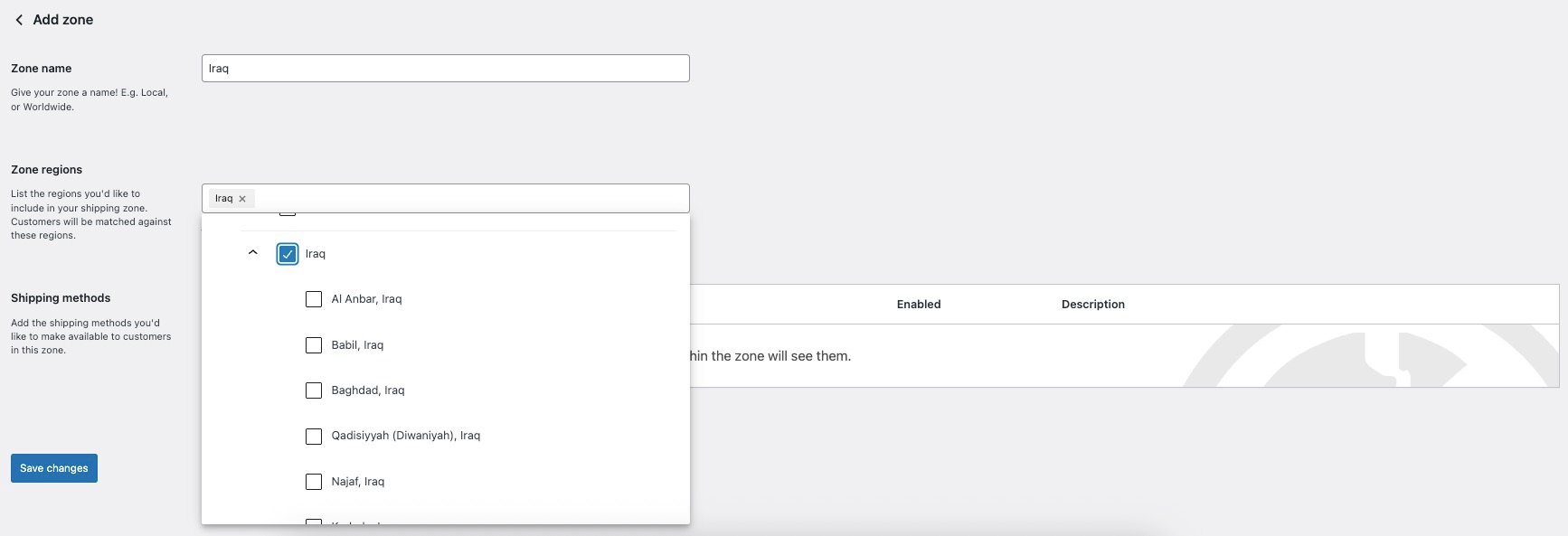
It will add all Iraq provinces to WooCommerce. Then, when you go to WooCommerce → Settings → Shipping and add a new Shipping Zone, you’ll be able to assign rules to individual provinces.
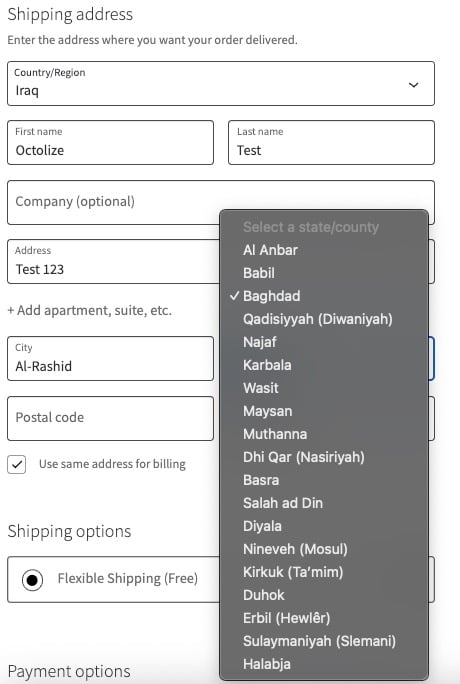
Your customers will see the same improvement on the checkout page. Instead of typing freely, they will be able to select their province from the dropdown menu in the State / County field.
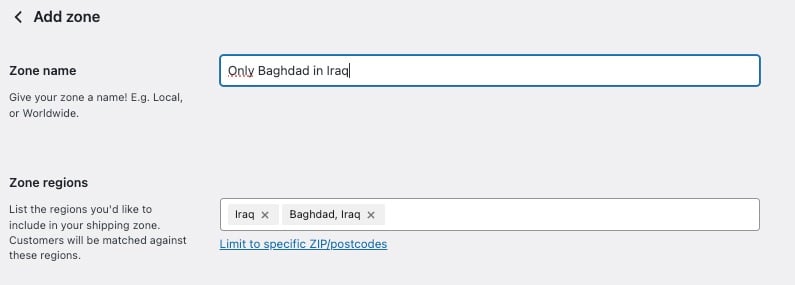
If you want to restrict shipping to only one province — e.g., Baghdad — simply create a Shipping Zone limited to Baghdad and assign methods and rates just for that area.
If you want to set different delivery fees depending on the province (for example, $5 for Baghdad, $8 for Basra, $10 for Nineveh), you can do it in two ways:
Create a separate Shipping Zone for each province and assign a method with its own rate.
Use the Flexible Shipping Locations add-on. This will allow you to configure all rates inside a single shipping method, which is much easier to maintain. You can use it only with the Flexible Shipping method available in both the free version and the PRO version.
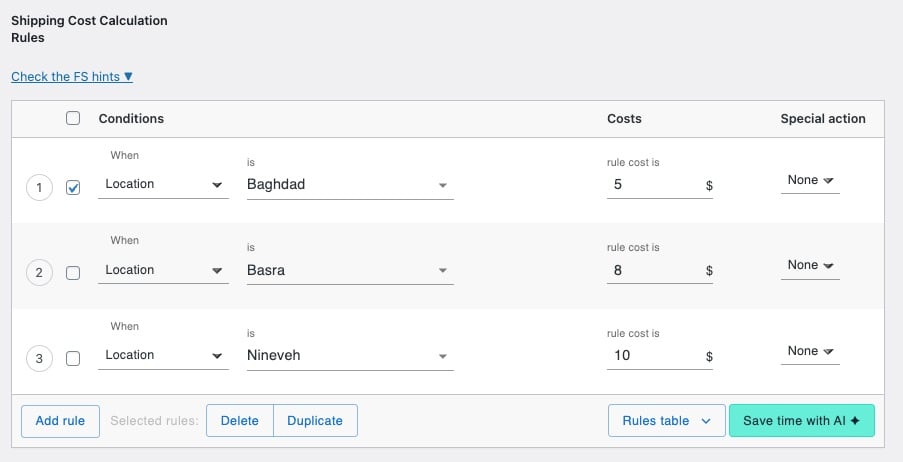

Extend Flexible Shipping with custom locations and create shipping costs based on weight, order totals or item count.
View DetailsorAdd to cartYes. This method works not only for Iraq but also for any other country. You simply need to adjust the snippet to match the country code and provide the list of regions you want to add. After that, they will appear in the WooCommerce Shipping Zones and at the checkout just like in the example above.
woocommerce_states filter operates on WooCommerce’s country and state data, not on a particular checkout template, so the dropdown appears in both the classic checkout and the Cart and Checkout blocks.



Learn how Octolize helped Kurzgesagt, the online shop behind one of YouTube’s most popular science channels, set up conditional courier rules using the Shopify Shipping Rates Rules & Zones app.

Learn how Octolize solutions helped WooCommerce store based in the United Kingdom set up shipping scenarios.
Learn how Octolize helped Shopify store based in the USA set up distance based rates with a usage of Octolize Distance Based Rates.
 Pickup Points