
- Home
- WooCommerce
- What plugin are you looking for?
- Shopify
- Find my product
- About us
- Blog
- Docs
- Contact us
- What can we help you with?

Shopify pickup points let customers collect their orders from a nearby locker, carrier store, or partner shop instead of waiting at home for a courier. This guide covers what they are, why they matter for your conversion rate, how setup works on each Shopify plan, and the best practices that make them stick.
Key Takeaways
Pickup points (also called PUDO: Pick-Up Drop-Off, access points, or parcel lockers) are designated locations where customers collect their online orders at a time that suits them, instead of waiting at home for a courier. They include carrier-operated stores, local businesses partnered with delivery networks, post offices, grocery stores, and 24/7 automated parcel lockers (APMs).
The network is large and growing fast. According to the Last Mile Experts Out of Home Delivery in Europe 2025 report, there are now over 646,000 active OOH points across Europe — up 28% from 2023 — spanning 462,080 PUDO locations and 184,400 automated parcel machines. For Shopify merchants shipping to Europe, the infrastructure is already there. The question is whether your checkout lets customers use it.
Yes, but with significant caveats. Shopify includes native in-store pickup and, in select countries, the ability to display carrier pickup points at checkout. The catch: the carrier pickup points feature is exclusive to Shopify Plus, the most expensive tier, and is not available in all markets. Merchants on Basic, Shopify, or Advanced plans cannot use it natively at checkout. The sections below show how to work around this on every plan.
Juggling a busy lifestyle, balancing family and work, followed by tons of errands and plenty of to-dos. Feel like you’ve been there? I bet you have. With such a packed schedule, the last thing you want is to be tied down waiting for deliveries or missing packages. How about playing it by your own rules and picking up your order when and where it’s most convenient for you? Makes sense, right? It’s not just us—millions of customers feel the same way, and this is exactly where pickup points come to play.
Access points, drop-offs, pickup points, parcel lockers or PUDO, no matter what each carrier calls them, are no longer just a nice-to-have option. A recent study by Savanta and HubBox reveals that 68% of urban residents and 71% of hybrid workers favor pickup points for their online deliveries. This confirms that they’ve become a standard that customers expect, and providing them isn’t just a way to stand out anymore; it’s a must-have if you want to keep up in the market. With that in mind, let’s take a look at some more advantages they can bring to your Shopify store:
Okay, we’ve spent enough time on the ‘why’ and covered why offering pickup points in Shopify store is a must. Now it’s time to focus on the ‘how’. So, let’s break it down…
The setup depends on which Shopify plan your store is on. The experience and available features differ significantly between Basic, Shopify/Advanced, and Plus. Octolize Pickup Points PRO removes most of these restrictions. It works across all Shopify plans, supports 50+ carriers worldwide, requires no contracts, and includes a 14-day free trial.
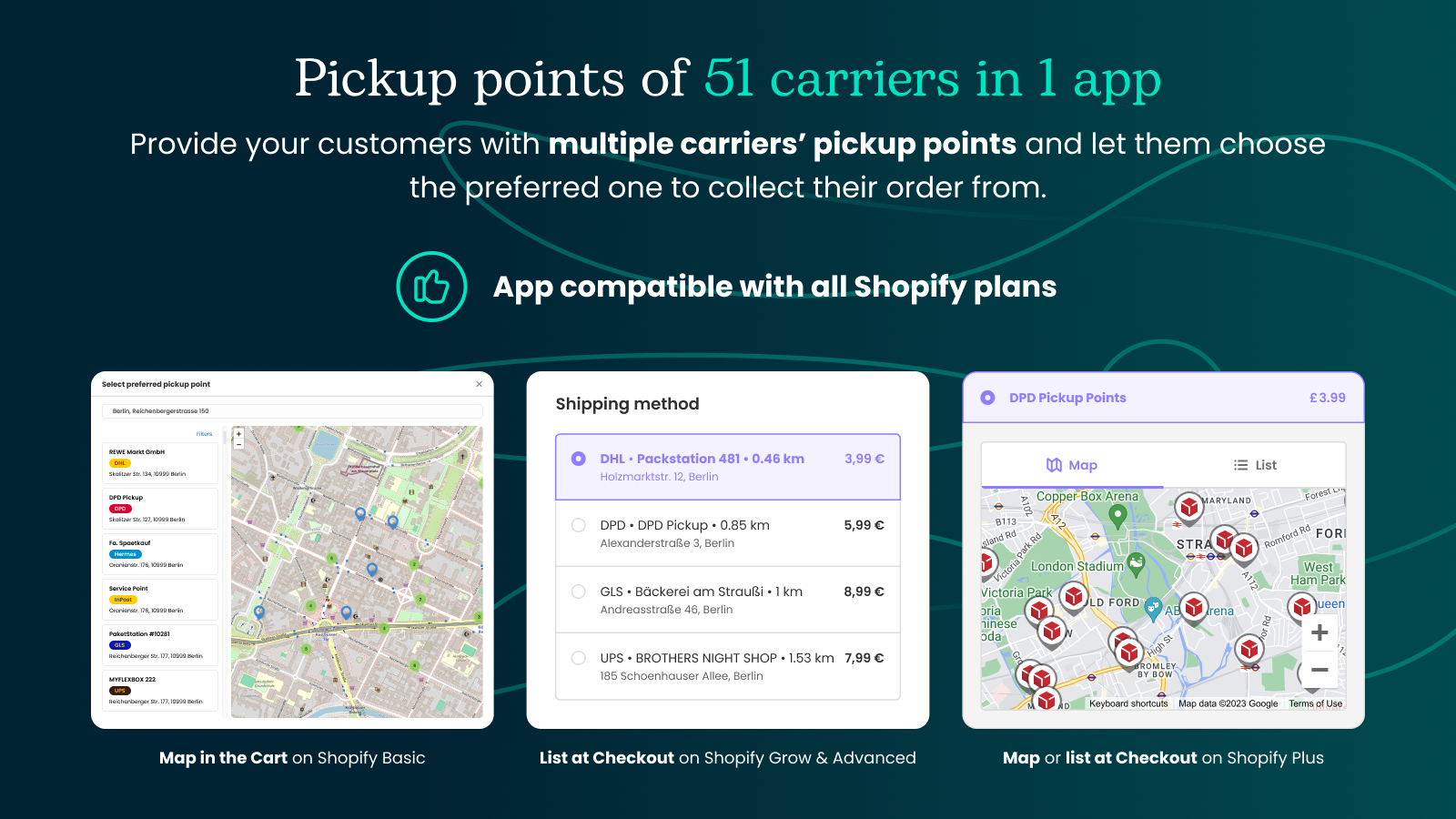
Octolize Pickup Points PRO lets you offer your customers pickup points of 50+ most popular carriers worldwide and decide which countries they are available in. What’s more, you get full control over shipping costs with custom rules and free shipping thresholds. All of this in a single app, with no need to sign a thing or create any user accounts. It comes with a 14-day free trial, giving you a two weeks to test out every feature and make sure it meets your expectations, hassle-free. And the cherry on top? It works across all Shopify plans, including Shopify Basic, adapting to your current plan’s capabilities, so you can add pickup points to your Shopify store, no matter what plan you’re on.
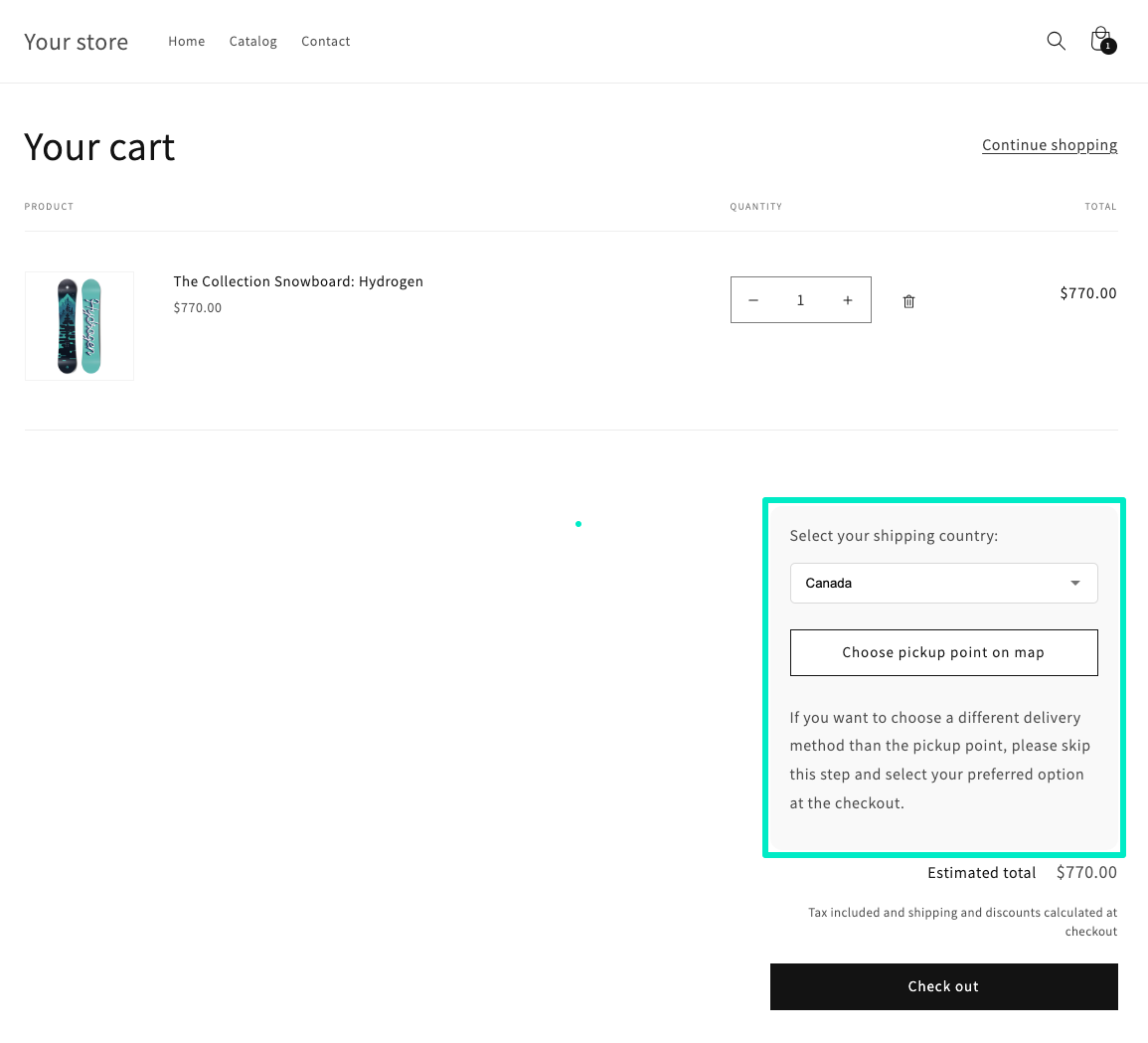
On Shopify Basic, the Carrier-Calculated Shipping (CCS) API is not included, which means third-party shipping methods (including carrier pickup points) cannot be displayed at checkout. The workaround: display the pickup point selector in the cart instead, one step before checkout.
Octolize Pickup Points PRO handles this with a widget you add to the cart page template in the theme editor. Setup takes three steps:
The customer selects their preferred pickup location from a map in the cart. It keeps the flow natural and works within Basic’s limitations.
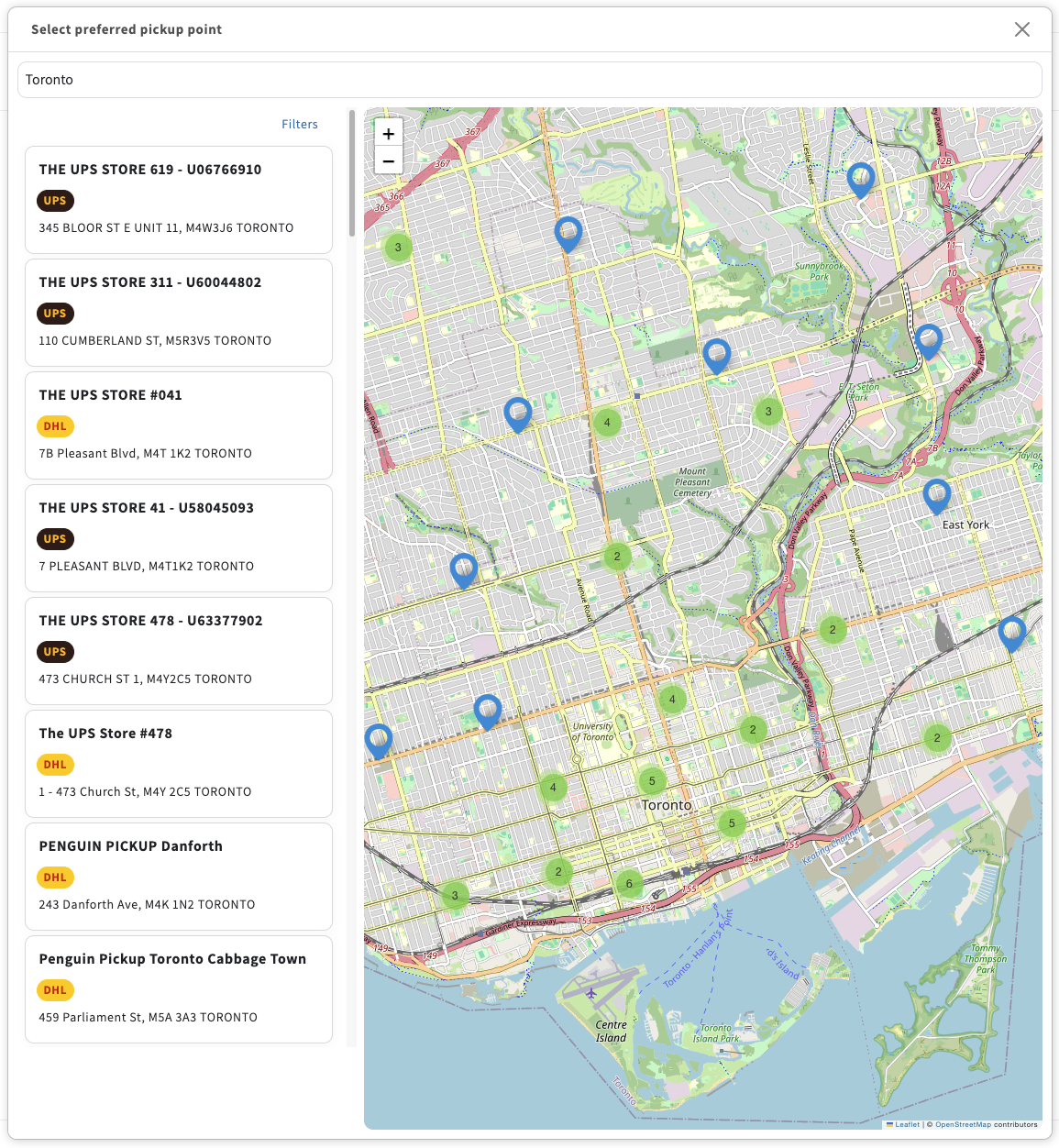
You’re not limited to one carrier. Add UPS, DHL, or any other supported carrier for a country and all their pickup points appear on a single map. Customers pick the carrier they trust or the location that’s most convenient. Here is how UPS and DHL pickup points look together on one map when shipping to Canada:
I’m sure you would agree that this feature definitely opens up the door to more possibilities for stores on the Shopify Basic plan. It’s a game-changer for those who want to offer a lot more to their customers without having to jump to a higher tier and upgrading their plan.
On Shopify and Shopify Advanced, the Carrier Service API is included. It means that third-party shipping methods can appear at checkout. Octolize Pickup Points PRO uses this to display a list of nearby pickup points directly at checkout, below the standard shipping methods.
When the customer enters their delivery address, the app automatically surfaces a list of nearby pickup points from the carriers you’ve configured. No map at this stage (that’s Shopify Plus territory), but a clean, functional list that works on both desktop and mobile.
You control exactly what the customer sees. For example: show a minimum of 6 nearby PUDOs total, with at least 3 always from FedEx and the remaining 3 from other carriers sorted by distance. This keeps the experience consistent regardless of which carrier has the densest network in that ZIP code.
On plans with Carrier Service API access, you replace the rate-pairing approach used on Basic with custom cost calculation rules. Set pickup point delivery costs based on order value, product weight, or any other condition. Add a free shipping threshold to incentivize customers to choose pickup over home delivery. It’s very useful for raising average order value while lowering your last-mile costs at the same time.
Shopify Plus unlocks checkout extensibility with the ability to add custom blocks directly to the checkout page. Octolize Pickup Points PRO uses this to display a live pickup points map at checkout, powered by Google Maps.
With Google Maps behind the scenes, you can use your own API key to let your customers choose DPD pickup points on a map during checkout. It integrates seamlessly with shipping methods, using Shopify native mechanisms and fitting so perfectly, it’s like it’s been there from day one. All it takes is adding a dedicated block to your checkout page template, and the app will pretty much take it from there.
You decide whether you want to show pickup points on a map or in a list. If you go with the map, a mini-map will appear below the shipping method, displaying carrier-specific PUDO locations like these DPD pickup points here:
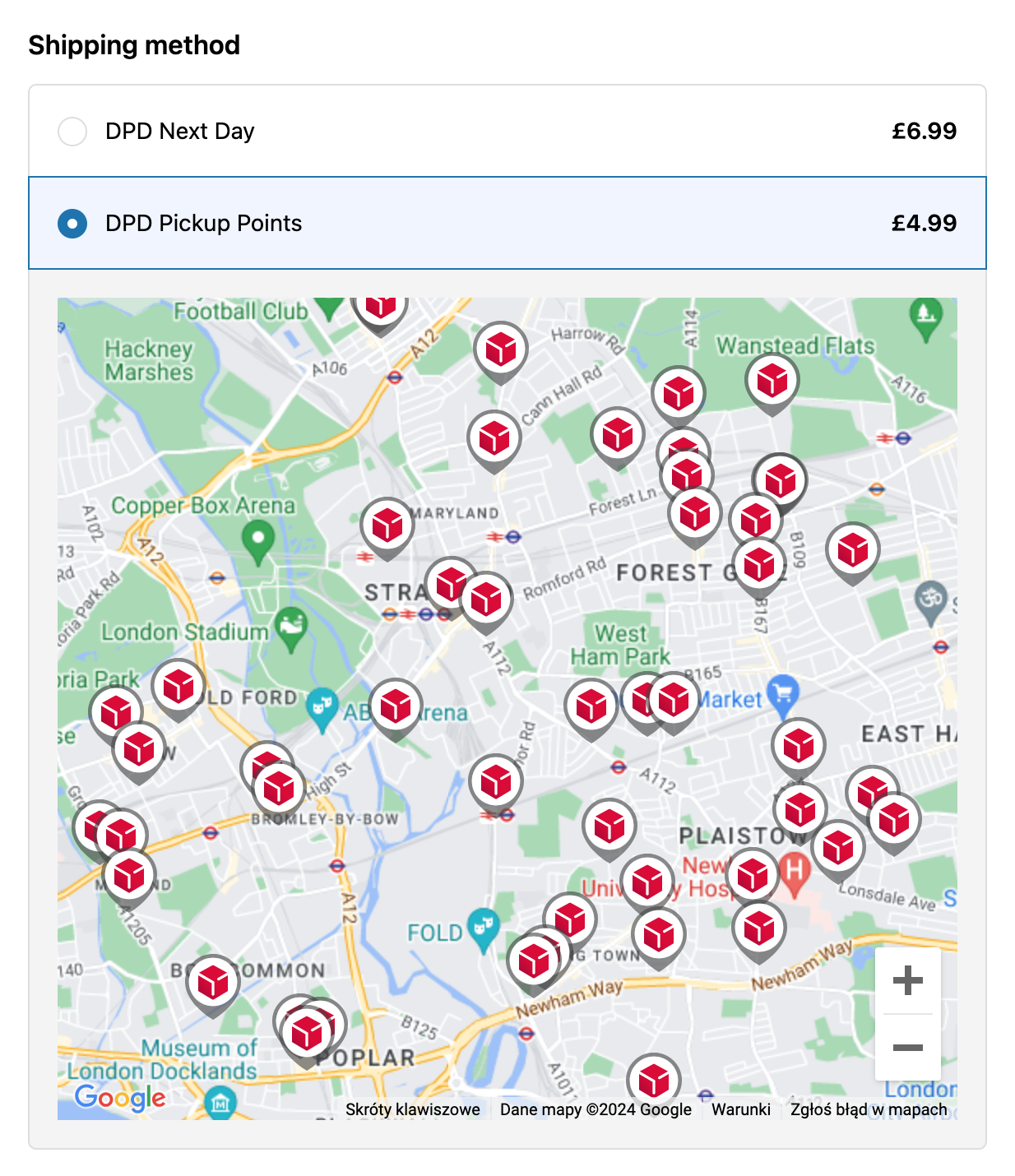
Nice and clean, perfectly integrated with Shopify checkout and mobile friendly, which is a must these days; exactly what you need. The rest runs like it does with the Shopify plans with Carrier Service API access we’ve covered before. No changes here – you can still control which types of carrier pickup points your customers can choose from, set precise delivery cost calculation rules based on weight or order value, and even add free shipping threshold to make those cart totals climb higher. What’s solid, stays solid, so this part’s no different.
On all plan versions, you can set the customer’s chosen pickup point to be automatically saved as the order’s shipping address. This matters for stores using external fulfillment or WMS platforms for label generation: the app updates the delivery address to the pickup point’s details, so your fulfillment system can generate labels without manual address corrections. This feature works with all carriers, on every Shopify plan.
This feature is a great fit if you’re using external shipping tools for label generation, like WMS platforms or third-party fulfillment integrations. No more jumping through hoops to sync it all up. The app takes the customer’s chosen pickup point, saves it to the order information and automatically updates the final shipping address with the pickup point’s details. From here, you can pull the data to your fulfillment system and generate shipping labels there with just a few clicks, with no address corrections or manual edits required. It simply makes your day-to-day order handling a whole lot easier. And the best part? This feature doesn’t play favorites. It works with all carriers, and it’s available on every app version, no matter which Shopify plan you’re on.
Now that you’ve got a good grasp of how pickup points work, how to set them up and how to overcome any hurdles, let’s think about how to make the most of your Shopify pickup points. After all, the key to success is not just setting them up, but also making them part of your customers’ journey from start to finish. So, let’s have a look then at the…
Pickup points only deliver the conversion and cost benefits above if customers actually notice and use them. These four practices make the difference between a feature customers ignore and one that moves the needle.
You can use Shopify’s built-in pickup points; however, they are limited to the Shopify Plus plan and available only in certain countries. A much better approach is to use a dedicated app, which opens up many more possibilities, supports multiple carriers, and provides more features and flexibility.
The Shopify Basic plan, due to its limitations and lack of Carrier-Calculated Shipping (CCS) rates, unfortunately doesn’t allow pickup points to be displayed as a standard option at checkout. A workaround is to use a dedicated app that enables customers to select a pickup point, e.g., in the Cart.
To show a map of pickup points at checkout, your store needs to be on Shopify Plus, which allows adding a custom block to display carrier’s pickup points. If you’re not on Shopify Plus, you can use a third-party app to show your customers the nearest pickup points suggestions on the list instead.
Yes, unlike the native Shopify pickup points, with dedicated third-party apps for pickup points shipping, you can give your customers the flexibility to choose from a wide range of multiple carriers’ pickup points worldwide, all at once, providing more convenience and a better shopping experience.
It depends on your store’s specific needs, but the right app for adding pickup points to Shopify should support multiple carriers, work on all Shopify plans, provide global coverage and integrate seamlessly with your store. Octolize Pickup Points PRO has it all, making it a great choice to consider.
Pickup points have moved from a differentiator to a baseline expectation. With over 646,000 active OOH points across Europe and customer preference firmly established, the infrastructure exists. Now, it’s time to act and add Pickup Points selection in your Shopify store. And there’s no better solution for this than Octolize Pickup Points PRO.



Learn how Octolize helped Kurzgesagt, the online shop behind one of YouTube’s most popular science channels, set up conditional courier rules using the Shopify Shipping Rates Rules & Zones app.
Learn how Octolize solutions helped WooCommerce store based in the United Kingdom set up shipping scenarios.
Learn how Octolize helped Shopify store based in the USA set up distance based rates with a usage of Octolize Distance Based Rates.
 Pickup Points