
- Home
- WooCommerce
- What plugin are you looking for?
- Shopify
- What Do I Need?
- About us
- Blog
- Docs
- Contact us
- What can we help you with?
Shipping configuration in WooCommerce often starts simple – but quickly becomes complex as your store grows. With nearly 70% of carts abandoned globally and almost half of shoppers leaving due to unexpected costs like shipping, even small limitations in your shipping setup can have a direct impact on your revenue.
From handling delivery locations, controlling when shipping methods apply, to organizing outgoing orders – small limitations can quickly turn into daily friction.
That’s precisely what we set out to fix.
That’s why we’ve introduced three new features designed to solve exactly these challenges:
Each update targets a real operational bottleneck reported by store owners – and helps you run your store more efficiently.
If you’re using Flexible Shipping Locations, you already know it’s Flexible Shipping add-on that extends WooCommerce shipping by allowing you to define advanced shipping zones based on locations, including zip codes – far beyond default country or postcode limitations.
Now, it gets even more precise.
Many stores need to differentiate shipping based on cities or towns, not just postal codes. But postcodes often cover multiple areas with entirely different delivery conditions.
As a result, you either oversimplify your shipping rates or create complicated workarounds that are difficult to maintain.
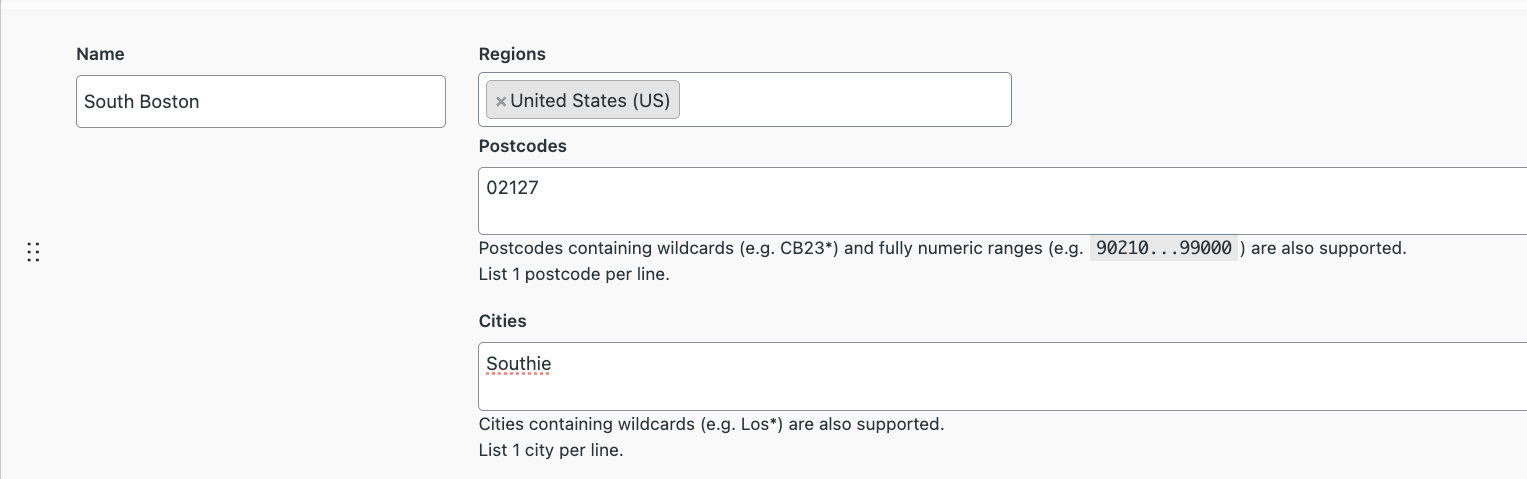
We’ve added a new “City” condition, allowing you to define shipping zones, methods, and rates based on specific cities or towns.
You can now:
More precision means:
Your shipping setup finally reflects how your logistics actually work – not how postcodes are structured. Are you ready to test it in your store?

Extend Flexible Shipping with custom locations and create shipping costs based on weight, order totals or item count.
View DetailsorAdd to cart
Flexible Shipping PRO is designed for stores that need more advanced, condition-based WooCommerce shipping rules – based on cart contents, product types, quantities, and more.
Now, it introduces a feature users have been asking for.
Creating rules that apply only when specific products or classes are in the cart – and nothing else – was difficult.
To achieve this, users had to:
This became especially challenging in stores with large catalogs.
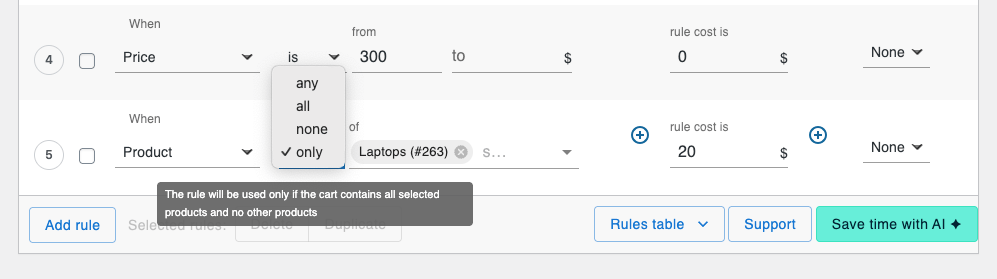
Introducing the new “only” operator.
You can now define rules that apply exclusively when the cart contains:
No exclusions required.
Now you can easily:
Thanks to this feature, you can enjoy:
And it delivers exactly what modern e-commerce needs – flexibility and simplicity in shipping configuration. All of that you can achieve with our plugin.

The best Table Rate Shipping for WooCommerce. Period. Create shipping rules based on weight, order totals, or item count.
View DetailsorAdd to cart
The Delivery Date Picker plugin for WooCommerce lets you give customers the ability to choose their preferred delivery or shipping date directly at checkout.
Now, it also helps you manage what happens next.
When customers select delivery dates, that data is often scattered across orders.
For stores handling multiple daily shipments, this leads to:
In short – more orders, more chaos. We wanted to change that.
We’ve added a new way to manage orders based on their delivery date. From now on, all scheduled delivery dates are displayed in the orders table. Moreover, you can filter orders based on delivery dates.
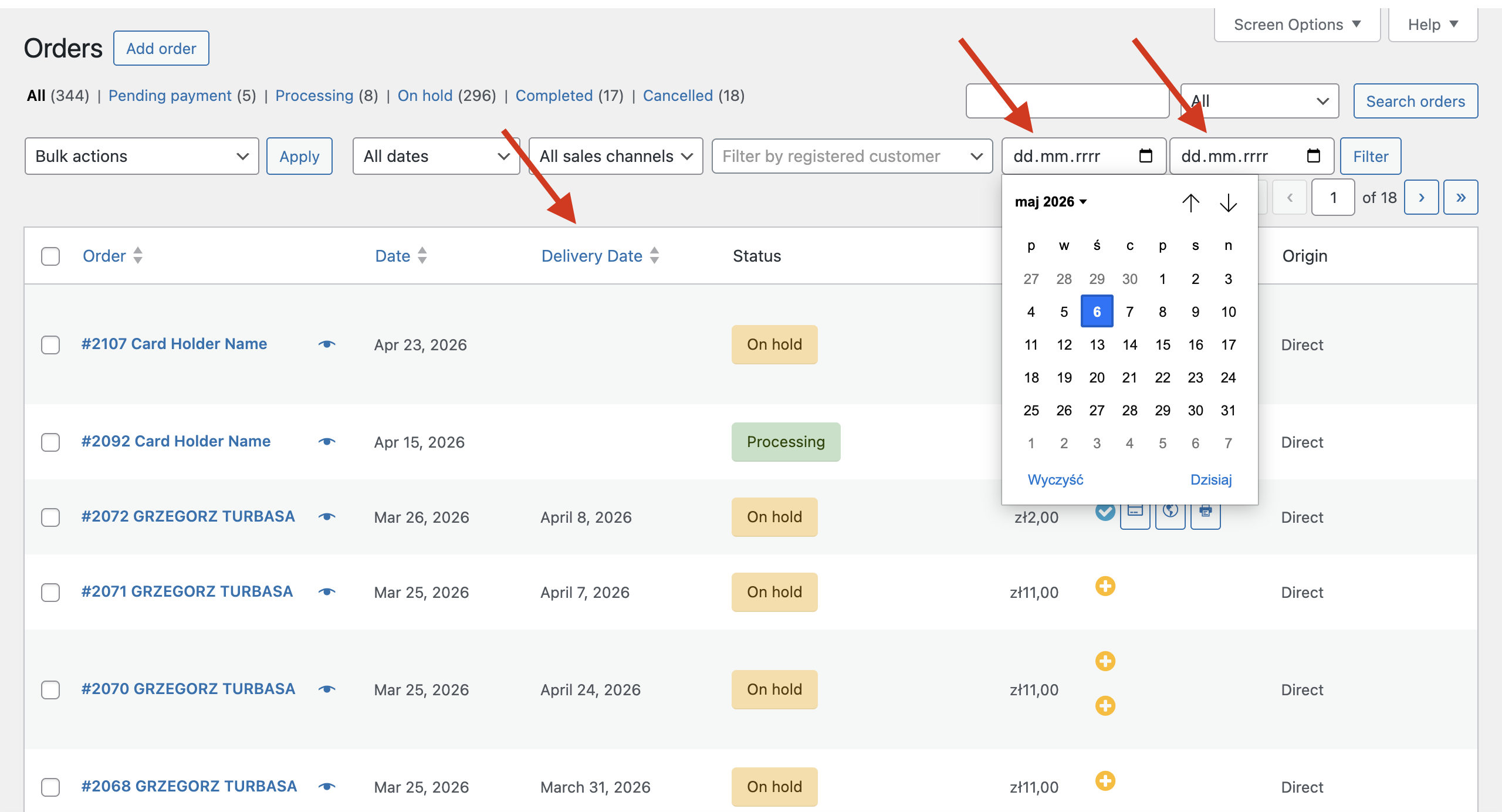
This update gives you a clear overview of scheduled deliveries, helping you quickly identify busy days and then manage orders accordingly in WooCommerce. This makes it much easier to plan packing, staffing, and dispatching.
You can now:
This feature turns delivery date selection from a frontend feature into a powerful operational tool. Try this plugin and improve your checkout experience today!

Let your customers pick a convenient delivery date for the ordered products and make the shipping cost dependent on the chosen date.
View DetailsorAdd to cartThese updates go beyond adding new options – they solve real operational challenges: allow for more precise delivery areas, more powerful rule logic and clearer visibility of scheduled shipments. Together, they give you more control, better automation, and new growth opportunities.
And when combined, they unlock even more value. By using Flexible Shipping PRO for advanced rules, Flexible Shipping Locations for precise targeting, and Delivery Date Picker for scheduling, you can build a fully flexible and scalable shipping system tailored to your store’s needs.
Check how easily you can implement advanced shipping scenarios in your store – try the features today!
Yes. You can combine the City condition with existing postcode-based rules to create more precise shipping logic – e.g. define general rules by postcode and override them for specific cities.
You can use it to:
The rule will not apply. The “only” operator works exclusively – meaning the shipping method is shown only when all products in the cart match the defined condition.

Head of Marketing at Octolize
Natalia Sowa is a marketing expert with over 11 years of experience in developing and scaling marketing strategies, with a strong background in both analytical and creative areas of digital marketing. She has worked across various industries, supporting the growth of innovative tech companies through data-driven campaigns, brand development, and performance-focused initiatives.
At Octolize, she leads the company’s marketing strategy and brand development. Her areas of specialization include SEO, performance marketing, and designing high-impact campaigns, visual assets, and communication that drive real business results. On the blog, she shares actionable insights based on data, hands-on experience, and an in-depth understanding of e-commerce market trends.




See how Octolize helped Dominican Liturgical Center set up pickup points with a Pickup Points plugin for WooCommerce.
See how Flexible Shipping PRO helped WooCommerce store based in the UK set up the domestic rates.
Learn how Octolize helped NGO set up their WooCommerce rates with a usage of Flexible Shipping PRO.
 Pickup Points