
- Home
- WooCommerce
- What plugin are you looking for?
- Shopify
- What Do I Need?
- About us
- Blog
- Docs
- Contact us
- What can we help you with?

WooCommerce plugin gives WordPress owners a fast and cheap way to transition from a pure content management functionality to an e-commerce one. But that ease of transition comes at a known shortcoming; it doesn’t teach you, nor give you the functionality to utilize the full e-commerce potential of the new plugin.
Out of the box, you’ll have two separate “islands”. You have the WordPress “Blog Island” where traffic goes to read, and the WooCommerce “Shop Island” where people go to buy. The gap between the islands, or the so-known “reader-to-buyer chasm,” is a uniquely WordPress/WooCommerce problem.
One tool is designed to build readership, while the other is meant to build revenue. As many as 90% of store owners fail because they either do not acknowledge the discrepancy or refuse to solve it. Using the language of our analogy, they never build a bridge between the two islands.
This article will show you exactly how to connect the two islands into a single, fruitful system. You will learn how to utilize a modern e-commerce content marketing strategy and embed seamless purchasing triggers directly into your content, ensuring visitors don’t just arrive to read an article, but are guided straight to checkout.
Leaving your ‘Shop Island’ isolated isn’t just bad for user experience. In 2026, it is a fatal flaw for your traffic and margins. Here is why the old way of running a static storefront no longer works.
For years, WooCommerce owners did fine with their product pages being nothing more than simple catalogs. They maintained a series of product listings, each with a solid description, and that was enough for sales to kick off and bring in real money.
However, in 2026, the demand and expectations from customers are not that simple. Customers don’t get engaged by simple product catalogs. If the content on your store pages doesn’t support broader educational content (e.g., solving a particular customer problem, showcasing product usage, etc.), then you are essentially invisible to modern customers.
Your isolated “shop island” must be discovered through content. The kind of content and content capabilities that exist on your other, the “blog island”.
This problem is much deeper than most WooCommerce beginners think. Here is why:
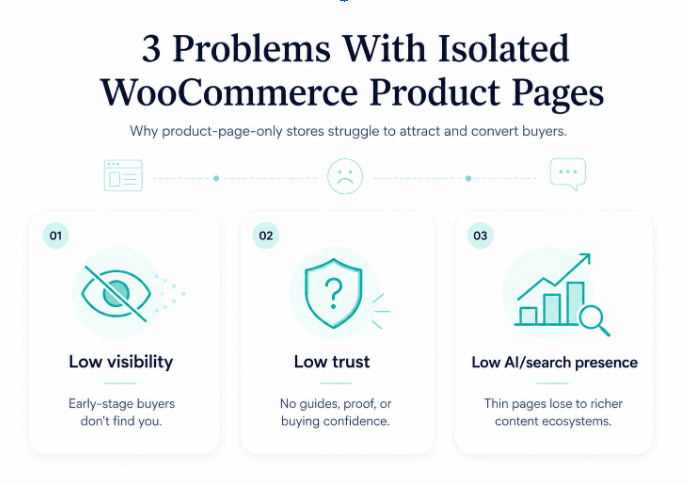
In 2026, search engines still search for keywords, but they are no longer the main ranking factor. No matter how many relevant keywords your isolated pages contain, they cannot outcompete the pages of your rivals backed up by complete topical authority.
To rank your commercial product categories, your WooCommerce store must prove it possesses deep industry expertise. And not on your pages alone, but on social media, news portals, blog posts and articles, industry catalogs and review sites, to name a few.
Topical ownership is the new SEO currency. The quantity of publications matters, but quality and relevance play a far greater role. Also, ownership stipulates regularity of publication and frequent content updates, e.g., updating dates, statistics, or conclusions.
Publishing and updating great content is only half the battle. To secure stable search engine rankings, you need to build authoritative contextual backlinks that pass powerful link equity straight to your WooCommerce category pages. Without backlinks, blogs and articles look like a waste of effort and resources.
Pro tip: Aim to place content with relevant backlinks on high-authority websites where your target audience already exists. For instance, if you’re selling sunscreens and other skincare products, pick targets for your outreach among fitness and supplement publications, travel resources, relevant skincare and beauty stores, or forums where women discuss their summer vacations and cosmetics.
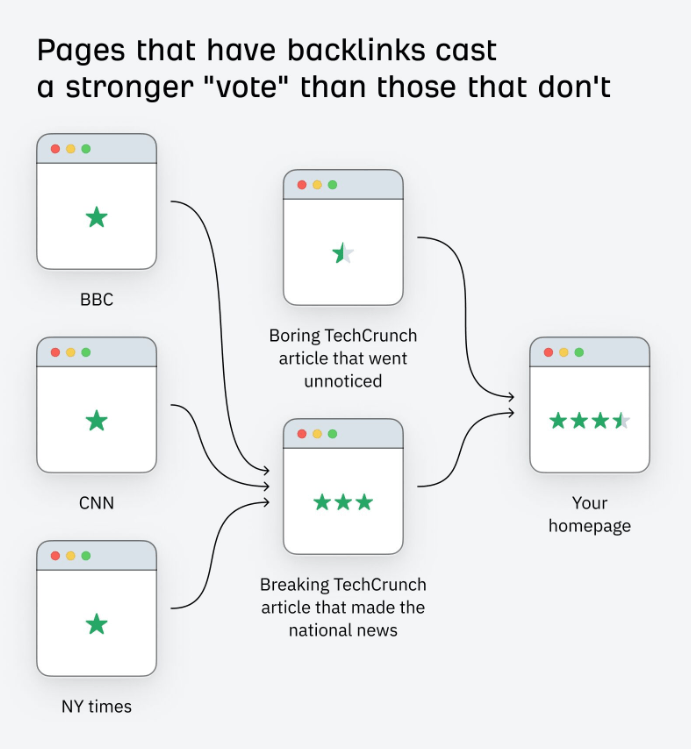
Source: Ahrefs
Let’s now move on from theory and general recommendations to the practical, down-to-Earth principles of WooCommerce conversion rate optimization that you can implement today to bridge the chasm between your blog and your shop. These strategies will help you optimize your entire digital marketing funnel, transforming visitors from passive readers into active buyers.
Remember, we mentioned how content should solve concrete customer problems? To win the modern customer, your commercial offer must be useful to them.
Problem-solving hubs are nothing more than long-form guides designed to address highly specific customer pain points. You need to picture a typical situation where customers experience problems and challenges, and provide a reasonable way out.
At this stage, focus only on expertly curated content. If you’re unsure whether your content is going to hit the target, find a relevant expert who specializes in each problem and ask them to proofread and edit your guide.
For example. If you run an outdoor gear store, don’t just write a post titled “How to make a fire if you have no matches”. Create a detailed step-by-step instruction. Inside the section discussing the type of knife (with steel grade) needed for making fire, embed a WooCommerce Handpicked Products Block featuring your top-selling bushcraft knife model. The reader clicks “Add to Cart” directly from the paragraph and continues reading, reinforcing the rightness of their choice.
To sum up, here are the concrete steps you need to take:
While our first strategy focused on bringing the checkout cart functionality into your blog posts, the current e-commerce content marketing strategy does the opposite. It brings high-quality content into your product pages.
Once you plug in WooCommerce, its standard product pages out of the box won’t impress (you and your customers). In their default version, these are barren, transactional fields – just a title with a short product description/technical specifications and basic add to cart functionality.
In 2026, this minimalistic approach will cost you many buyers. Instead of completing their journey, they’d often leave to read additional information somewhere else. That’s typical; buyers hesitate at the very final moment. If you don’t support their choice with relevant content, you’ll likely lose many of them.
You need to embed informational resources directly into the product layout. The goal is to surround your product pages with the kind of content that will reassure buyers they won’t regret their purchase.
For example. If you run an online cosmetics store selling high-end face serums, don’t just list the ingredients and price. Turn the product page into a mini-hub by embedding a step-by-step morning skincare routine video, an expandable FAQ section addressing specific skin types (e.g., oily vs. dry), and an interactive product choice tab, offering specific serums based on skin types, time of application (day vs. night), and seasonality (summer vs. winter).
To execute this WooCommerce marketing strategy on your site, follow these steps:
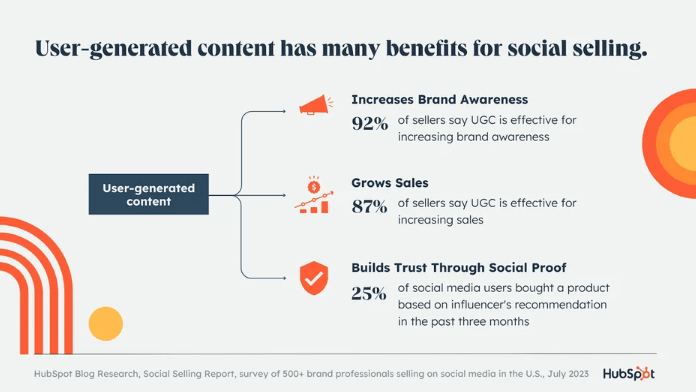
Source: Hubspot
In 2026, e-commerce trends are like meteorites. They appear suddenly, and you only have a few seconds to make a wish. This is an aggregation, of course, but modern trends, ignited by social media, are really very sudden and fast.
Traditional, corporate SEO is of little help here, as it takes months to rank a page, causing massive stores to miss these sudden, fleeting traffic spikes. As a WooCommerce site owner, your advantage is speed of response, since all the functionality to capture and monetize trends is already in place.
The “viral velocity” blueprint is a rapid-response content distribution strategy about deploying fast blog content to address sudden e-commerce trend spikes. Before enterprise SEO teams can even organize a meeting to discuss their response, your WooCommerce store will actively capture dominant top-of-funnel visibility and convert the meteorite-like trends into revenue.
For example. You run an e-commerce store selling everyday carry items, and a specific minimalist backpack suddenly goes viral on social media. First of all, don’t panic if you don’t stock that exact backpack model (or close to it in characteristics).
Immediately deploy a review guide titled “The Ultimate [Viral Brand] Alternative: Why This Pack Wins.” Inside the guide, you position backlinks leading straight to your store’s page with a relevant backpack, plus suggested items that a person can put there.
That said, your winning algorithm of actions to be ready to deploy this strategy includes:
Your brand-new WooCommerce store carries hundreds of SKUs. And when you want to scale, writing so many individual blog posts will simply slow you down for months.
Programmatic SEO is the right tool in this case. It’s a data-driven SEO methodology that uses templates to produce hundreds and thousands of high-quality landing pages and other content that is fine-tuned for visibility.
But here is an undeniable advantage that comes with WordPress; you can leverage your existing WordPress database, custom fields, and WooCommerce attributes (like brand, size, color, or material) to populate dynamic content templates. This acts as a massive shortcut for shopping intent optimization, enabling you to automatically capture thousands of low-competition long-tail search queries (popular among hyper-targeted buyers).
To implement this approach, follow these steps:
The secret to WooCommerce store efficiency lies in bridging the chasm between the content “island” created by WordPress and the shop “island” created by the WooCommerce plugin itself. And while there are infinite creative paths you can take, executing these core methodologies is exactly how high-performing stores systematically capture market share in 2026:
Ultimately, mastering how to increase sales in WooCommerce with content marketing is an ongoing process of refinement. Once you begin doing it, small, incremental changes will reveal themselves. All you need is the will and curiosity to never stop learning and implementing what works best for your specific store.
To future-proof your WooCommerce undertaking, focus on optimizing content for AI systems. Generative engines, such as ChatGPT, Claude, or Google AI Overviews, value well-structured content, ready for extraction and reuse. They also look for entity-based information – the one where you give clear product and brand names, and define concepts and ideas in simple terms.

This guest article was written by Jessica Harris, who is an experienced Partnerships Manager at Adsy, where she excels in building strategic collaborations with publishers, link builders, and businesses. With a background in digital marketing, she’s passionate about exploring the evolving landscape of online marketing and brand partnerships.




Learn how Octolize helped Kurzgesagt, the online shop behind one of YouTube’s most popular science channels, set up conditional courier rules using the Shopify Shipping Rates Rules & Zones app.
Learn how Octolize solutions helped WooCommerce store based in the United Kingdom set up shipping scenarios.
Learn how Octolize helped Shopify store based in the USA set up distance based rates with a usage of Octolize Distance Based Rates.
 Pickup Points