
- Home
- WooCommerce
- What plugin are you looking for?
- Shopify
- What Do I Need?
- About us
- Blog
- Docs
- Contact us
- What can we help you with?

Flat rate shipping is one of the most commonly used shipping methods in WooCommerce. It allows store owners to charge a fixed delivery cost for an order, regardless of its value, weight, or contents, which makes it easy to set up and easy for customers to understand. In this article, you’ll learn how flat rate shipping works in WooCommerce and what its main advantages and disadvantages are from a business perspective.
Flat rate shipping in WooCommerce is a delivery method where you charge a predefined, fixed cost for shipping an order. This cost is set by you in the WooCommerce settings and is applied in a very predictable way. Once the flat rate is configured, the same shipping price is shown to the customer every time the conditions of the shipping zone are met.
This simplicity is exactly why many WooCommerce store owners start with flat rate shipping. It’s easy to understand, easy to explain to customers, and quick to configure. At the same time, it’s important to remember that this method treats all qualifying orders in the same way, which can become a limitation as your catalog, order values, or delivery distances start to vary.
WooCommerce flat rate shipping is always configured inside a shipping zone, so before you can use it, you need at least one zone in your store. A shipping zone is simply a geographic area where the same shipping rules apply. It can cover a country, a group of countries, a region, or even a single city or postcode range. When a customer enters their shipping address, WooCommerce checks which zone it belongs to and then displays the shipping methods assigned to that zone.
To add flat rate shipping, go to WooCommerce → Settings → Shipping → Shipping zones, edit an existing zone or create a new one.
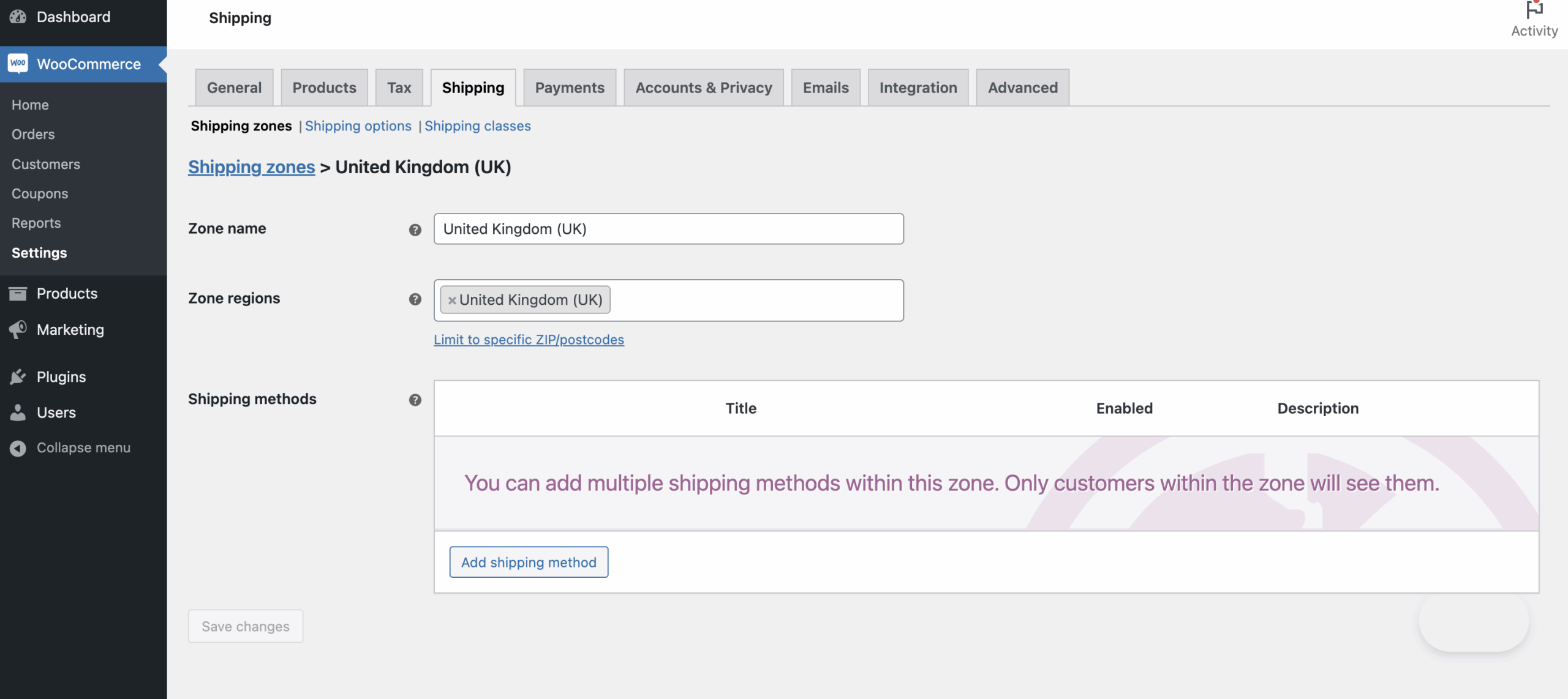
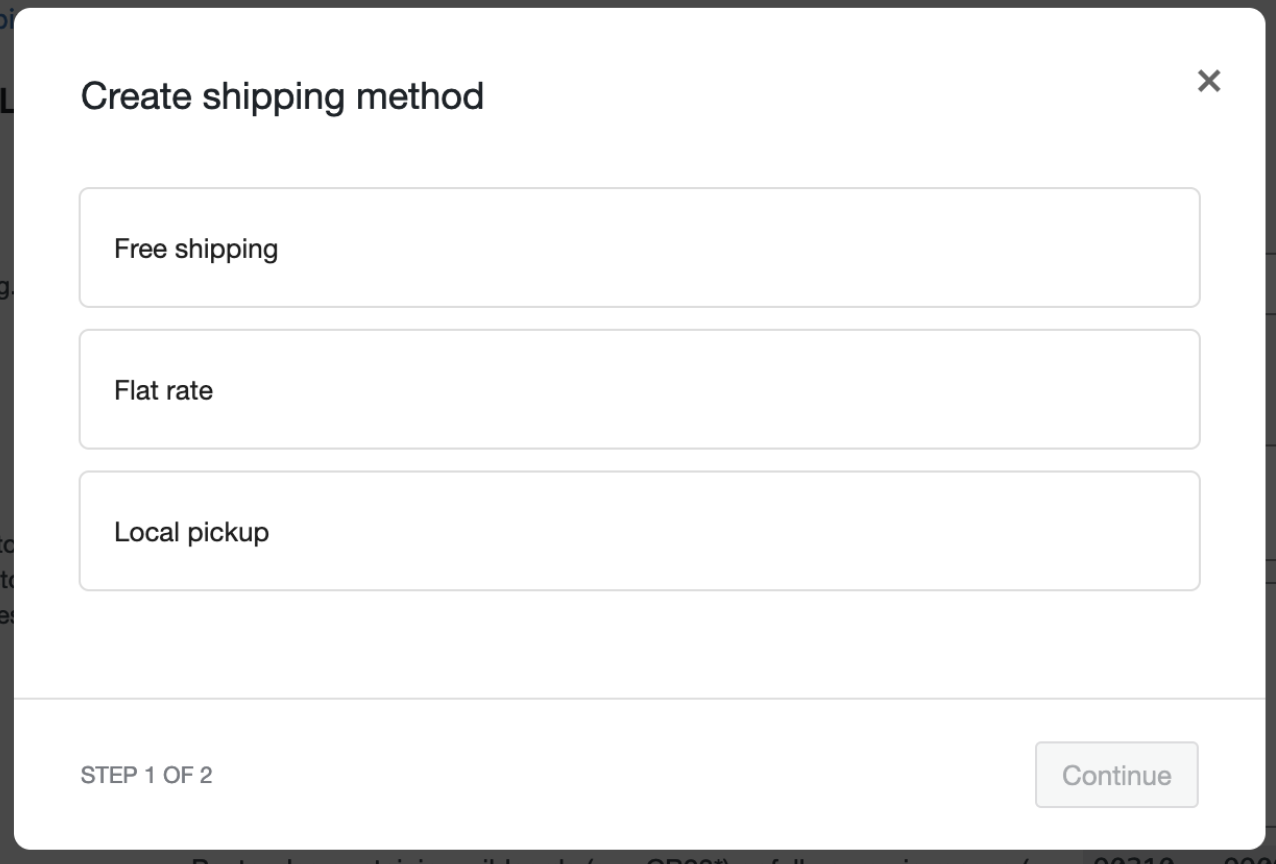
Next, click on the Add shipping method button and choose Flat rate.
Inside the flat rate settings, you’ll see a few core options. The Method title is the name shown to customers at checkout, such as “Courier delivery” or “Standard shipping”. The Tax status defines whether shipping is taxable or not, depending on how taxes work in your store. The most important field is Cost, where you enter the flat rate amount that will be applied to the order. If you enter a simple number, for example 10, that amount will be charged for every order that qualifies for this zone.
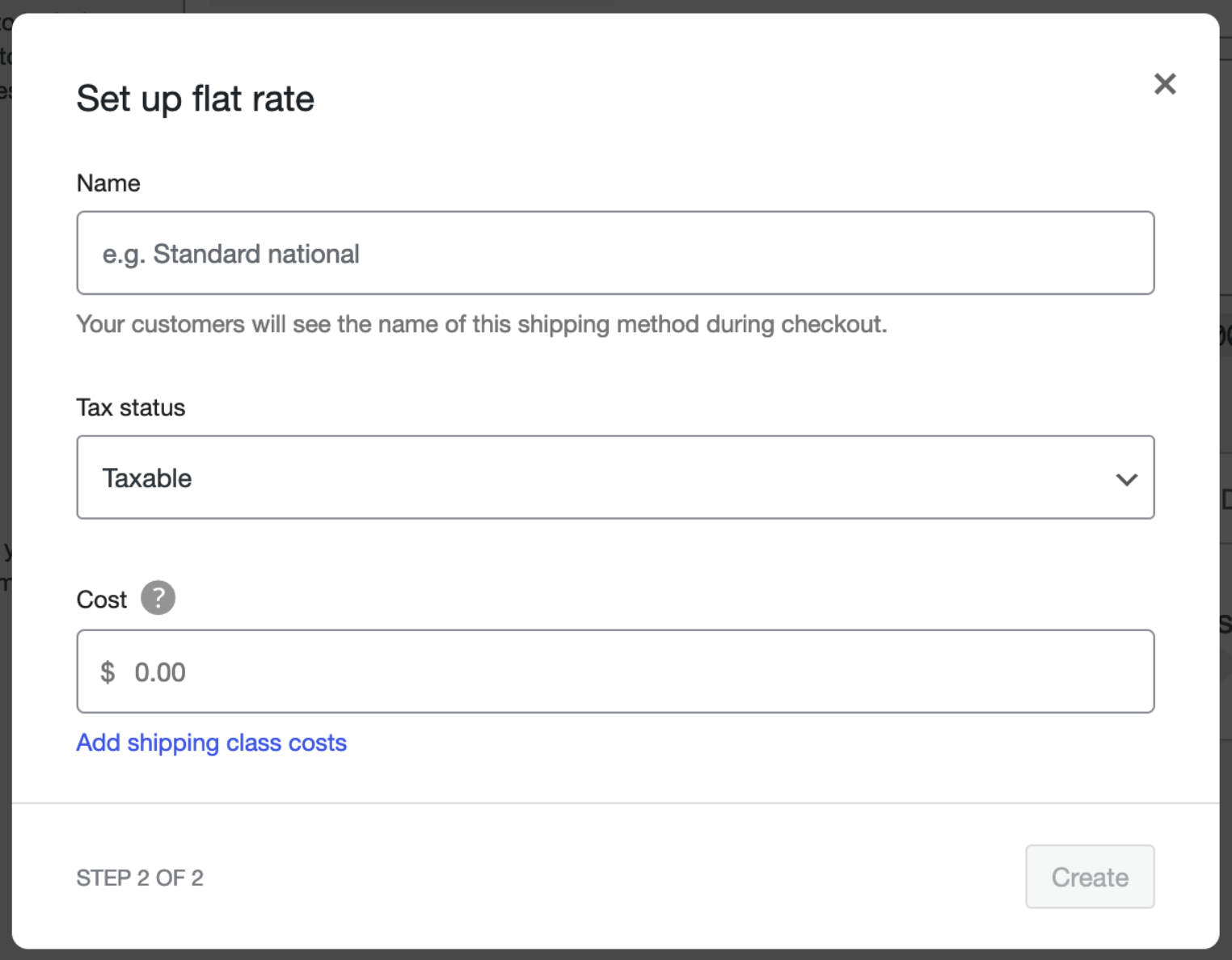
This setup allows for the simplest use case: one flat shipping cost for all orders within a given zone. No matter how many products the customer buys or what their cart value is, the shipping price stays the same.
Flat rate shipping becomes slightly more flexible when you use shipping classes. A shipping class is a label you assign to products, usually to group items with similar delivery requirements, such as bulky, heavy, or fragile products. In the flat rate settings, you can add an extra cost for each shipping class.
For example, you might set a base flat rate of £10 for all orders, and then add an additional £15 cost for products assigned to a “Bulky items” shipping class. If a customer orders a bulky product, WooCommerce will add that extra class cost to the base flat rate. This allows you to charge higher shipping fees for specific product types without creating separate shipping methods.
One of the biggest advantages of flat rate shipping in WooCommerce is how easy it is to configure. You can add a flat rate method in a shipping zone, enter a cost, and start offering delivery in just a few minutes. For many store owners, especially when launching a new store, this removes the need to calculate exact shipping costs for every possible order scenario.
Flat rate shipping is also low maintenance. Once it’s set up, there’s very little to manage on a day-to-day basis. You don’t need to update rates when product prices change or when customers add more items to the cart. As long as your average shipping cost stays relatively stable, the same flat rate can be used for a long time without adjustments.
Another benefit is predictable margins. Because you control the shipping cost, you can factor average courier fees into your pricing strategy. For example, if most domestic orders cost around £8 to ship, you might set a £10 flat rate to cover delivery and packaging. Even if some orders cost slightly more and others less, the overall balance stays predictable and easier to plan for.
Flat rate shipping is also easy to explain to customers. At checkout, they see one clear delivery option with a fixed price, such as “Standard courier delivery – £10”. There’s no confusion about why shipping costs change between orders or why adding one more product suddenly increases the fee. This clarity helps customers make faster decisions and reduces questions about delivery costs before completing a purchase.
While flat rate shipping is simple, its biggest drawback is that it treats many very different orders exactly the same way. The shipping cost does not change based on cart value, number of products, or total weight. A customer ordering a single lightweight item pays the same delivery fee as someone ordering several heavy products. From a business perspective, this often leads to overcharging smaller orders or undercharging larger ones, which can directly affect conversion rates or profit margins.
Flat rate shipping in WooCommerce also lacks price-based and weight-based logic. You cannot say, for example, that orders over £100 should have cheaper delivery, or that heavier carts should cost more to ship. To work around this, store owners often add multiple flat rate methods or manually adjust prices, which quickly becomes inefficient and harder to manage as the store grows.
As your product range expands, these limitations become more noticeable. A growing catalog usually means more variation in order size, weight, and delivery distance. Flat rate shipping struggles to scale with that complexity, and the result is often a compromise between simplicity and accuracy. In many cases, this leads to lost conversions from customers who feel delivery is too expensive, or reduced margins from orders that cost more to ship than the flat rate covers.
The most commonly used alternative to flat rate shipping is table rate shipping. They are both common ways to charge for delivery in WooCommerce, but they work very differently. Flat rate shipping applies one fixed cost per order, per shipping class, or per zone, as we’ve discussed earlier. It’s simple, predictable, and easy to manage, but it doesn’t adapt to variations in weight, order value, quantity, or specific locations.
Table rate shipping, on the other hand, allows you to define conditional rules that adjust shipping costs based on factors like order weight, total price, item quantity, or even the customer’s city or postcode. For example, you could charge £10 for orders under £50, £15 for orders between £50 and £100, and £20 for orders over £100. You could also add surcharges for heavy or bulky products or create special rules for certain locations.
In practice, flat rate shipping stops being enough when your orders vary widely in size, weight, or destination. Stores with small, consistent catalogs may find flat rates ideal, but as soon as you start shipping larger, heavier, or more geographically spread orders, table rate shipping becomes a better solution.
Here’s a quick comparison of the two methods from a store owner perspective:
| Feature / Benefit | Flat Rate Shipping | Table Rate Shipping |
|---|---|---|
| Setup simplicity | Very simple: one cost per zone or class | Slightly more complex: need rules per condition |
| Maintenance | Low: set once and rarely change | Medium: rules may need updates as catalog or prices change |
| Predictability for customers | Medium: same cost for all orders | High: depends on rules, but can be clear if explained |
| Adapts to cart value, weight, quantity | No | Yes: fully customizable |
| Location-based control | Limited (per zone only) | Advanced: can define city, postcode, or region-specific rules |
| Best use case | Small catalogs, consistent product sizes | Growing stores, variable products, multi-location shipping |
This table helps store owners quickly see when flat rate works and when table rate shipping is worth using.
While flat rate shipping works well for small stores with consistent products, many store owners find its limitations start to show as their business grows. Default WooCommerce flat rate is simple and predictable, but it doesn’t adapt to the complexity of real-world shipping. Stores with diverse product sizes, varying weights, or customers spread across different cities may find that one fixed price can’t cover actual courier costs. Multiple flat rate methods or zones can partially solve this, but they become hard to manage and can confuse customers at checkout.
To configure a more complex purchasing scenario in WooCommerce, you will need an additional solution – the WooCommerce shipping plugin.
When configuring shipping, it is worth using proven solutions. Certainly, one of them is one of the top free WooCommerce shipping plugins, used by over 100,000 stores worldwide. Flexible Shipping adds table rate logic to WooCommerce without requiring any coding. With it, you can create rules that adjust shipping costs based on cart conditions such as weight, and cart total.

The best Table Rate Shipping for WooCommerce. Period. Create shipping rules based on weight, order totals, or item count.
Go to WordPress.orgorDownload for freeFor example, you could charge £10 for standard lightweight orders, add £15 for bulky items, and offer lower rates for local deliveries, all within one shipping zone and one method. This approach can give you much more control while keeping the setup manageable.
Flat rate shipping WooCommerce is a method where you set a fixed delivery cost for an order, per shipping class, or per shipping zone. The cost does not change based on cart value, weight, or quantity, making it simple to configure and easy for customers to understand.
Flat rate shipping WooCommerce is ideal for stores with small catalogs or consistent product sizes. It provides predictable costs, low maintenance, and clear shipping prices, which improves the checkout experience for customers.
The main limitations of flat rate shipping WooCommerce are that it doesn’t adjust for order weight, subtotal, quantity, or specific locations within a shipping zone. This can lead to overcharging or undercharging and may reduce profit margins or conversions as your store grows.
Flat rate shipping WooCommerce applies a single, fixed shipping cost per order or class. Table rate shipping, on the other hand, allows conditional rules based on cart weight, price, quantity, or customer location, making it more flexible for stores with variable shipping needs.
If flat rate shipping WooCommerce is too limiting, consider using a plugin like Flexible Shipping to add table rate logic. This allows you to create rules based on weight, subtotal, quantity, or location, providing more accurate shipping costs while keeping the setup manageable.
Flat rate shipping in WooCommerce is a simple method where a fixed delivery cost is applied per order, per shipping class, or per shipping zone. It works well for small stores with consistent product sizes and weights, providing predictable costs, easy setup, and clear pricing for customers. However, as orders vary in size, weight, or destination, flat rate can become limiting, leading to overcharging, undercharging, or lost conversions.

Content Writer at Octolize
Bartosz Gajewski is a content and marketing specialist with a solid background in SEO, WordPress content strategy, and technical documentation for digital products. With years of hands-on experience in both in-house and freelance roles, he supports tech companies – especially in the SaaS and e-commerce space – by creating content that informs, engages, and drives results.
His approach blends storytelling with data-driven SEO, and he’s been involved in projects ranging from rebranding and product marketing to growth experiments and copywriting for complex software tools. On the blog, he shares actionable insights from his work across marketing teams, product documentation, and online store optimization.




Learn how Octolize helped Kurzgesagt, the online shop behind one of YouTube’s most popular science channels, set up conditional courier rules using the Shopify Shipping Rates Rules & Zones app.

Learn how Octolize solutions helped WooCommerce store based in the United Kingdom set up shipping scenarios.
Learn how Octolize helped Shopify store based in the USA set up distance based rates with a usage of Octolize Distance Based Rates.
 Pickup Points