
- Home
- WooCommerce
- What plugin are you looking for?
- Shopify
- Find my product
- About us
- Blog
- Docs
- Contact us
- What can we help you with?

A shopper adds a few items to their cart, goes to the checkout page, and then just disappears. N0 purchases made, no explanations, no nothing. This is something that happens in so many marketplaces. According to the Baymard Institute’s meta-analysis of over 50 studies, the average online cart abandonment rate is roughly 70%, meaning about 7 people leave without buying anything each time. There is also an interesting gap between mobile shoppers and desktop users, almost 10 percentage points. The most obvious and popular reason people mention is the unexpected final cost at checkout; this can be shipping prices, taxes, and other fees that they didn’t expect.

What’s interesting here is that sometimes it’s not really about money; it’s about the uncertainty. You can add something to the cart because you felt like it’s a promising product, and then you start to guess whether that’s actually the right product for you. Rather than researching the product and finding whether it suits you or not, you most probably would just close the tab.
Another reason for cart abandonment is the distractions that come especially on mobile devices. Unlike desktop users, mobile shoppers usually multitask; as they switch between apps, they text and do other things. Their shopping experience can be interrupted by basically just getting a single notification, or a warning that their battery is running low; even a slow-loading page can make them leave the page without buying anything. \
This is where a product recommendation quiz becomes very useful: by quickly guiding users to the right product in just a few steps, it reduces the time and effort needed to make a decision, making it more likely that the customers stay focused and complete the purchase before distractions pull them away. This tool mainly does 2 things at once: it helps shoppers pick the right product the first time, and it gives you a reason to reach out to them again later through the quiz result.
Quiz Maker by AYS is one of the most useful tools in the sphere. It’s one of the most popular WordPress plugins that helps you build interactive quizzes and can connect directly with WooCommerce to turn the quiz answers into personalized product suggestions.
What Is a Product Recommendation Quiz?
A Product Recommendation Quiz is a short set of questions that leads a shopper to the product that fits them the best, instead of making them scroll through the entire store page. Let’s think of skincare brands that ask you about your skin type before suggesting a specific routine, or maybe a wine shop where they ask you about your taste before picking a bottle. This idea works for almost any kind of business and product. And this is exactly what a person who doesn’t want to waste time would like to experience: get a personalized and specific result, instead of scrolling through long lists.
This works well for several reasons. Firstly and mainly, a quiz feels very personal; even when it’s just a few simple questions, it makes a person feel like the answer was made just for them. It also makes choosing easier, fun, and a more active kind of experience. There is also the trust factor in here. A quiz doesn’t really feel like a story trying to sell you something desperately; it’s more like getting advice from someone who pays attention specifically to your needs.
Let’s take the example of an online skincare store
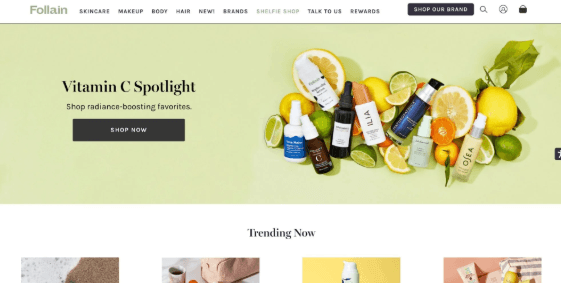
A customer wants to buy a face sunscreen, but the store offers 15+ different options. The customer doesn’t know which one is right for their skin, so they randomly add one to their cart, but midway they start wondering if they chose the right thing or not. In the second case scenario, the second online skincare store offers this short quiz asking the customer about their skin type, main skin concerns, their preferred texture, or even the budget they consider. After answering these questions, the customer gets a personalized recommendation for one or two products.
According to RevenueHunt’s benchmark data, a company that uses quizzes shows that shoppers who finish a product recommendation quiz end up buying almost 3 times more often, compared to a regular visitor. Quizzes like this also tend to get finished more often than regular sign-up forms. People usually prefer to complete something when they know they’ll get a personal result at the end, instead of just handing over their email for nothing in return. If you want to see what the quiz looks like in action, try a live example here.

For a WooCommerce store, this tool will give you 4 real benefits:
1) More first-visit sales, as shoppers go straight to the right product
2) Fewer abandoned carts
3) A wider email list (as the quiz maker by AYS lets you the chance the collect and have user data)
4) Fewer support questions, since the quiz already taught the shopper what they need to know about the product.
There are a few things to keep in mind when creating your quiz.
Getting these basics right is the difference between a quiz that feels like a fun shortcut and one that feels like just another mandatory form to fill out.
One of the tools you can use to create quizzes like this is one of the most popular WordPress plugins – Quiz Maker by AYS. This tool allows website owners to create unlimited quizzes and questions, with 5+ question types (multiple choice, dropdown, text, true/false, and more), image and video support, question and answer randomization, hint options, content copy-protection, and email automation that can send a shopper their personalized result and do many other things.
And lastly, the tool lets you integrate with Mailchimp, Google Sheets, and many other platforms. Before creating the quiz, you need two things active on your WordPress site: the WooCommerce plugin and the Quiz Maker by AYS plugin. Once both are installed and activated, you’ll see the Quiz Maker icon appear in your WordPress dashboard, along with its own menu.
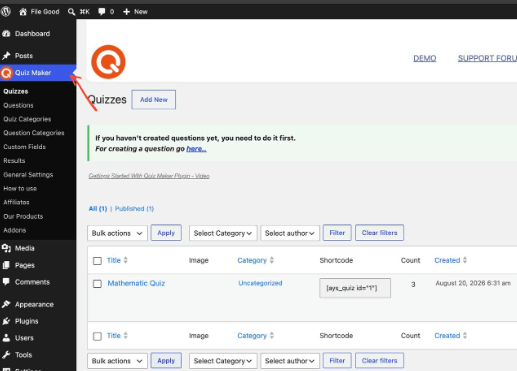
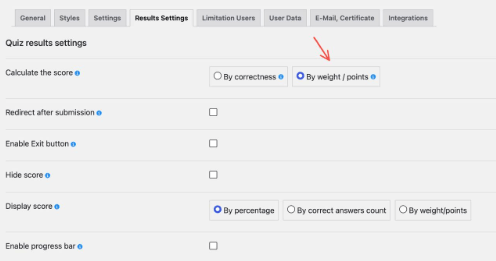
Once both plugins are active, the next step is what actually makes this a product recommendation quiz instead of just a regular one. Inside Quiz Maker’s Result Settings, you can set up scoring “by points” and create intervals, basically point ranges tied to specific outcomes. Each answer a shopper picks adds to their total score, and depending on where that score lands, they’re shown the WooCommerce product attached to that range. So instead of getting a generic “here’s a sunscreen you might like,” the shopper who said they have oily skin, want a matte finish, and picked a mid-range budget, gets pointed straight to the one product in your catalog built for exactly that combination. And this is exactly how you turn the whole stressful sales experience into something fun and engaging.
Every quiz submission is also a small piece of data. Under the ” User Data” section, you can choose what information to collect and store; this means that the email list stops being just a list and starts becoming something you can actually segment – by skin type, budget, style, or whatever kind of questions you covered in the quiz. This matters a lot because personalized follow-ups usually perform better than general ones. Instead of sending the same reminders and offers to the whole list, you can send them only to the customers who mentioned they have oily skin and a tight budget. For a more detailed breakdown of the setup process, you can check out this guide.
Frequently Asked Questions (FAQs)
1) Does this only work for skincare stores? – No, you can use a product recommendation quiz for almost any kind of business, that can be home goods, clothes, wines, and basically anything.
2) Do I need to have coding skills to do all of these ? – No, you don’t need any kind of coding skills to be able to set up the whole process. Quiz maker by AYS is there to help you design the quizzes without doing any development work․
3) Can I offer more than one product as a result? – You of course can do that; you can redirect shoppers to a results page showing more than 1 matching option.
At the end of the day, most of the online marketers try to fix cart abandonment by chasing the shopper after they’ve already left; they do this by sending emails afterwards and offering appealing deals. A product recommendation quiz changes this; it meets them before they’ve made their mind, like when they’re still open to being “guided”, instead of doing it when they’re already leaving. This is a small shift, but this actually does a lot. The quiz maker by AYS really makes this shift and change very easy to set up, without needing a developer or a big budget. As online shopping continues to grow, tools like this will become an increasingly important part of creating better, smoother, and more personalized shopping experiences.
Sources:





Learn how Octolize helped Kurzgesagt, the online shop behind one of YouTube’s most popular science channels, set up conditional courier rules using the Shopify Shipping Rates Rules & Zones app.
Learn how Octolize solutions helped WooCommerce store based in the United Kingdom set up shipping scenarios.
Learn how Octolize helped Shopify store based in the USA set up distance based rates with a usage of Octolize Distance Based Rates.
 Pickup Points
Nice breakdown. In my view a quiz only reduces cart abandonment if the result page answers the last doubt quickly: showing the recommended product in use, not just a static photo, tends to help. For stores that lack product footage, AI tools such as Nereo (https://www.nereo.io/) can turn existing product images into short clips for those result pages.