
- Home
- WooCommerce
- What plugin are you looking for?
- Shopify
- Find my product
- About us
- Blog
- Docs
- Contact us
- What can we help you with?

Shipping questions often come up while you are configuring a plugin or fine-tuning a shipping method. The latest updates bring an AI-powered help chat directly into the WooCommerce settings of Flexible Shipping, USPS Live Rates, and FedEx Live Rates, so you can get contextual guidance without leaving the screen you are working on.
The chat is included in:
Open the chat from the plugin settings or an individual shipping method and ask about configuration, available options, or a problem you are troubleshooting. The assistant receives context about the relevant plugin and current settings, helping it focus on the part of the setup you are working with. In the USPS and FedEx plugins, sensitive API credentials are masked before the settings context is prepared.

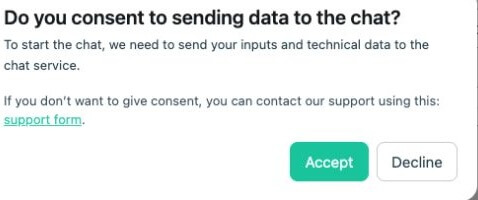
Before the conversation starts, the plugin asks for your consent to send your inputs and technical data to the chat service. If you prefer not to use the chat, the existing support option remains available.
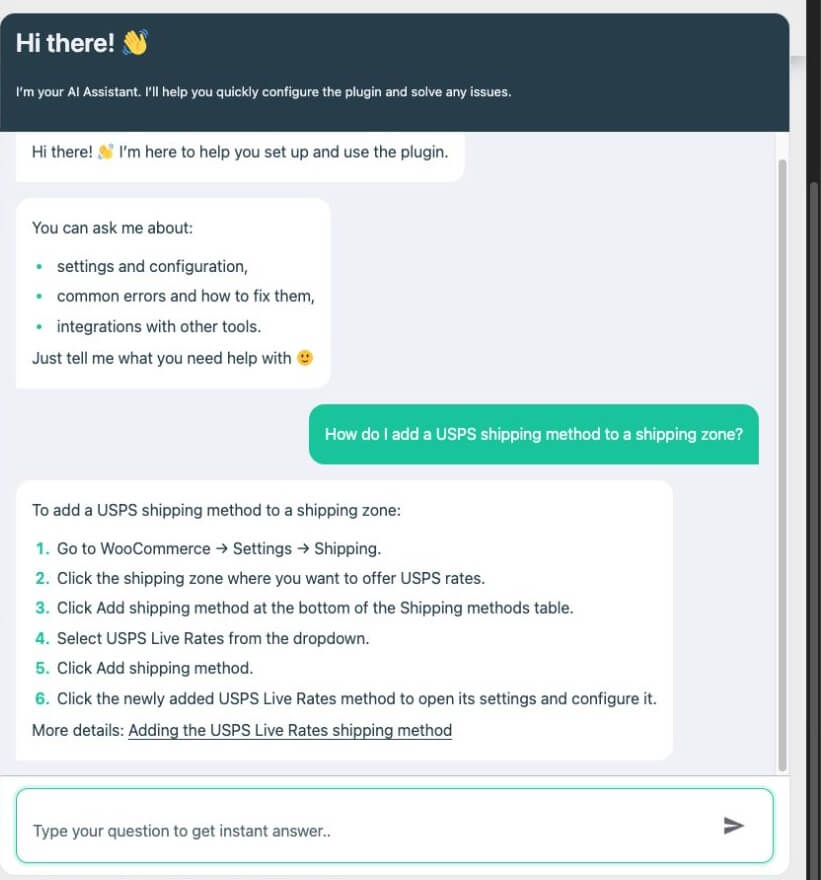
When you need human help, the chat can also create a support request. Our support team will then take over the case and help resolve it.
Update the plugins you use to the versions listed above. Then go to WooCommerce → Settings → Shipping, open the relevant plugin settings or shipping method, and select Open chat. Review the consent notice and ask your question.
Update your Octolize shipping plugins and get help right where you configure them.

Lucyna Polok is an SEO and content specialist passionate about crafting effective strategies and creating engaging content. She has worked across a variety of industries, both in-house and as a freelancer. A strong believer in the power of storytelling, she believes that good content not only delivers business results, but also resonates with customers through an emotional connection with a brand.
At Octolize, she is responsible for aligning the content strategy with business goals and increasing visibility, trust, and authority of the brand via data-based SEO efforts. On the blog, she focuses mostly on topics for those only beginning their adventure with e-commerce, explaining scenarios and terms in an approachable way.
Learn how Octolize helped Kurzgesagt, the online shop behind one of YouTube’s most popular science channels, set up conditional courier rules using the Shopify Shipping Rates Rules & Zones app.

Learn how Octolize solutions helped WooCommerce store based in the United Kingdom set up shipping scenarios.
Learn how Octolize helped Shopify store based in the USA set up distance based rates with a usage of Octolize Distance Based Rates.
 Pickup Points