🚀 ¿Listo para optimizar los envíos de tu WooCommerce y Shopify? Consigue acceso anticipado GRATIS a un nuevo producto →
New Fs Pro Ai Cover

Table Rate Shipping para WooCommerce - Flexible Shipping PRO

Ikony Table Rates
El mejor y más potente plugin de tarifas de envío por tabla (Table Rate) para WooCommerce. Define las reglas de envío basándote en múltiples condiciones y configura con facilidad incluso los escenarios más complejos.
  • Soporte tĂ©cnico premium 1 a 1
  • Configuraciones listas para usar
  • Actualizaciones periĂłdicas, correcciĂłn de errores y funciones nuevas
  • GarantĂ­a de reembolso de 30 dĂ­as
  • Ăšltima versiĂłn: 4.0.19
  • Ăšltima actualizaciĂłn: 2026-06-01
  • Descargas: 299,128

Beneficios clave de Flexible Shipping PRO para WooCommerce

Descubre todas las funcionalidades del plugin, explora la amplia gama de características que ofrece y conoce de qué es capaz.
Icon Weight

19 condiciones de cálculo de costes

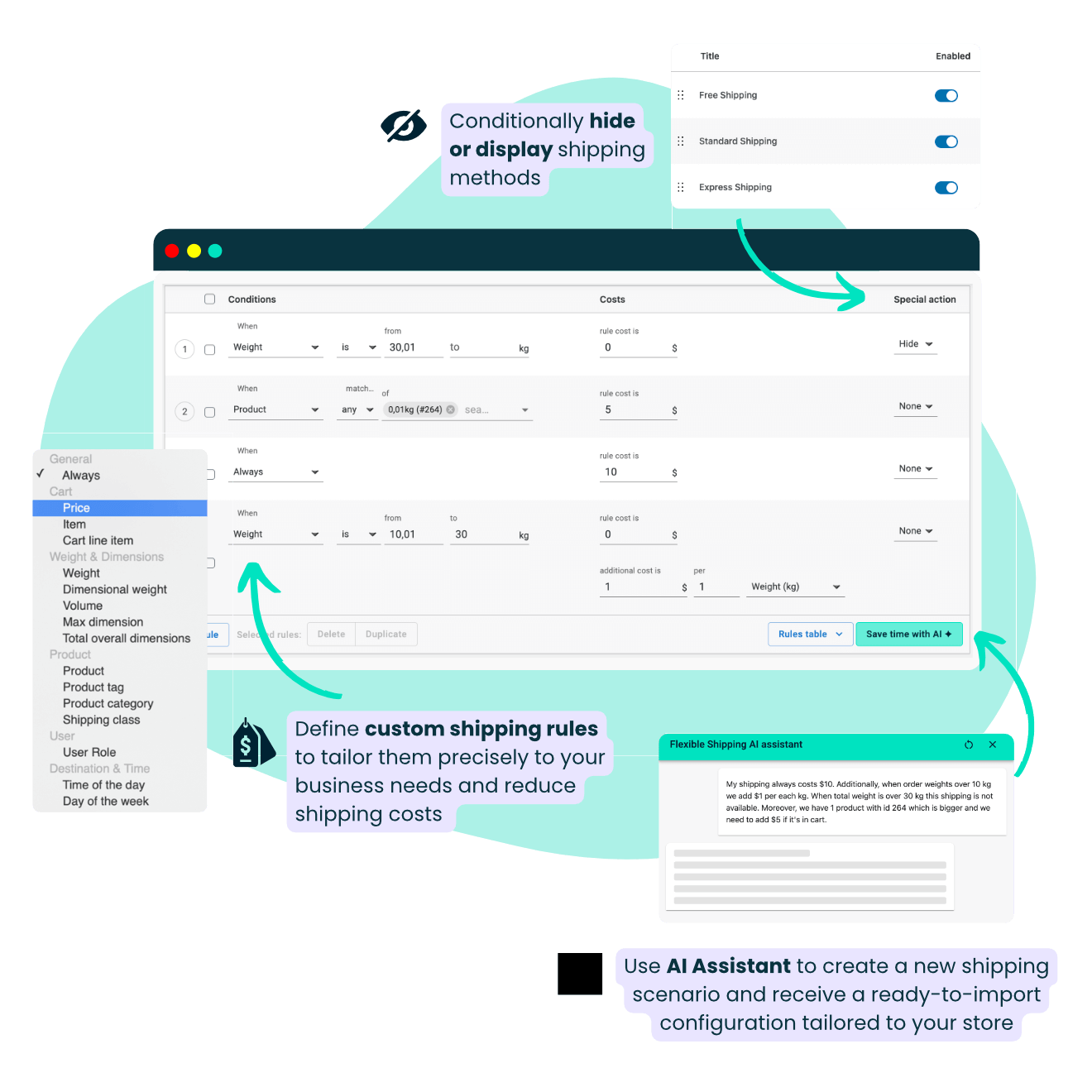
Calcula el coste de envío por precio, peso, cantidad, tamaño, clases de envío, fecha y hora, categorías de producto, rol de usuario y mucho más.

Icon Wizard

Asistente de envĂ­o por IA

Configura tus envíos más rápido con la ayuda de la IA. Describe tu caso y deja que el asistente genere reglas de envío listas para usar por ti.

Icon Wallet Check

Añadir costes adicionales

Cobra a tus clientes un coste de envío adicional fijo o porcentual y determina la unidad en función de la cual debe añadirse.

Icon Free Car

EnvĂ­o gratuito compatible con cupones

Ofrece envío gratuito y muestra un aviso de cuánto falta para conseguirlo. Elige si el envío gratuito también debe activarse mediante cupones.

Icon Premium Support

Soporte técnico premium 1 a 1

Disfruta de nuestro excelente soporte técnico; estamos aquí para respaldarte y ayudarte a solucionar cualquier problema que encuentres.

Icon Hide

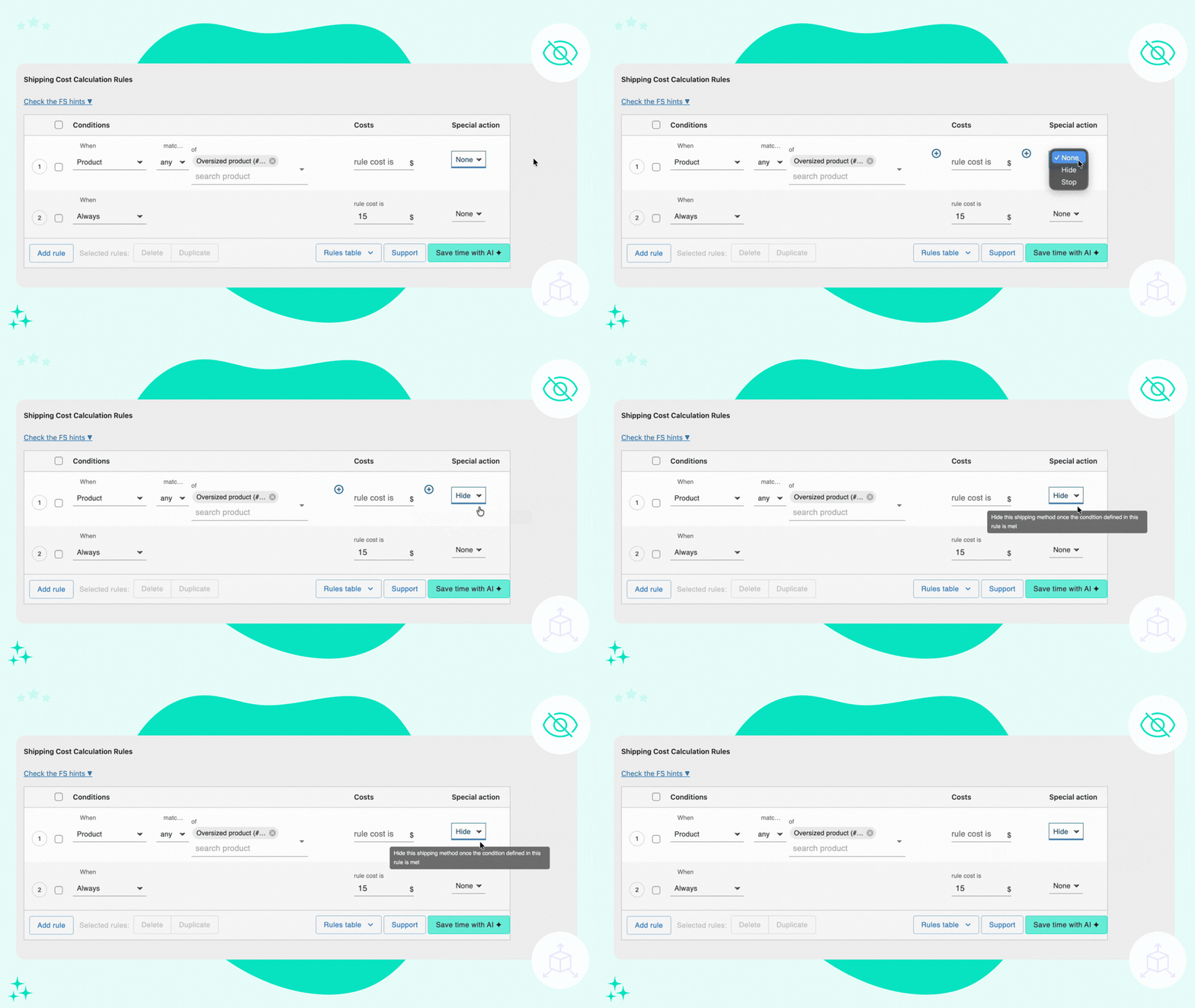
Ocultar métodos de envío

Oculta o muestra métodos de envío de forma condicional. Decide cuándo deben estar disponibles para elegir y cuándo no.

CaracterĂ­sticas clave de Flexible Shipping PRO

Con Flexible Shipping PRO, tienes el poder de adaptar las reglas de envío exactamente a las necesidades de tu negocio. Ya sea en función del peso, el precio, la cantidad, los productos o el tamaño, podrás garantizar a tus clientes un cálculo de costes de envío preciso y transparente.

  • 🤖 Asistente de IA: ConfiguraciĂłn de envĂ­os en menos de 60 segundos
  • 🚀 EnvĂ­o gratuito estratĂ©gico y barras de progreso. ¡Aumenta el valor medio de tus pedidos!
  • 📦 Compatibilidad con clases de envĂ­o
  • âž• Reglas de costes adicionales
  • 🔢 EnvĂ­o segĂşn la cantidad
  • ⚖️ EnvĂ­o segĂşn el peso
  • 👤 EnvĂ­o segĂşn el rol de usuario
  • đź•’ EnvĂ­o segĂşn el dĂ­a y la hora
  • 🔍Transparencia total con Debug Mode

ÂżTe da pereza pasar horas configurando complejas reglas de envĂ­o en WooCommerce? Deja que la IA lo haga por ti.

El nuevo Asistente de envĂ­o por IA de Flexible Shipping PRO genera al instante configuraciones de envĂ­o listas para usar, a partir de una sola instrucciĂłn.
Reglas basadas en el peso, condiciones del transportista, recargos, umbrales de envĂ­o gratuito, precios por niveles... todo listo en cuestiĂłn de segundos. Sin ensayo y error, sin frustraciones.

Este es el primer y único plugin de envío por tarifas de tabla (table rate shipping) del mercado con IA integrada, diseñado para ahorrarte horas de configuración manual y eliminar las complicaciones de las lógicas complejas.

Tanto si gestionas una tienda pequeña como si administras una logística avanzada, nuestro Asistente de IA te ayuda a configurar exactamente lo que necesitas, sin esfuerzo.

Mira nuestro nuevo vĂ­deo sobre esta revolucionaria funciĂłn:

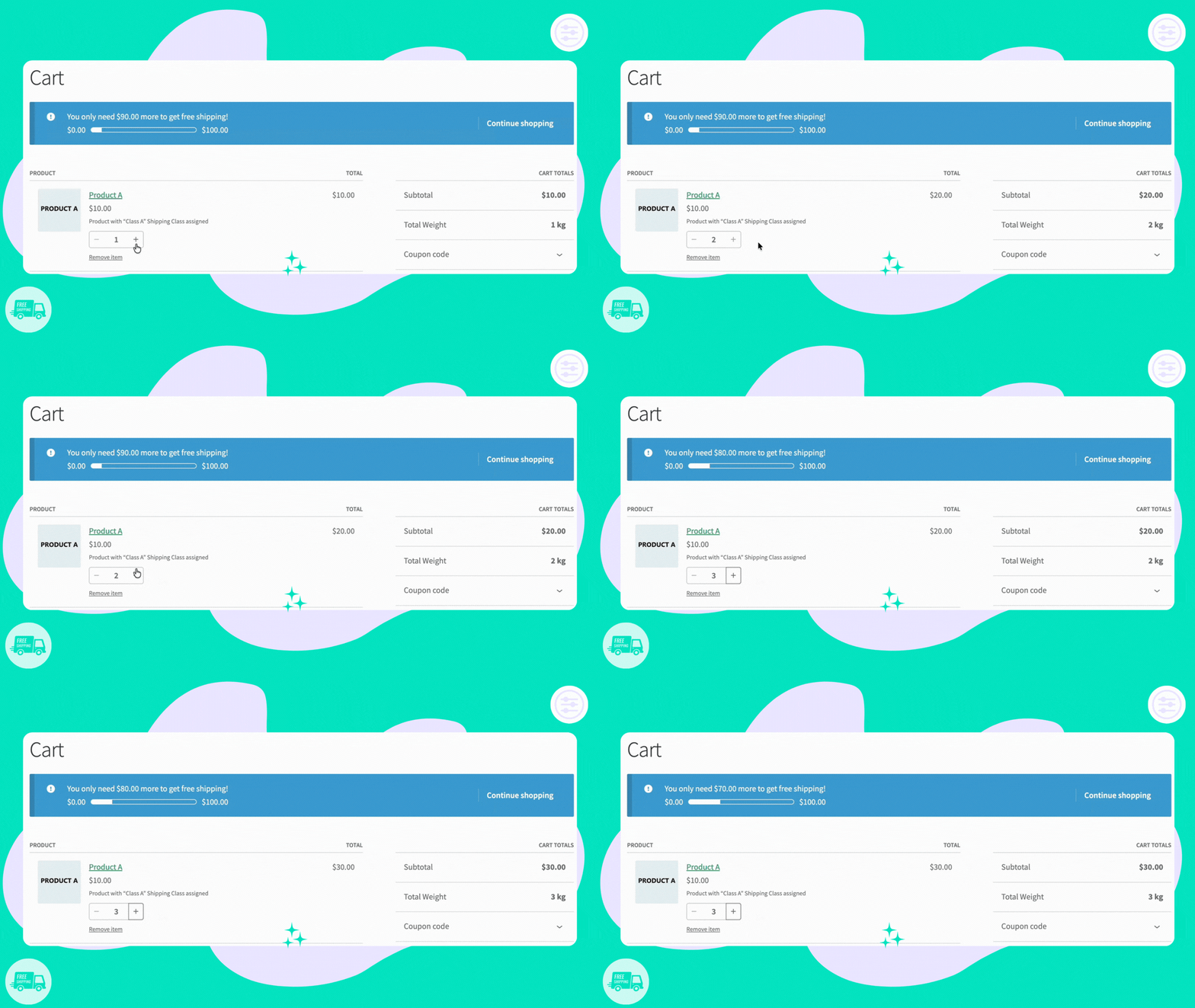
Protege tu margen de beneficio. Convierte el envío gratuito en una recompensa irresistible estableciendo umbrales de gasto estratégicos. Flexible Shipping Pro te permite mostrar a tus clientes exactamente cuánto más necesitan añadir a su carrito para desbloquear el envío gratuito, transformando al instante un pedido pequeño en una venta mayor.

Activa fácilmente el aviso integrado de "falta para el envío gratuito" y barra de progreso visual para incentivar un mayor gasto y mantener a los clientes motivados hasta que consigan su recompensa.

Mira nuestro nuevo vĂ­deo sobre esta funciĂłn:

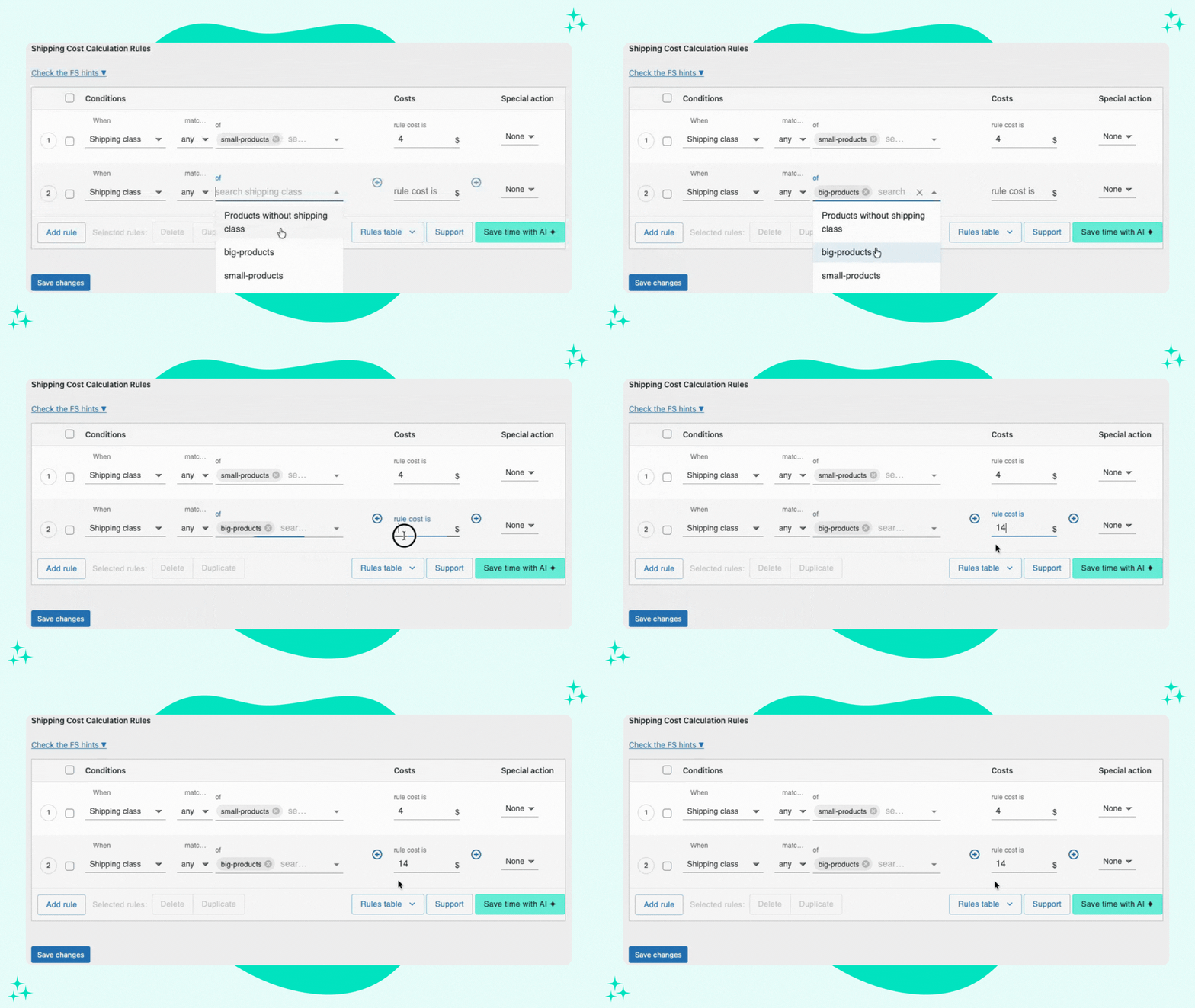
Asigna costes a grupos especĂ­ficos de productos en tu tienda.

Flexible Shipping PRO Shipping Classes support setup gif

Ejemplo de uso: Puedes establecer diferentes costes de envío para las clases de envío "productos pequeños" y "productos grandes":

Flexible Shipping PRO Shipping Classes support setup gif 2

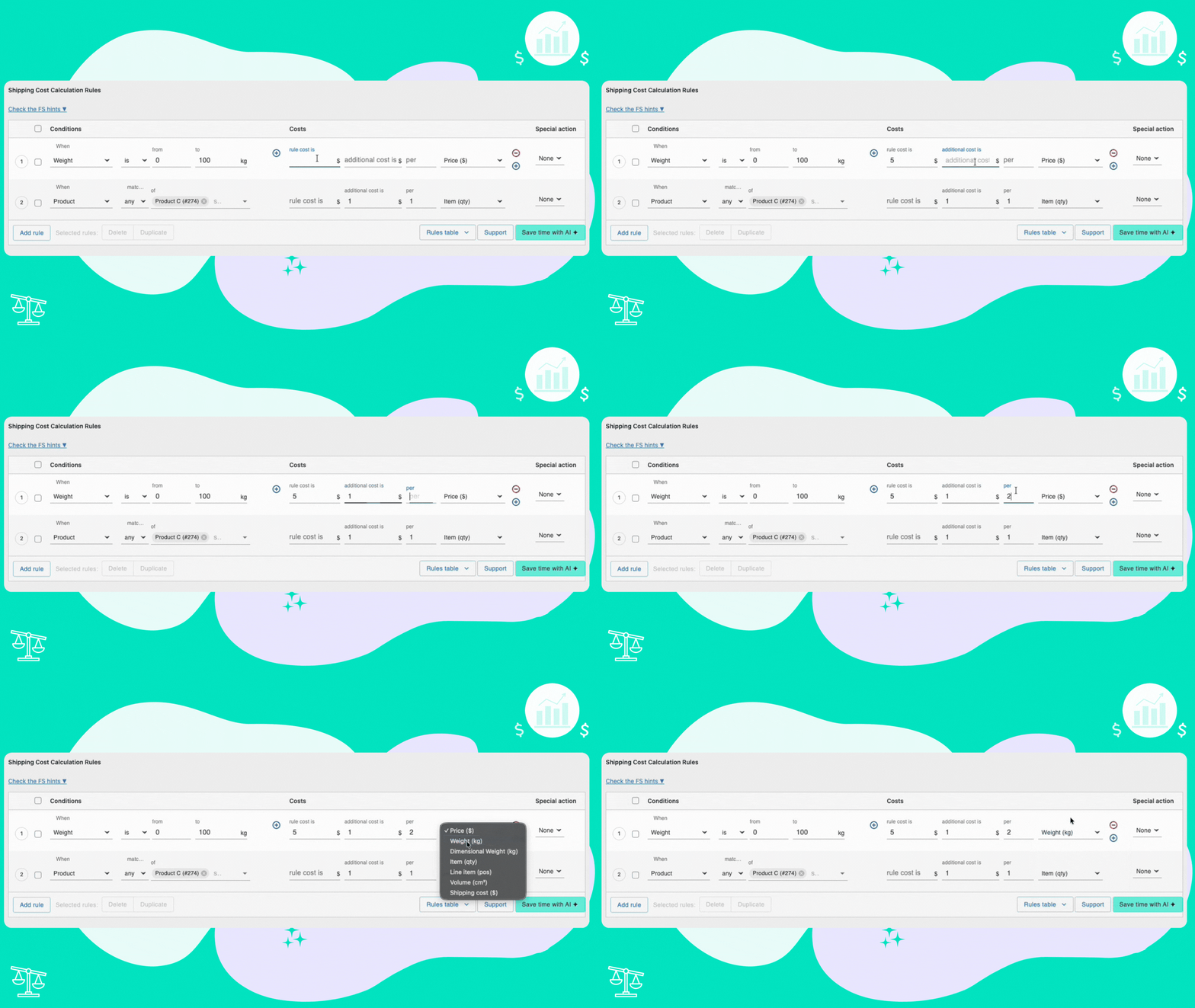
Introduce un coste adicional y define la unidad en función de la cual debe añadirse.

Flexible Shipping PRO additional cost feature gif 1

Es posible ampliar la gama de parámetros, por ejemplo, con el complemento Distance-Based Shipping Rates y utilizar parámetros de distancia y duración::

Flexible Shipping PRO - adding extra cost by distance setup screenshot

Ejemplo de uso: Puedes establecer el coste de envío basándote en un % del pedido de tu cliente.
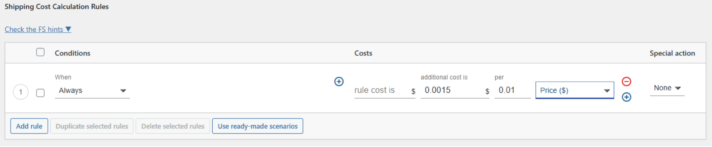
Flexible Shipping PRO - additional cost based on a % of order setup screenshot

Calcula los costes de envío de forma dinámica en función de la cantidad de productos en el carrito.
Flexible Shipping PRO - additional cost based on the quantity of products in the cart setup gif

Ejemplo de uso: Puedes crear una campaña de marketing para animar a tus clientes a añadir más productos a su cesta para obtener el envío gratuito.
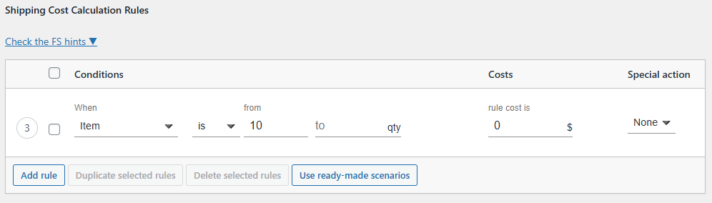
Flexible Shipping - free shipping based on the quantity of items setup screenshot

Además, puedes activar una barra de progreso de envío gratuito para motivar a los clientes a alcanzar el umbral de envío gratuito.

Calcula el coste de envĂ­o en funciĂłn del peso total del carrito de acuerdo con la unidad de peso elegida en los ajustes de WooCommerce.

Flexible Shipping PRO - additional cost based on cart’s total weight setup  gif

Ejemplo de uso: En combinación con el mecanismo de "acción especial", puedes, por ejemplo, excluir un envío estándar y pasar a un envío en palé una vez que se supere un umbral de peso específico.
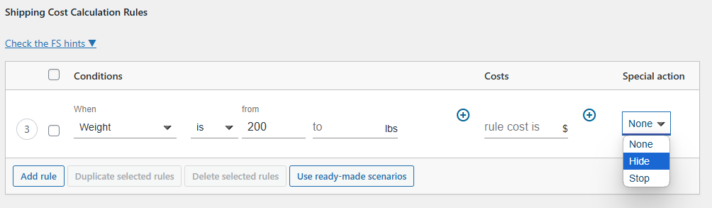
Flexible Shipping PRO - exclude shipment type setup screenshot

Personaliza los costes de envĂ­o segĂşn los roles de usarioofreciendo precios a medida para los diferentes segmentos de clientes.

Flexible Shipping PRO - customize shipping costs based on user roles setup gif

Ejemplo de uso: Puedes ofrecer distintas tarifas de envĂ­o para clientes registrados y no registrados.
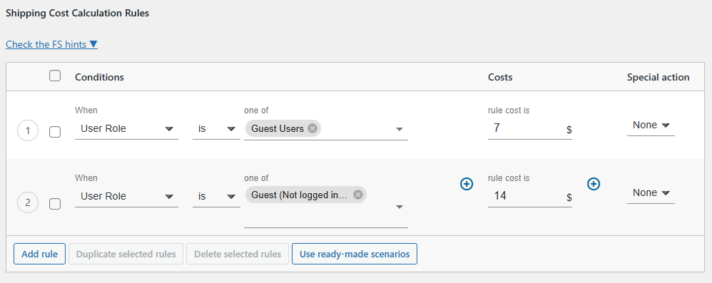
Flexible Shipping PRO - setup different prices for logged in and non-logged in customers screenshot

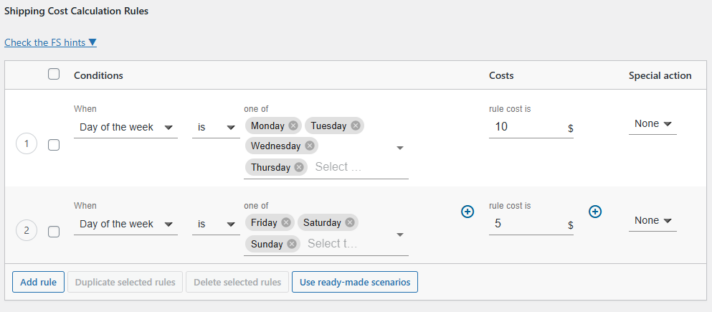
Gestiona los métodos de envío de forma dinámica en función de la hora del día y el día de la semana..

Flexible Shipping PRO - setup shipping methods dynamically based on the time of day and day of the week screenshot

Ejemplo de uso: Puedes ofrecer tarifas distintas para los envĂ­os realizados durante la semana y precios diferentes para los envĂ­os durante el fin de semana.

Flexible Shipping PRO - configure different praces based on days of week and times of day screenshot

Cada plugin de Octolize está equipado con potentes herramientas que hacen que la gestión de tus ajustes de envío no requiera ningún esfuerzo..


A screenshot showing Octolize Flexible Shipping debug mode

Con el Debug Mode (modo depuración), puedes ver exactamente los parámetros, reglas y cálculos que se han activado.Esta valiosa función reduce drásticamente el tiempo de resolución de problemas,eliminando las complicaciones a la hora de diagnosticar y ajustar con precisión tu configuración de envíos.


A screenshot showing result of Octolize Flexible Shipping debug mode

Escenarios de envĂ­o

Descubre los escenarios de envĂ­o especĂ­ficos que puedes resolver con el plugin Flexible Shipping PRO
SHIPPING NEWS (3)

Cobra un recargo por artĂ­culos especĂ­ficos

Con Flexible Shipping PRO, las tarifas de envío no tienen por qué ser universales para todos los productos. Decide cuánto cobrar por el envío de los artículos en función de su peso y dimensiones, el total del carrito, el rol de usuario, la clase de envío y mucho más. 


Activa el envĂ­o gratuito para productos seleccionados

Los ajustes predeterminados de WooCommerce solo te permiten configurar el envĂ­o gratuito a partir de un total de carrito determinado o con un cĂłdigo de descuento. Con Flexible Shipping PRO, puedes aplicar la regla de envĂ­o gratuito a los productos o categorĂ­as que elijas y mostrar una barra con lo que "falta para el envĂ­o gratuito".

Table Rate Free Shipping Scenario
Table Rate Scenario

Oculta automáticamente los métodos de envío seleccionados

Muestra solo los métodos disponibles para tus clientes en un escenario determinado. Oculta opciones de envío individuales o completas; por ejemplo, para artículos de gran tamaño o con exceso de peso. 

Aplica tarifas progresivas

Permite que las tarifas de envío aumenten junto con las dimensiones y el peso de los artículos. Flexible Shipping PRO te permite configurar precios que se incrementan automáticamente en función de condiciones predefinidas. 
 

Additional Cost

¿A quién va dirigido el plugin Flexible Shipping PRO?

Multi-category retailers

Tiendas multicanal o multicategorĂ­a

Gracias a las reglas por producto, categorĂ­a, etiqueta y clase de envĂ­o, puedes configurar diferentes tarifas para una gran variedad de productos.

B2B and wholesale stores

Tiendas B2B y de venta al por mayor

Segmenta las tarifas según el rol de usuario, el recuento de artículos, las líneas del carrito y el valor de la compra. Limita los totales con un coste de envío máximo o elige el cálculo del coste más bajo/alto para simplificar los presupuestos.

International shippers

Empresas de envĂ­o internacional

La mayoría de las tiendas combinan las tarifas en tiempo real de las agencias de transporte con ajustes de tarifas de tabla. Flexible Shipping PRO funciona a la perfección con nuestras integraciones de tarifas en vivo (Live Rates), garantizando un control total sobre los escenarios más complejos.

Heavy-oversized shipping

EnvĂ­os pesados o voluminosos

Las tiendas cuyas tarifas de envío dependen del peso o las dimensiones pueden beneficiarse de las condiciones de peso total, peso volumétrico, volumen, dimensión máxima y dimensiones totales acumuladas.

Teams with frequent changes and-or large catalogs

Equipos con cambios frecuentes o catálogos grandes

El Asistente de IA integrado te permite describir un escenario específico y genera una tabla de reglas lista para usar, ahorrándote tiempo y minimizando el riesgo de errores que conllevan los cambios y las actualizaciones frecuentes.

Stores using free shipping as a growth lever

Tiendas que usan el envĂ­o gratuito como palanca de crecimiento

Amplía las funciones básicas de envío gratuito de WooCommerce vinculándolo a diversas condiciones: peso, artículo, clase de envío y más. Anima a los clientes a comprar más mostrando una barra de progreso de envío gratuito.

Nuestras soluciones ayudan a hacer crecer y gestionar los envíos en más de 250.000 tiendas WooCommerce cada día.

Conocemos los envĂ­os de WooCommerce a la perfecciĂłn, y ponemos toda nuestra experiencia en nuestros plugins. Descubre lo que dicen nuestros clientes sobre las soluciones que ofrecemos:
ValoraciĂłn:

Quite possibly one of the easiest plugins out there. It’s not complicated. It works out-of-the box. Does exactly what it says it can do. Makes my merchant life so much easier.

ValoraciĂłn:

Flexible Shipping Bundle a Win!
I have white glove delivery for my best products at a rate per loaded mile. I tried the WooCommerce plugin, which didn’t work, and I needed the Octolize Flexible Shipping Bundle. They gave great support, and the AI tool helped me configure rules perfectly. I am very impressed.

ValoraciĂłn:

Very useful plugin to let customers see if shipping is available to their place without going to cart or checkout.

Support is also very responsive.

ValoraciĂłn:

I run a drop-shipping website and need really unique shipping rules. Some products ship free after a certain number of orders. Some products ship flat rate, some do not. Some ship at different rates for a different number of items. This plugin allows me to customize my shipping rules to meet my vendors’ needs. I’m super glad I have this.

ValoraciĂłn:

The Most Powerful Shipping Plugin on the Market, Backed by Stellar Support!

For a long time, we struggled to configure the complex shipping scenarios our WooCommerce store required. Our needs involved rules based on weight, cart totals, product dimensions, and shipping classes, and finding a single, reliable solution felt impossible. After extensive research, we discovered Flexible Shipping PRO by Octolize, and it has been an absolute game-changer for our business.

ValoraciĂłn:

I can see this would be extremely useful in many ways, but all I really wanted to do right now was add handling fees to my shipping options, and this makes that incredibly easy!

Thank you for such great tools!

Flexible Shipping PRO for WooCommerce

Choose the subscription plan which suits you best and let our plugins do the rest. Simple, straight forward, no strings attached.

Preguntas frecuentes y detalles del plugin

Echa un vistazo al plugin en pocas palabras y encuentra las respuestas a las preguntas preventa más frecuentes.

Detalles del plugin

Ăšltima versiĂłn:
4.0.19
Ăšltima actualizaciĂłn:
2026-06-01
Totalmente compatible con
WooCommerce 10.4 - 10.8.x
PHP >= 7.4
Descargas:
299,128

Fast answers for a quick start

WooCommerce’s built-in tools give you flat rate, free shipping, and some basic zone options, but the logic stops there. You can't combine dimensions, time of day, cart volume, or add extra fees like handling or insurance. You also won't find a debug tool to help troubleshoot when rules misbehave.

Flexible Shipping PRO unlocks full flexibility - you can build rules based on cart weight, product dimensions, quantity, tags, time windows, user roles, and many more. You can hide methods, stack conditions, and insert additional costs when needed. Plus, there’s an integrated Debug Mode to help you test and refine your rules step by step, and the built-in AI Assistant that can suggest, check, and adjust your setup whenever you need extra help.

Compared to default tools, it’s like turning a flat puzzle into a Rubik’s Cube: you can go to the next level. And with modular add-ons like Distance‑based shipping, Box Packing, or courier integrations, you can tailor shipping like never before.
The AI Assistant is a smart helper built into Flexible Shipping PRO. It’s constantly being improved - each update makes it even better. We’ve added features like natural-language chat, suggestions for rule changes, file export support, and more. It is designed to make setting up shipping rules faster and easier, especially if you're not a tech expert. And if you prefer not to use it, you can ignore it entirely and work manually — the option is completely yours.

Got 47 seconds? Watch how our AI Assistant could help you.
Flexible Shipping PRO is a powerful table-rate engine for WooCommerce that lets you build precise shipping rules without coding. You combine conditions such as weight, order total, item quantity, dimensions, dimensional weight, shipping classes, product categories or tags, customer role, and date or time.

You then decide how the cost is calculated: fixed fee, percentage of order value, per item, per weight unit, or per dimensional weight. There are also options to hide a method, stop further rule checks, or pick the cheapest or highest result. It works on its own or connected to carrier live rates, so you can keep real prices and still apply your business logic. You also get Debug Mode to see exactly why a method shows or not, and an AI Shipping Assistant that can draft or edit rules from a simple prompt.
Our main clients are:
  1. Store owners who need more than flat rates and want full control over costs and visibility.
  2. WooCommerce developers and agencies who build repeatable, testable shipping setups for clients.
  3. Stores with complex catalogs or workflows, including marketplaces, when paired with add-ons like Multi Vendor Shipping, distance-based shipping, etc.
Real-world usage examples:
  1. Free shipping over a threshold with exceptions for heavy or oversized items.
  2. Weekend cutoff logic that hides express options after 3 p.m. on Fridays.
  3. Role-based pricing where B2B customers see pallet shipping while retail customers see standard services.
  4. Connecting UPS/FedEx/USPS live rates and adding a handling fee or promotional discount on top.
Absolutely. You may visit our YouTube channel for tips and guides.   Here is the dedicated Flexible Shipping PRO series.
Yes. It works with popular tools like:
  1. Aelia Currency Switcher
  2. FOX – Currency Switcher Professional for WooCommerce (WOOCS)
  3. Currency Switcher for WooCommerce by WP Wham
  4. CURCY – Multi Currency for WooCommerce by VillaTheme
  5. WooCommerce Multilingual (a part of the WPML package)
So you can define and translate rules per currency or language. More about it here.
Yes, absolutely. You can manage your license activations from your Octolize account dashboard, so that you can set it up on staging, then switch the activation to your live store when you are ready.
No worries - it’s usually a quick fix. Here’s what you can do:
  1. Use the built-in Debug Mode - this tool shows messages right in the cart explaining why the method isn’t appearing in a few seconds. 
  2. Dive into our detailed documentation - we have documented nearly every issue and solution to help you troubleshoot faster. 
  3. Tap into our AI Assistant chat, available 24/7 and get instant, AI-powered help diagnosing and resolving your issue. 
  4. Prefer human help? Our support team is always ready to assist with setup, rule adjustments, or custom configurations. 
You’re never stuck - there is always a clear path to a working shipping setup.
Licenses are per production site. Activate one license for each live store. You can set up on a staging site first and transfer the activation to your live domain later, and if you run WordPress Multisite, each site in the network needs its own activation.
In short, they add extra features and new possibilities on top of Flexible Shipping PRO. Here’s a quick guide to help you pick only what you need:
  1. Distance-Based Shipping Rates - calculate shipping by distance and travel time. Great for local delivery or zones that need precise distance logic
  2. Shipping Packages - split the cart into separate packages and group or isolate items by shipping class. It works alongside any shipping method and is great for subscription shipping when items must ship separately, fragile products that need their own box, and palletized or oversized orders.
  3. Flexible Shipping Import / Export - export rules to CSV, bulk update prices, move or clone methods between zones or stores, and keep backups tidy.
  4. Flexible Shipping Locations - create your own locations beyond standard zones, then use them as conditions with your rules.
  5. Flexible Shipping Box Packing - define custom boxes and let the packing algorithm fit items into boxes, calculate by box count and box type.
  6. Shipping Cost on Product Page PRO - show a shipping cost calculator right on product pages, so shoppers see costs before checkout.
  7. Pickup Points PRO - let customers choose pickup points from supported carriers at checkout with an easy map and nearest point search.
  8. Delivery Date Picker - allow customers to choose a delivery date. You can make the cost depend on the chosen date or offer premium slots.
  9. Multi Vendor Shipping - set shipping logic per vendor or product author. Ideal for marketplaces and multi-seller stores.
No – we don’t surprise you with price hikes. When you choose to renew after 12 months, it’s always at the same price you originally paid. Any future price changes apply only to new customers, not to your existing renewal. This policy helps agencies and store owners plan predictable long-term costs and prevents unexpected increases in their maintenance budget.
We’re developers ourselves, and we understand that projects are time-sensitive and reliable support is crucial. That’s why we’ve designed multiple support channels to make sure you get help as quickly as possible:
  1. AI Assistant – trained on our documentation and constantly improving, it can answer most Flexible Shipping and shipping configuration questions instantly.
  2. Live chat on octolize.com – get AI-generated answers in just a few seconds.
  3. DocumentaciĂłn - our knowledge base grows daily and covers step-by-step guides, hooks, and advanced use cases.
  4. Human support - reach out to our team, and you will receive a personal reply in under 24 hours on business days.

I am a small store owner

In Flexible Shipping, you use the Additional cost field and choose what the fee is per. The available bases are:
  • Price, Weight, Dimensional weight, Item (quantity), Line item (position), Volume, Shipping cost.
Octolize add-ons introduce new cost bases and conditions you can combine with your rules. For example:
  • Distance-Based Shipping Rates adds distance and travel time, so you can set a base fee plus an additional rate per km/mi or per minute.
Flexible Shipping Box Packing lets you calculate by boxes and box types, which makes it easy to add a per-box surcharge on top of your rules.
Not at all; setup is smooth. You get built-in scenarios, step-by-step guides, and tutorials. On top of that, the AI Assistant creates and tweaks rules based on simple prompts, so non-technical users can configure complex logic in minutes. Furthermore, our human support is ready to help you with any struggle.
It depends on what you need. WooCommerce core does not natively optimize a whole cart into the best set of boxes for table-rate style pricing, and packing multiple items is a classic bin packing problem that is difficult to solve exactly. If you want accurate cart-level packing based on real box sizes, the best approach is to install our Box Packing add-on. It lets you define your box dimensions and limits, then uses an advanced packing algorithm to fit the cart into boxes and pass the right costs to Flexible Shipping.
Yes. PRO supports dimensional weight with a DIM factor and volume-based rules.
Yes. Flexible Shipping PRO lets you combine multiple conditions in one method. For example, weight ranges and product categories, so your price reflects what you actually ship.

I have a WooCommerce agency

Licenses are issued per production site. Your staging/test site is covered under the same license for that client. You can also reassign a license from staging to live or transfer ownership later (for example, from your agency to your client) via your Octolize account. We make licensing affordable for agencies:
  1. Volume discounts – starting from just 2 sites, you get at least 20% off, and the more licenses you buy, the bigger the discount. You can check the exact tiers directly on the pricing section of the product page.
  2. Bundles – save even more by purchasing Flexible Shipping bundles or the All Plugins Bundle (up to 83% off vs buying separately).
Promotions – we occasionally run limited-time offers during the year.
Yes. With the Import/Export add-on, you can clone shipping methods, bulk update rules, or back up configurations across staging, production, or multiple client sites.
Yes. Your Octolize account dashboard lets you manage all your subscriptions, invoices, and license activations in one place. You’ll also get VAT invoices automatically after each purchase.
Yes. You can use our 7-day demo environment to prepare client-facing demonstrations. It’s private to you, deleted after 7 days, and can be extended if you need more time.
We follow semantic versioning. Major changes come with migration guides, while minor updates are backwards-compatible. Debug Mode and our support team help quickly identify and resolve any issues.
Yes. We operate in line with GDPR principles. Flexible Shipping runs inside your WordPress/WooCommerce store. By default, it doesn’t transmit cart or customer data to Octolize servers.
 We provide fast, practical help aimed at getting your client sites unstuck quickly:
  1. AI Assistant – instant guidance on Flexible Shipping configuration (great for first drafts and quick edits).
  2. Live chat on octolize.com – rapid answers for common questions.
  3. Growing documentation – step-by-step guides and how-tos you can share with clients.
  4. Human support – responses within 24 business hours for configuration help, compatibility guidance, and troubleshooting.
What’s included: help with plugin configuration, understanding rules/conditions, choosing add-ons, reading debug output, and identifying likely conflicts.

What’s not included: custom development for third-party themes/plugins or building bespoke features. (We’ll still point you to hooks, examples, or workarounds whenever possible).