
- Home
- WooCommerce
- What plugin are you looking for?
- Shopify
- Product Matcher
- About us
- Blog
- Docs
- Contact us
- What can we help you with?
🚀 Ready to optimize your WooCommerce & Shopify shipping setup? Get FREE early access to a new product →

Subscribe to our newsletter

In this WooCommerce free shipping tutorial, we will show you why free shipping is a great tool to increase your sales in a smart way. In the particular context of WooCommerce, it is a creative marketing idea. Generally speaking, it makes customers add more items to their carts and feel satisfied with it. Free shipping with conditions has been proven to be an extremely effective sales incentive, and it adds a major boost to your average cart value.
For example, the power of the word “free”. Although everybody knows well that nothing is really free, the word itself seems to be magical. Of course, there are also other reasons behind the importance of free shipping. Granted that, rationalizing our shopping habits and having an excuse for online purchases, the illusion of a choice between a shipping fee or free shipping after reaching a certain threshold can be equally weighty. Finally, it helps to avoid the number one culprit behind abandoning shopping carts – hidden fees.
Consequently, according to some statistics, over 60% of the e-commerce companies use the free shipping option. It influences consumer behavior on a psychological and irrational basis. Similarly, a survey from 2004 found that shipping and handling costs triggered 52% of the abandonment of online shopping carts. Therefore, in this WooCommerce Free Shipping TutForial, we will show you how to set up and configure the free shipping option.
In order to enable the option of a free shipping method, it must be added to a previously configured Shipping Zone. Moreover, you can add it to any number of WooCommerce Shipping Zones – it is up to you. To illustrate how to do this:
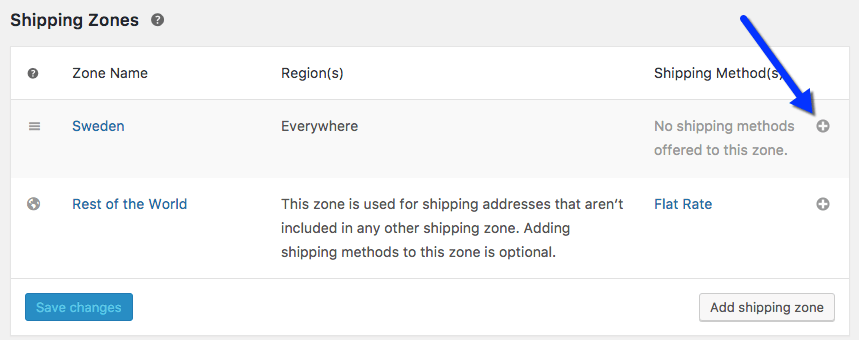
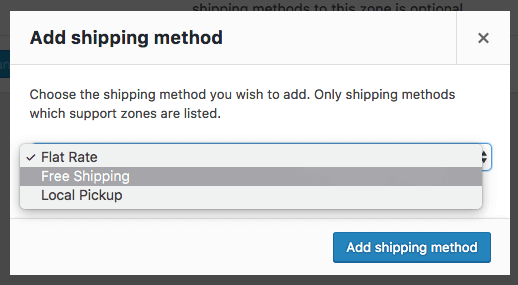
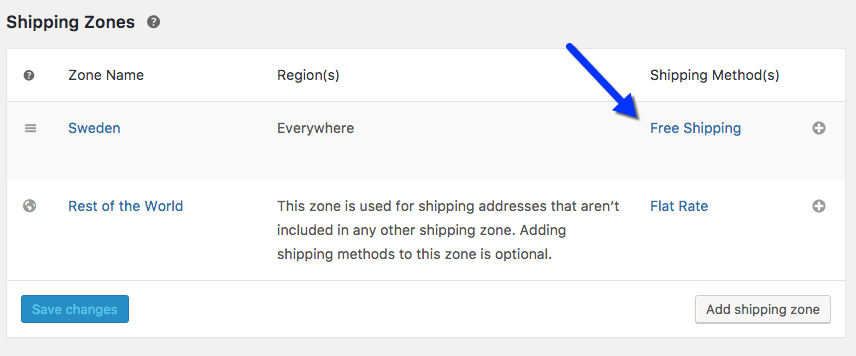
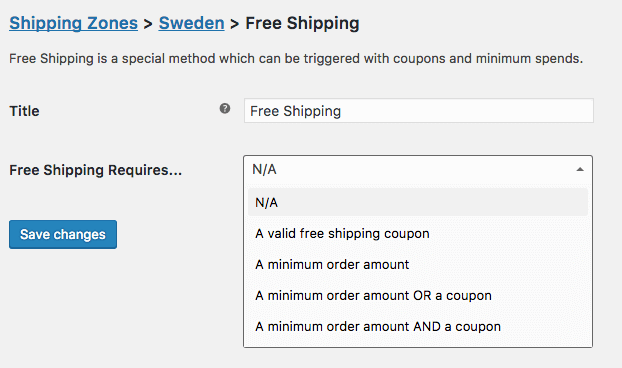
Good job! You have successfully configured the WooCommerce Free Shipping.
On the other hand, you can enable or disable Free Shipping via hooks. The free shipping method has an is_available function that can be hooked into:
return apply_filters( 'woocommerce_shipping_' . $this->id . '_is_available', $is_available );
You can use add_filter() on woocommerce_shipping_free_shipping_is_available. Then just define true or false.
Remember that if you offer coupons for free shipping, and a minimum. amount at the same time, coupons take priority. If a customer has a coupon, then the minimum amount requirement is ignored. However, a minimum amount will be checked if a client does not use any coupons.
To ship or not to ship, that is the question? To recapitulate, configuring the free shipping method is extremely easy to do and could potentially bring a lot of benefits to any company. It is definitely worth considering for any WooCommerce-based business. The free shipping threshold is a different topic, though – most certainly interesting and exciting. All in all, sometimes a small implementation like that can notably affect an average shopping cart. Therefore, take your time and think about the described ideas for your own profit.

Content Writer at Octolize
Bartosz Gajewski is a content and marketing specialist with a solid background in SEO, WordPress content strategy, and technical documentation for digital products. With years of hands-on experience in both in-house and freelance roles, he supports tech companies – especially in the SaaS and e-commerce space – by creating content that informs, engages, and drives results.
His approach blends storytelling with data-driven SEO, and he’s been involved in projects ranging from rebranding and product marketing to growth experiments and copywriting for complex software tools. On the blog, he shares actionable insights from his work across marketing teams, product documentation, and online store optimization.


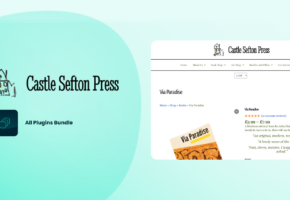
Learn how Octolize solutions helped WooCommerce store based in the United Kingdom set up shipping scenarios.
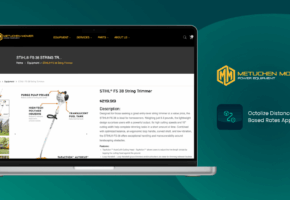
Learn how Octolize helped Shopify store based in the USA set up distance based rates with a usage of Octolize Distance Based Rates.
Learn how Octolize helped NGO set up their WooCommerce rates with a usage of Flexible Shipping PRO.
 Pickup Points