
- Home
- WooCommerce
- What plugin are you looking for?
- Shopify
- Find my product
- About us
- Blog
- Docs
- Contact us
- What can we help you with?

We understand how important it is to test and verify the functionality of WordPress plugins. That’s why we have created a dedicated the Octolize Demo, where you can test all of our plugins for 7 days, free of charge.
Octolize demo is a dedicated WordPress instance created just for your use. It contains all our plugins for you to test freely – and completely for free. It also includes WooCommerce in the latest version and a Storefront theme. It works out of the box – you will find ready product examples in your demo store, which will make testing much easier. Once the demo is generated, you have 7 days to use it. After that time, it will be deleted.
If you’d like to import the setup created in your demo straight into your real store, you can use the Flexible Shipping Import/Export plugin.
If you want to test our plugins, just sign up for our Octolize Demo. You can also find buttons redirecting you to the Demo setup on every plugin’s product page.
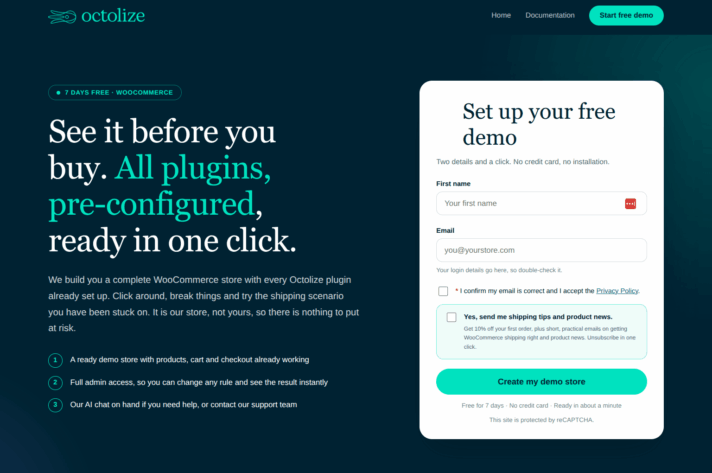
On the demo page, just enter your email address. Remember to check the box: I confirm I have entered a valid email address. You can also tick the box that will add you to our newsletter with the latest product news, special deals, and shipping tips, but it’s completely up to you.
Then, click on the Create my demo store button, and you’re all done. After a few seconds, you should get the confirmation email.
Inside the email, you will find your login credentials. If it hasn’t come to you after a few minutes, please check your spam folder. The email will look like this, with the subject line Your demo store is ready, sent from the email address [email protected]:
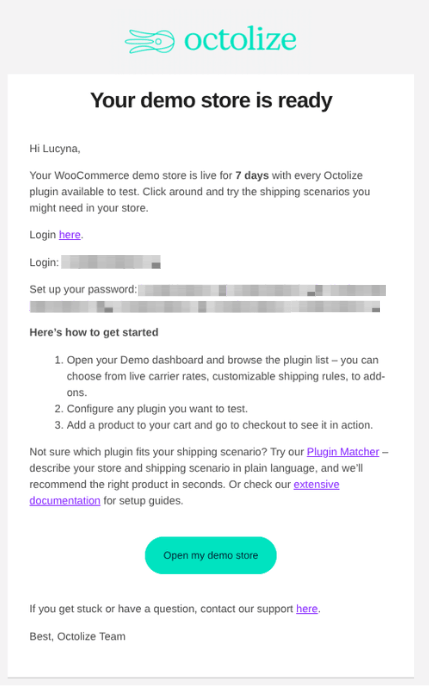
Click on the Open my demo store button to log in to your Demo and use the login credentials included in your email. Once you’re logged in, you can test and review all of our plugins.
We recommend taking a closer look at our Welcome Page (the first page you will see once you log into your Demo), where you’ll find a lot of useful information and additional content.
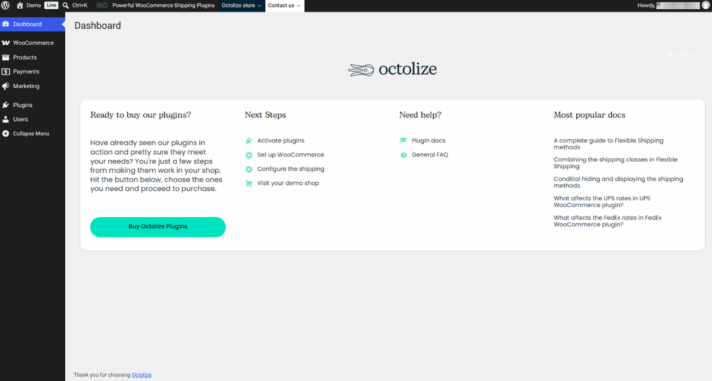
Testing our plugins in the demo is easy. You get a ready store, complete with working cart and checkout pages, as well as products with different weights, dimensions, and categories. All you need to do is select the right plugins, set up your shipping rules, and see how they work in practice.
The demo works like your own personal sandbox. You can tinker with different plugins and rules without having to worry about breaking something in your actual store. If you want to import the setup into your real store, just use the Flexible Shipping Import/Export plugin.
You get access to both the dashboard and the demo store, allowing you to test our plugins on the development side, as well as see how they perform directly in the WooCommerce store.
Octolize demo allows you to easily test our plugins in a safe environment. This way, you can set up your shipping rules and quickly verify if our solutions are right for you.
You may test the performance of free plugins without installing them on your WordPress site or check the functionality of PRO plugins before you buy them.
If you get stuck, you can use the built-in AI chat. It will provide an instant answer, regardless of time of day or day of the week. You may also contact our support team, which will help you as soon as they can within our working hours. They will be happy to assist if you are left with any doubts about which product is right for you at the end of your demo.
Complete list of all plugins available for tests in the Octolize demo:
You will see all of them in the Plugins tab – you decide which ones to activate at a given time. The demo grants you access to all our plugins, so it’s also a good opportunity to see how they work together.

Content Writer at Octolize
Bartosz Gajewski is a content and marketing specialist with a solid background in SEO, WordPress content strategy, and technical documentation for digital products. With years of hands-on experience in both in-house and freelance roles, he supports tech companies – especially in the SaaS and e-commerce space – by creating content that informs, engages, and drives results.
His approach blends storytelling with data-driven SEO, and he’s been involved in projects ranging from rebranding and product marketing to growth experiments and copywriting for complex software tools. On the blog, he shares actionable insights from his work across marketing teams, product documentation, and online store optimization.




Learn how Octolize helped Kurzgesagt, the online shop behind one of YouTube’s most popular science channels, set up conditional courier rules using the Shopify Shipping Rates Rules & Zones app.

Learn how Octolize solutions helped WooCommerce store based in the United Kingdom set up shipping scenarios.
Learn how Octolize helped Shopify store based in the USA set up distance based rates with a usage of Octolize Distance Based Rates.
 Pickup Points
Hi I have the free version and for the past 3 months it has caused so many problems the template host tested it and told me the fault was with your plugin but there is no one to contact?
Hi Judith,
We could use some more details to support you. I see that you contacted us via the form. We sent you a message, but your reply has not been received. The fastest way to get help is by contacting us here: https://octolize.com/support/